NET-Thread.Terminate
1.0.1
See the version list below for details.
dotnet add package NET-Thread.Terminate --version 1.0.1
NuGet\Install-Package NET-Thread.Terminate -Version 1.0.1
<PackageReference Include="NET-Thread.Terminate" Version="1.0.1" />
<PackageVersion Include="NET-Thread.Terminate" Version="1.0.1" />
<PackageReference Include="NET-Thread.Terminate" />
paket add NET-Thread.Terminate --version 1.0.1
#r "nuget: NET-Thread.Terminate, 1.0.1"
#:package NET-Thread.Terminate@1.0.1
#addin nuget:?package=NET-Thread.Terminate&version=1.0.1
#tool nuget:?package=NET-Thread.Terminate&version=1.0.1
Introduction
.NET Thread.Terminate lets you terminate any managed threads on both .NET and .NET Framework on an OS level (TerminateThread) by adding an extension method to the BCL class Thread: Thread.Terminate; it also restores the .NET Framework style of thread abortion (Thread.Abort) on modern .NET versions. ".NET Thread.Terminate" is a partial implementation of a bigger project Untitled under development.

A little bit of research on the internet will probably lead to answers suggesting using canonical approaches such as using CancellationToken or constantly checking a flag to decide whether to continue or return in the thread.
In most contexts, you should take these safe approaches especially in a production environment; however, there come times when we need to end a thread we didn't create in the first place, for example, threads that were created and started in a third party library; threads hung on a native call, and then, these commonly safe methods don't exactly meet the needs of our situation; that leaves us with occasions on which we need to terminate a thread immediately the low level way (in a similar manner to terminating processes [TerminateProcess]).
.NET threads: a managed wrapper
Obtaining the handle of the relative native thread makes this possible; however, none of .NET runtimes offers an option to expose the native handle to the created thread; instead we're left with a managed thread ID that essentially serves as a number to distinguish between our instantiated managed threads: ultimately a Thread instance in C# is not a real native thread and only relevant to the managed context, right? Not quite right! The Thread class can be concisely explained as a managed wrapper around a C++ object containing the handle of the created native thread by the runtime; that "C++ object" is preserved in a field named "DONT_USE_InternalThread" we have no business even looking at as suggested by the name: This field represents the internally instantiated C++ object.
Utilizing this object, this project allows native operations such as termination, suspension, or resumption, and restores or simulates the threading functionality we saw on .NET Framework.
How to use
.NET Terminate is easy to use: it adds extension methods to the Thread class so you could call them like you would do any other methods on your Thread object. These methods are, also, defined and available in System.Threading.NativeThreadExtensions.
⭐1. Terminate
SomeThread.Terminate(ExitCode = 0);
Terminates the thread immediately on the low level by calling the Windows API TerminateThread on its native handle. Do not adopt using this method unless you have a good reason to terminate the thread immediately; nonetheless, DotNetAbort is preferred over this method.
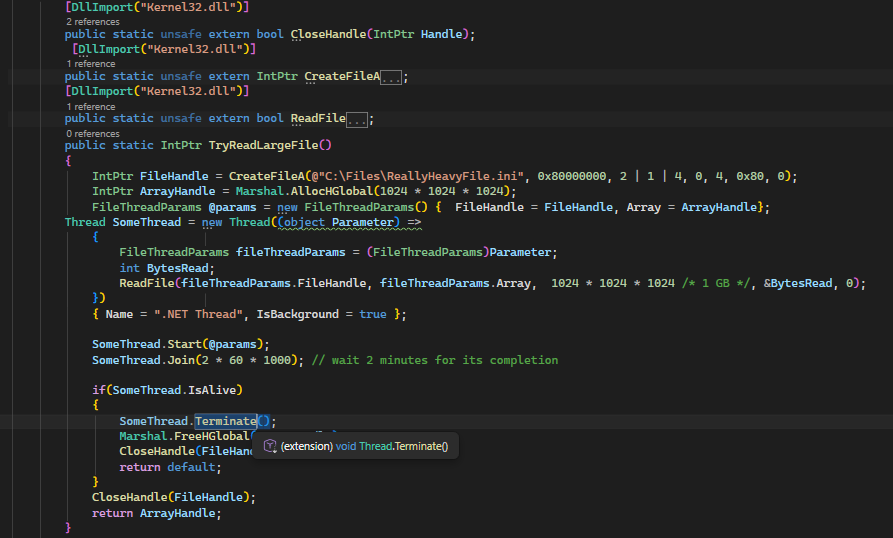
This method requires special exception handling on .NET 5 and .NET 6
2. DotNetAbort
SomeThread.DotNetAbort();
Aborts the thread in the same style as the Abort method on .NET Framework; it interrupts the thread by throwing an exception at the running thread which gives us the opportunity to properly release the resources we used in the thread when catching the exception in the exception clause.
To reset the thread abortion, the extension method ThreadAbort should be called on the thread object.
This method works on all .NET versions starting with .NET 5. On .NET 5 and .NET 6, it works by changing the internal thread state to request the runtime to abort the thread; starting with .NET 7, it just falls back to DotNetAbortInternal because it's more stable.
There is a catch you should absolutely consider and take into account when aborting the thread on .NET 5 and .NET 6 using this method: a random exception might be thrown at the thread before the main ThreadAbortException exception; this possible case must be handled like the code below:
  Thread SomeThread = new Thread(() =>
  {
      Exception exception = null;
      try
      {
          try
          {
              for (; ; Thread.Sleep(150))
              {
                  Console.WriteLine("Stop me!");
              }
          }
          catch (Exception ex)
          {
              exception = ex;
          }
      }
      catch (ThreadAbortException ex)
      {
          exception = ex;
          // Use ResetAbort() to reset the abortion when using DotNetAbort methods; not Thread.ResetAbort()!
          Thread.CurrentThread.ResetAbort();
      }
      if (exception != null)
      {
          // doing finalizing stuff

          if (exception.GetType() == typeof(ThreadAbortException))
          {

              return;
          }
          Console.WriteLine($"An error occurred. {exception.Message}");
      }
  })
  { Name = ".NET Thread", IsBackground = true };

  SomeThread.Start();
  SomeThread.DotNetAbort();
However, this is not necessary and relevant on .NET 7+ since it just falls back to DotNetAbortInternal.
3. DotNetAbortInternal
SomeThread.DotNetAbortInternal();
Aborts the thread in the same style as the Abort method on .NET Framework; analogously does the the same thing DotNetAbort does.
ControlledExecution was introduced on .NET 7 which would allow you to run a piece of code and abort it; to do that, it implements a p/Invoke declaration responsible for aborting the thread; that declaration is used to abort the thread. On .NET platforms older than .NET 7, it falls back to DotNetAbort. This method is preferred over Terminate whenever it's possible.
4. ResetAbort
SomeThread.ResetAbort();
Thread.CurrentThread.ResetAbort();
Applies the same mechanism as the documented static method Thread.ResetAbort to reset an abort request. This extension method should be called instead of the static method in the Thread class (Thread.ResetAbort) starting with .NET 5. Like on .NET Framework when calling the Abort Method, you should reset the abort request once you catch the ThreadAbortException exception; starting with .NET 7, you should do that by calling this method directly on the thread instance.
5. SuspendNative
SomeThread.SuspendNative();
Suspends the thread on the low level by calling the Windows API SuspendThread on its native handle. Not to be confused with the Suspend method on .NET Framework. Do not adopt using this method unless you have a good reason.
6. ResumeNative
SomeThread.ResumeNative();
Resumes the suspended thread by calling the Windows API ResumeThread on its native handle. Not to be confused with the Resume method on .NET Framework. Do not adopt using this method unless you have a good reason.
7. GetNativeHandle
SomeThread.GetNativeHandle();
Returns the handle to the native thread associated with the managed thread object.
Utility Class A class containing some methods or fields that might come in handy; the class is defined under the NativeThreadExtension namespace.
⭐1. CheckCompatibilityatRuntime
Utility.CheckCompatibilityatRuntime = false;
Determines whether the runtime version of the imported library matches the running application's or not. If true, it will check the application's runtime version against the compiled library to ensure compatibility; if it doesn't match, an exception will be thrown as a means to let you know you've imported the reference of the library. If you encounter this error unintentionally, you should add the right reference closest to your runtime version; the best way to do that is by installing the NuGet package in your project, the closest reference will be added automatically. If you assign false to this field, the compatibility checking will not be performed.
This method is supported on all .NET and .NET Framework versions.
2. GetRuntimeVersion
      DotNetPlatform Platform = Utility.GetRuntimeVersion();
      if((Platform & DotNetPlatform.CLR) != 0)
      {
          DotNetPlatform DotNetFrameworkVersion = Platform & ~DotNetPlatform.CLR;
          if(DotNetFrameworkVersion == DotNetPlatform.NET_Framework_2_X)
          { // do stuff
          }
          if (DotNetFrameworkVersion == DotNetPlatform.NET_Framework_4_0)
          { // do stuff
          }
          if (DotNetFrameworkVersion == DotNetPlatform.NET_Framework_4_5)
          { // do stuff
          }
          if (DotNetFrameworkVersion == DotNetPlatform.NET_Framework_4_5_1)
          { // do stuff
          }
          if (DotNetFrameworkVersion == DotNetPlatform.NET_Framework_4_8_1
              )
          { // do stuff
          }
           ...
      }
      else
      {
          if (Platform !=  DotNetPlatform.NET_11)
          { // do stuff
          }
          if (Platform != Utility.DotNetPlatform.NET_10)
          { // do stuff
          }
          if (Platform != Utility.DotNetPlatform.NET_8)
          { // do stuff
          }
          if (Platform != Utility.DotNetPlatform.NET_5)
          { // do stuff
          }
          ...
      }
Returns an Enum with the type of Utility.DotNetPlatform representing the .NET runtime the application is running on. On .NET 5+, the returned value will be one of the Utility.DotNetPlatform.NET_X Enum members with no extra flags set; on .NET Framework, the value is one of NET_Framework_X to indicate the .NET Framework version in conjunction with bits set to include the CLR variant. If you intend only to obtain the .NET Framework version, you should remove the extra bits set: you can do that by removing Flag Utility.DotNetPlatform.CLR "DotNetPlatform DotNetFrameworkVersion = Platform & ~DotNetPlatform.CLR;".
3. GetRuntimeVersionString
Console.WriteLine($"Running on {Utility.GetRuntimeVersionString(Utility.GetRuntimeVersion(), IncludeRuntimeVersion = true)}");
Returns a string representation of the Enum value returned by GetRuntimeVersion.
4. GetNativeThreadState
Returns the internal thread state. This method should not be used unless it's for an advanced case.
5. SetNativeThreadState
Sets the internal thread state. This method should not be used unless it's for an advanced case.
Compatibility
| Runtime | Compatible? | Terminate | GetNativeHandle | DotNetAbort | SuspendNative | ResumeNative | ResetAbort |
|---|---|---|---|---|---|---|---|
.NET 11 |
✔️ | ✔️ | ✔️ | ✔️ | ✔️ | ✔️ | ✔️ |
.NET 10 |
✔️ | ✔️ | ✔️ | ✔️ | ✔️ | ✔️ | ✔️ |
.NET 9 |
✔️ | ✔️ | ✔️ | ✔️ | ✔️ | ✔️ | ✔️ |
.NET 8 |
✔️ | ✔️ | ✔️ | ✔️ | ✔️ | ✔️ | ✔️ |
.NET 7 |
✔️ | ✔️ | ✔️ | ✔️ | ✔️ | ✔️ | ✔️ |
.NET 6 |
✔️ | ✔️ | ✔️ | ✔️ | ✔️ | ✔️ | ✔️ |
.NET 5 |
✔️ | ✔️ | ✔️ | ✔️ | ✔️ | ✔️ | ✔️ |
.NET Framework 2.x– 4.8.1 |
✔️ | ✔️ | ✔️ | ✔️ | ✔️ | ✔️ | ✔️ |
NativeAOT |
✔️ | ✔️ | ✔️ | ❌ | ✔️ | ✔️ | ❌ |
.NET Framework 1.x |
❌ | ❌ | ❌ | ❌ | ❌ | ❌ | ❌ |
.NET Core 1.x - 3.1 |
❌ | ❌ | ❌ | ❌ | ❌ | ❌ | ❌ |
Terminate, SuspendNative, and ResumeNative are only supported on Windows. Support for other platforms will be added.
Additional Information
Some important information regarding the internal thread implementation that deserves attention:
The .NET Framework style of thread suspension is not implemented on this repository. It is preserved for the main untitled project.
DotNetAbort is not supported on NativeAOT. NativeAOT does not benefit from the internal runtime implementation handling thread "gradual" abortion requests and throwing a
ThreadAbortExceptionexception at the GC safe points since the concept doesn't exist on the Native level.On .NET Framework, the address to the native handle in the C++ object mentioned only differs by the CLR version: CLR 2.x and CLR 4.x. All .NET Frameworks, hence are supported with an exception of .NET Framework versions older than 2. Notwithstanding, starting with .NET 5, that is not the case anymore since each .NET version has its separate runtime with different offsets. So if you use modern .NET, you should update the package and check if the newly released .NET is supported.
| Product | Versions Compatible and additional computed target framework versions. |
|---|---|
| .NET | net5.0 is compatible. net5.0-windows was computed. net6.0 is compatible. net6.0-android was computed. net6.0-ios was computed. net6.0-maccatalyst was computed. net6.0-macos was computed. net6.0-tvos was computed. net6.0-windows was computed. net7.0 is compatible. net7.0-android was computed. net7.0-ios was computed. net7.0-maccatalyst was computed. net7.0-macos was computed. net7.0-tvos was computed. net7.0-windows was computed. net8.0 is compatible. net8.0-android was computed. net8.0-browser was computed. net8.0-ios was computed. net8.0-maccatalyst was computed. net8.0-macos was computed. net8.0-tvos was computed. net8.0-windows was computed. net9.0 is compatible. net9.0-android was computed. net9.0-browser was computed. net9.0-ios was computed. net9.0-maccatalyst was computed. net9.0-macos was computed. net9.0-tvos was computed. net9.0-windows was computed. net10.0 is compatible. net10.0-android was computed. net10.0-browser was computed. net10.0-ios was computed. net10.0-maccatalyst was computed. net10.0-macos was computed. net10.0-tvos was computed. net10.0-windows was computed. net11.0 is compatible. |
| .NET Framework | net20 is compatible. net35 was computed. net40 is compatible. net403 was computed. net45 is compatible. net451 was computed. net452 was computed. net46 was computed. net461 was computed. net462 was computed. net463 was computed. net47 was computed. net471 was computed. net472 was computed. net48 was computed. net481 was computed. |
-
.NETFramework 2.0
- No dependencies.
-
.NETFramework 4.0
- No dependencies.
-
.NETFramework 4.5
- No dependencies.
-
net10.0
- No dependencies.
-
net11.0
- No dependencies.
-
net5.0
- No dependencies.
-
net6.0
- No dependencies.
-
net7.0
- No dependencies.
-
net8.0
- No dependencies.
-
net9.0
- No dependencies.
NuGet packages
This package is not used by any NuGet packages.
GitHub repositories
This package is not used by any popular GitHub repositories.
Corrected .NET 11 field offests.