Nextended.CodeGen
10.1.33
See the version list below for details.
dotnet add package Nextended.CodeGen --version 10.1.33
NuGet\Install-Package Nextended.CodeGen -Version 10.1.33
<PackageReference Include="Nextended.CodeGen" Version="10.1.33" />
<PackageVersion Include="Nextended.CodeGen" Version="10.1.33" />
<PackageReference Include="Nextended.CodeGen" />
paket add Nextended.CodeGen --version 10.1.33
#r "nuget: Nextended.CodeGen, 10.1.33"
#:package Nextended.CodeGen@10.1.33
#addin nuget:?package=Nextended.CodeGen&version=10.1.33
#tool nuget:?package=Nextended.CodeGen&version=10.1.33

Nextended.CodeGen



Roslyn source generator — DTOs and interfaces from your entities, strongly typed classes from JSON/XML, lookup tables from Excel, and documentation from source files.
📖 Documentation: English · Deutsch | 🧪 Runnable sample: CodeGenSample
Compile-time source code generation from various sources including classes, JSON, XML, Excel files, and now also raw source files for documentation purposes.
NOTE: This package is in an early test stage and the API may change in the near future or it may not work as expected.
Features
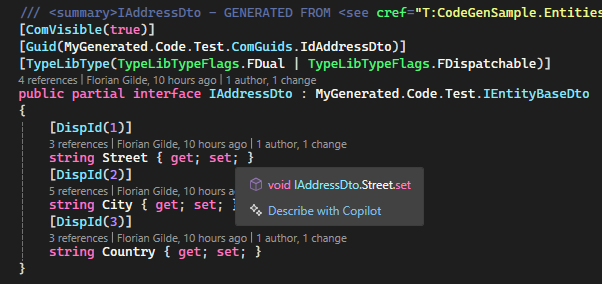
DTO Generation Automatically generate Data Transfer Objects (DTOs) from your classes and enums using attributes like this:
[AutoGenerateDto(ToDtoMethodName = "ToMegaDto", ToSourceMethodName = "AsSrc", IsComCompatible = true,
    Namespace = "MyGeneration"
)]
public class Address : EntityBase
{
    // ...
}
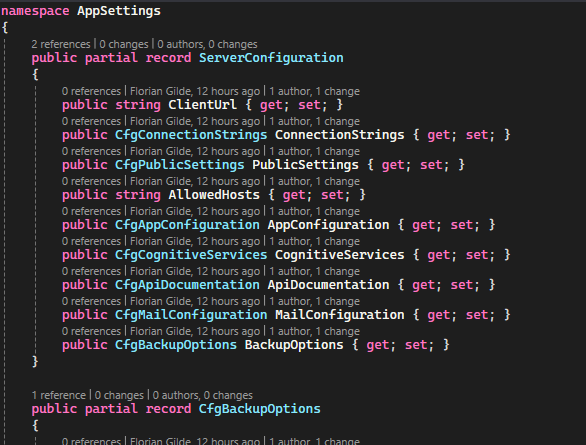
Class generation from XML or JSON files Generate strongly typed classes from JSON structures using the
StructureGenerationconfiguration. This is useful for configuration files or API responses.{ "SourceFile": "/Sources/appsettings.json", "RootClassName": "ServerConfiguration", "Namespace": "AppSettings" }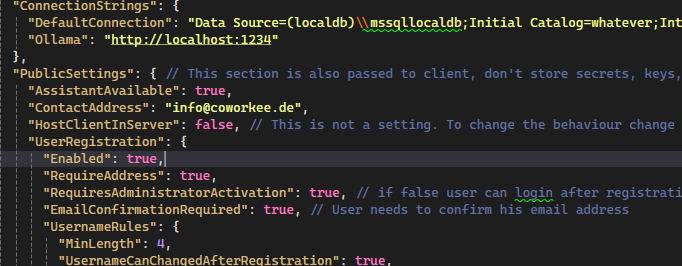
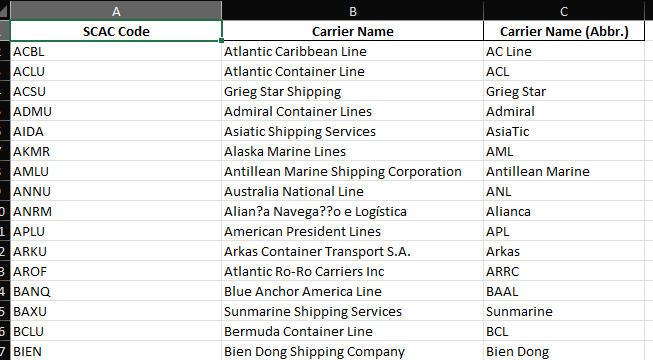
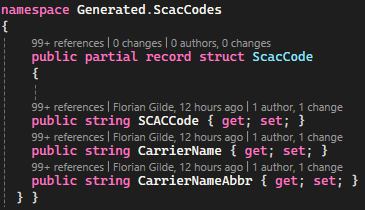
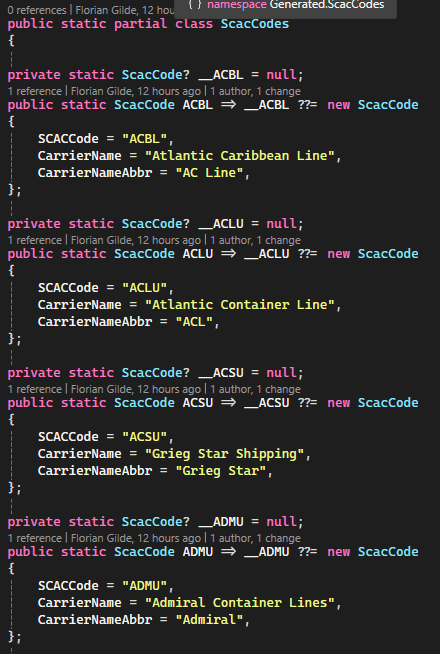
Class generation from Excel
"ExcelGenerations": [
  {
    "ModelType": "RecordStruct",
    "SourceFile": "/Sources/scac_codes.xlsx",
    "SheetName": null,
    "Namespace": "Generated.ScacCodes",
    "RootClassName": "ScacCode",
    "KeyColumn": "A",
    "HeaderRowIndex": 1,
    "DataStartRowIndex": 2,
    "GenerateModelClass": true,
    "GenerateStaticTable": true,
    "StaticClassName": "ScacCodes",
    "GenerateAllCollection": true,
    "OutputPath": "./Generated/Excel/"
  }
]
Source code documentation generation (
CodeToDocs)Generate documentation files directly from existing source files (e.g.
.cs,.razor,.html) using theCodeToDocsconfiguration. For every matching input file you can generate:- Plain text (
.txt) - Markdown (
.md) - HTML (
.html)
Example configuration:
{
  "DisableGeneration": false,
  "InputFolder": "./Entities",
  "OutputPath": "./Generated/HtmlDocs/",
  "FileIncludePattern": "*.cs",
  "SourceExportTypes": [ "PlainText", "Markdown", "Html" ]
}
Markdown output example:
- Plain text (
'''csharp
 public class Customer
 {
     public int Id { get; set; }
     public string Name { get; set; }
 }
 '''
Usage
With this package you can generate DTOs, Interfaces and other code from your classes and enums. It is a code generation library that uses attributes to define how the code should be generated.
After adding the package to your project, you can use the AutoGenerateDto attribute to mark classes that should have DTOs generated.
Additionally you need to to add a config file as AdditionalFile, this can be empty but maybe you want to control the generation process more precisely, or you want to use one of the other 2 Features
like generate code from other sources like JSON or Excel files.
For this, you can specify the Config in a additional json file.
The configuration file is a JSON file that defines how the code should be generated.
You can specify the namespace, the output directory, and other options.
Additionally, you can generate classes from JSON or XML files using the StructureGeneration configuration.
This allows you to create strongly typed classes from JSON structures,
which can be very useful for configuration files or API responses.
To add your configuration file please add a json as an AdditionalFile in your csproj file like this:
  <ItemGroup>
    <AdditionalFiles Include="CodeGen.config.json" />
  </ItemGroup>
Sample of a configuration file:
{
  "DtoGeneration": {
    // Notice:: The whole DtoGeneration section is optional and can also be overridden if set on the Attributes.
    "ComIdClassName": "ComGuids",
    "ComIdClassPropertyFormat": "Id{0}",
    "ComIdClassModifier": "Public",
    "BaseType": null,
    "AddReferencedNamespacesUsings": null,
    "AddContainingNamespaceUsings": null,
    "PreInterfaceString": null,
    "PreClassString": null,
    "KeepAttributesOnGeneratedClass": false,
    "KeepAttributesOnGeneratedInterface": false,
    "Interfaces": null,
    "DefaultMappingSettings": null,
    "OneFilePerClass": true,
    "Usings": null,
    "CreateRegions": true,
    "CreateComments": true,
    "GeneratePartial": true,
    "Namespace": "MyGenerated.Code.Test",
    "Suffix": "Wanda",
    "Prefix": null
    //"OutputPath": "./Generated/Dtos/" // Output path for the generated files, if its null or unset the files will added to generation source
  },
  "StructureGenerations": [
    {
      "SourceFile": "/Sources/appsettings.json", // Path to the source file to generate from
      "RootClassName": "ServerConfiguration", // Name of the root class to generate
      "Namespace": "AppSettings", // Namespace for the generated class
      "Prefix": "Cfg", // Prefix for the generated class name
      "Ignore": [ // Ignore for example to create a partial class with the same name or for whatever reason
        "PublicSettings.Endpoints"
      ],
      "OutputPath": "./Generated/AppSettings/" // Output path for the generated file, if its null or unset the files will added to generation source
    }
  ],
  "ExcelGenerations": [
    {
      "SourceFile": "/Sources/scac_codes.xlsx",
      "SheetName": null,
      "Namespace": "Generated.ScacCodes",
      "RootClassName": "ScacCode", // Name of the root class to generate
      "KeyColumn": "A", // Column to use as key for the generated class e.g. "A" for the first column B,C etc.
      "HeaderRowIndex": 1,
      "DataStartRowIndex": 2,
      "GenerateModelClass": true,
      "GenerateStaticTable": true,
      "StaticClassName": "ScacCodes", //Name of the static class to generate
      "GenerateAllCollection": true,
      "ColumnMappings": {
        "Coordinates (lat,lon)": "Coordinates",
        "Change indicator": "ChangeIndicator"
      },
      "PropertyTypeOverrides": {
        "Coordinates": "Coordinates", // eigener Struct
        "LocationStatus": "LocationStatus",
        "LocationFunction": "LocationFunction"
      },
      "OutputPath": "./Generated/Excel/" // Output path for the generated file, if its null or unset the files will added to generation source

    }
  ]
}
To use this package, you need to add the Nextended.CodeGen package to your project and additionally for using the attributes you need to add Nextended.Core as well.
  <ItemGroup>
    <PackageReference Include="Nextended.Core" Version="10.1.22" PrivateAssets="all" GeneratePathProperty="true" />
    <PackageReference Include="Nextended.CodeGen" Version="10.1.22"  />
  </ItemGroup>
Please have a look at this sample project to see how to use the code generation features: Nextended.CodeGen.Sample
Supported frameworks
netstandard2.0
Dependencies
- Nextended.Core
- Microsoft.CodeAnalysis.CSharp
- ClosedXML
The Nextended family
The other 17 packages in the suite:
Core libraries
- Nextended.Core — Foundation library — extension methods, custom types (Money, Date, BaseId, SuperType), class mapping, deep clone, encryption, hashing and the code-generation attributes.
- Nextended.Cache — Expression-based caching — automatic cache keys from method expressions, CacheProvider with condition-based invalidation, thread-safe AddOrGetExisting.
Data access
- Nextended.EF — Entity Framework Core extensions — graph loading (LoadGraphAsync, IncludeAll, MultiInclude), declarative include definitions, paging, dynamic sorting and bulk operations.
ASP.NET Core & web
- Nextended.Web — ASP.NET Core utilities — zero-config OData (AddODataAuto), composable IQueryable OData appliers, strongly typed controller URLs, streaming download helpers and a background executor that can replay a captured request.
- Nextended.ResponseFilters — Fluent, provider-agnostic pipeline that redacts, masks, rounds, truncates, hashes, prunes and restructures response DTOs before serialization — per request, per user, per permission.
- Nextended.ResponseFilters.AspNetCore — ASP.NET Core adapter for Nextended.ResponseFilters — registers the pipeline as a global IAsyncResultFilter and replays structural edits against the serialized JSON tree.
UI libraries
- Nextended.Blazor — Blazor helpers — IBrowserFile extensions (bytes, data URLs, downloads), a hierarchical model for browsing inside uploaded zip/tar/rar archives, MIME-type detection and component-parameter reflection.
- Nextended.UI — WPF and Windows desktop helpers — a global input-binding manager with hold/sequence matching, DirectInput and XInput gamepad readers, key-bind capture controls, converters, behaviours, markup extensions and runtime-defined PropertyGrid types.
Code generation & tooling
- Nextended.Imaging — Image processing — aspect-preserving resize, crop, colour replacement, brightness-based foreground picking, thumbnail generation, byte/data-URL conversion and MIME detection from magic bytes.
- Nextended.CodeGen — Roslyn source generator — DTOs and interfaces from your entities, strongly typed classes from JSON/XML, lookup tables from Excel, and documentation from source files. (this package)
.NET Aspire hosting
- Nextended.Aspire — Conditional AppHost builder extensions — WithReferenceIf / WaitForIf / WithExplicitStartIf, strongly typed environment variables from config objects, HTTPS dev-cert wiring, Docker guards, GitHub-source resources and npm app discovery.
- Nextended.Aspire.Hosting.Supabase — The complete Supabase stack — Postgres, Auth (GoTrue), REST, Realtime, Storage, Studio, Kong and Edge Functions — as one composable Aspire resource.
- Nextended.Aspire.Hosting.N8n — The n8n workflow-automation platform as an Aspire resource, with Postgres persistence, workflow import and a typed client for triggering workflows from .NET.
- Nextended.Aspire.Hosting.Grafana — Grafana, Prometheus, Loki, Tempo, Promtail, cAdvisor, postgres_exporter and the OpenTelemetry Collector as composable resources with auto-provisioned datasources.
- Nextended.Aspire.Hosting.WebDataStudio — WebDataStudio — a browser database studio for PostgreSQL, MySQL, SQL Server, SQLite, Oracle, DuckDB, ClickHouse, MongoDB and Redis — wired to the databases of your stack, with accounts and roles, an optional SQL assistant, and an MCP endpoint for AI agents.
- Nextended.Aspire.Hosting.AspireUI — AspireUI — the visual AppHost builder — as a resource inside your own Aspire stack, with an optional pre-seeded admin user and a starter stack built from your project paths.
- Nextended.Aspire.Hosting.LocalAI — Self-hosted, OpenAI-compatible multimodal AI — image generation, text-to-speech, speech-to-text and video — with gallery model management, GPU support and Open WebUI.
- Nextended.Aspire.Hosting.Php — Run PHP endpoints inside your Aspire stack — a docroot folder or a single router script served by PHP's built-in web server, with php.ini settings as fluent options.
Links
- 📦 NuGet package
- 📖 Documentation — English
- 📖 Dokumentation — Deutsch
- 🏠 Documentation portal
- 🧪 Runnable sample
- 🧑💻 Source code
- 🐛 Report an issue
License
GPL-3.0-or-later — see LICENSE.
Learn more about Target Frameworks and .NET Standard.
-
.NETStandard 2.0
- Nextended.Core (>= 10.1.33)
NuGet packages (1)
Showing the top 1 NuGet packages that depend on Nextended.CodeGen:
| Package | Downloads |
|---|---|
|
UNLowCoder.Lib
Classes for the UNECE UN/Locodes |
GitHub repositories (1)
Showing the top 1 popular GitHub repositories that depend on Nextended.CodeGen:
| Repository | Stars |
|---|---|
|
fgilde/MudBlazor.Extensions
MudBlazor.Extensions from https://www.mudex.org is a small extension for MudBlazor from https://mudblazor.com
|
| Version | Downloads | Last Updated |
|---|---|---|
| 10.1.35 | 0 | 8/30/2026 |
| 10.1.34 | 36 | 8/27/2026 |
| 10.1.33 | 134 | 8/24/2026 |
| 10.1.32 | 194 | 8/20/2026 |
| 10.1.31 | 95 | 8/19/2026 |
| 10.1.30 | 82 | 8/19/2026 |
| 10.1.21 | 138 | 7/30/2026 |
| 10.1.20 | 110 | 7/26/2026 |
| 10.1.19 | 114 | 7/23/2026 |
| 10.1.18 | 110 | 7/22/2026 |
| 10.1.17 | 106 | 7/21/2026 |
| 10.1.16 | 106 | 7/21/2026 |
| 10.1.15 | 102 | 7/21/2026 |
| 10.1.14 | 109 | 7/16/2026 |
| 10.1.13 | 114 | 7/12/2026 |
| 10.1.11 | 122 | 7/6/2026 |
| 10.1.10 | 152 | 6/16/2026 |
| 10.1.9 | 153 | 5/29/2026 |
| 10.1.8 | 155 | 5/19/2026 |