OpenCodeDotNet.Sdk.Extensions
2.1.0
Prefix Reserved
dotnet add package OpenCodeDotNet.Sdk.Extensions --version 2.1.0
NuGet\Install-Package OpenCodeDotNet.Sdk.Extensions -Version 2.1.0
<PackageReference Include="OpenCodeDotNet.Sdk.Extensions" Version="2.1.0" />
<PackageVersion Include="OpenCodeDotNet.Sdk.Extensions" Version="2.1.0" />
<PackageReference Include="OpenCodeDotNet.Sdk.Extensions" />
paket add OpenCodeDotNet.Sdk.Extensions --version 2.1.0
#r "nuget: OpenCodeDotNet.Sdk.Extensions, 2.1.0"
#:package OpenCodeDotNet.Sdk.Extensions@2.1.0
#addin nuget:?package=OpenCodeDotNet.Sdk.Extensions&version=2.1.0
#tool nuget:?package=OpenCodeDotNet.Sdk.Extensions&version=2.1.0
opencode SDK for .NET




Unofficial. This project is not affiliated with or endorsed by the opencode team.
A typed .NET client for the opencode server: the HTTP API that every opencode front-end (TUI, desktop, web UI, plugins) uses. From C#, you start a server or connect to one, send a prompt to a session, read the reply as the model writes it, answer the agent's permission requests, and see what a turn changed. The SDK speaks the OpenCode 2.x API.
📦 Installation
dotnet add package OpenCodeDotNet.Sdk
dotnet add package OpenCodeDotNet.Sdk.Extensions   # dependency injection, optional
npm install -g @opencode/cli@2.4.1                 # the opencode CLI, for the quick start
- The package id is not the namespace. You install
OpenCodeDotNet.Sdkand you writeusing OpenCode.Sdk;. nuget.org reserves theOpenCode.id prefix for an unrelated owner. - The CLI is the
@opencode/clinpm package. The version on the line above is this SDK's pin: the opencode release it is built and tested against. Later releases usually work, but the tests do not run against them. If you already run a server, you need no CLI: connect to its endpoint. - Nightly builds of
masterare on GitHub Packages: see Nightly builds.
🚀 Quick Start
using OpenCode.Sdk;
using OpenCode.Sdk.Models;

await using var server = await OpenCodeServer.StartAsync();
using var client = server.CreateClient();

var created = await client.Sessions.CreateSessionAsync(new SessionCreateRequest { Title = "hello from .NET" });
Console.WriteLine($"session {created.Session.Id}");
OpenCodeServer.StartAsync() starts a private opencode serve process, and disposing the server
stops it. For complete programs, see the four runnable apps.
Send a prompt and stream the reply
This program picks a model of opencode's own provider with zero listed input and output rates,
opens the live event stream before it prompts, and prints the reply as it arrives. The token
requests cancellation after two minutes; a call that is still pending then throws
OperationCanceledException.
using OpenCode.Sdk;
using OpenCode.Sdk.Models;

using var deadline = new CancellationTokenSource(TimeSpan.FromMinutes(2));
var token = deadline.Token;

await using var server = await OpenCodeServer.StartAsync(cancellationToken: token);
using var client = server.CreateClient();

// To use your own provider, replace this block with: var model = new ModelRef { Id = "...", ProviderId = "..." };
await client.LanguageModels.WaitForDefaultAsync(cancellationToken: token);
var catalog = await client.LanguageModels.ListModelsAsync(cancellationToken: token);
var model = catalog.Models.FirstOrDefault(static m =>
    m.ProviderId == "opencode" && m.Cost.Count > 0 && m.Cost.All(static c => c.Input <= 0 && c.Output <= 0));
if (model is null)
{
    await Console.Error.WriteLineAsync("No opencode model lists zero input and output rates yet. The server may still be loading plugins: run the program again.");
    return;
}

var created = await client.Sessions.CreateSessionAsync(
    new SessionCreateRequest { Model = new ModelRef { Id = model.Id, ProviderId = model.ProviderId } },
    cancellationToken: token);

// Subscribe before you prompt: the live event stream has no replay.
await using var events = client.Events.SubscribeAsync(cancellationToken: token).GetAsyncEnumerator();
await events.MoveNextAsync();

await client.Sessions.GetSessionClient(created.Session.Id)
    .PromptAsync(new SessionPromptRequest { Text = "In one sentence, what is a typed SDK?" }, cancellationToken: token);

while (await events.MoveNextAsync())
{
    switch (events.Current)
    {
        case SessionTextDelta delta when delta.Data.SessionId == created.Session.Id:
            Console.Write(delta.Data.Delta);
            break;
        case SessionExecutionSucceeded done when done.Data.SessionId == created.Session.Id:
            Console.WriteLine();
            return;
        case SessionExecutionFailed failed when failed.Data.SessionId == created.Session.Id:
            Console.WriteLine($"the turn failed: {failed.Data.Error.Message}");
            return;
        case SessionExecutionInterrupted stopped when stopped.Data.SessionId == created.Session.Id:
            Console.WriteLine($"the turn was interrupted: {stopped.Data.Reason}");
            return;
    }
}
- The model. Free
opencode/*models need no login; their list changes, and they have limits. Choosing a model shows how to use your own provider. - The folder. The session runs in the folder you start the program from. The agent can read that folder's files, and what it sends, your prompt included, goes to the model's provider.
- The full version. QuickStart also waits out the server's startup and reports retries. The program above answers no permission asks; Streaming shows the replies, and how to wait for a turn to end when a server's events differ from the SDK's.
Choose a connection mode
| You want… | Use | Who stops the server |
|---|---|---|
| A private server for this app only | OpenCodeServer.StartAsync() |
The SDK, when you dispose it |
| A server you already run | new OpenCodeClient(options) |
You |
| The background service the CLI shares with other clients | OpenCodeServer.DiscoverAsync() or EnsureAsync() |
Nobody, unless you call StopAsync() |
| The server the opencode CLI itself would choose | OpenCodeServer.ResolveAsync() |
Disposal stops only an owned standalone server |
Connection modes has each mode with its options. For dependency injection,
the OpenCodeDotNet.Sdk.Extensions package provides AddOpenCode, which registers the client and
every sub-client: see Registering with dependency injection.
🧰 What you can build
Four runnable apps are in playground/. Each app's README has its run command.
| App | What it shows |
|---|---|
| QuickStart, a console app | A prompt whose reply prints as it arrives. It returns exit code 0 or 1, so you can adapt it to a step of a CI job; it is not a ready-made CI integration. |
| HQ, Blazor Server with Aspire | A local dashboard: watch sessions, answer permission asks and the supported question types, and see a session's changed files. It has no login, so run it on your own machine only. |
| Worker, a Generic Host console app | A hosted service that reads the live event stream, and exits with code 1 when its server ends so that a service manager restarts it. |
| AotCli, a Native AOT console app | A native executable that inspects a repository. It needs no model. |
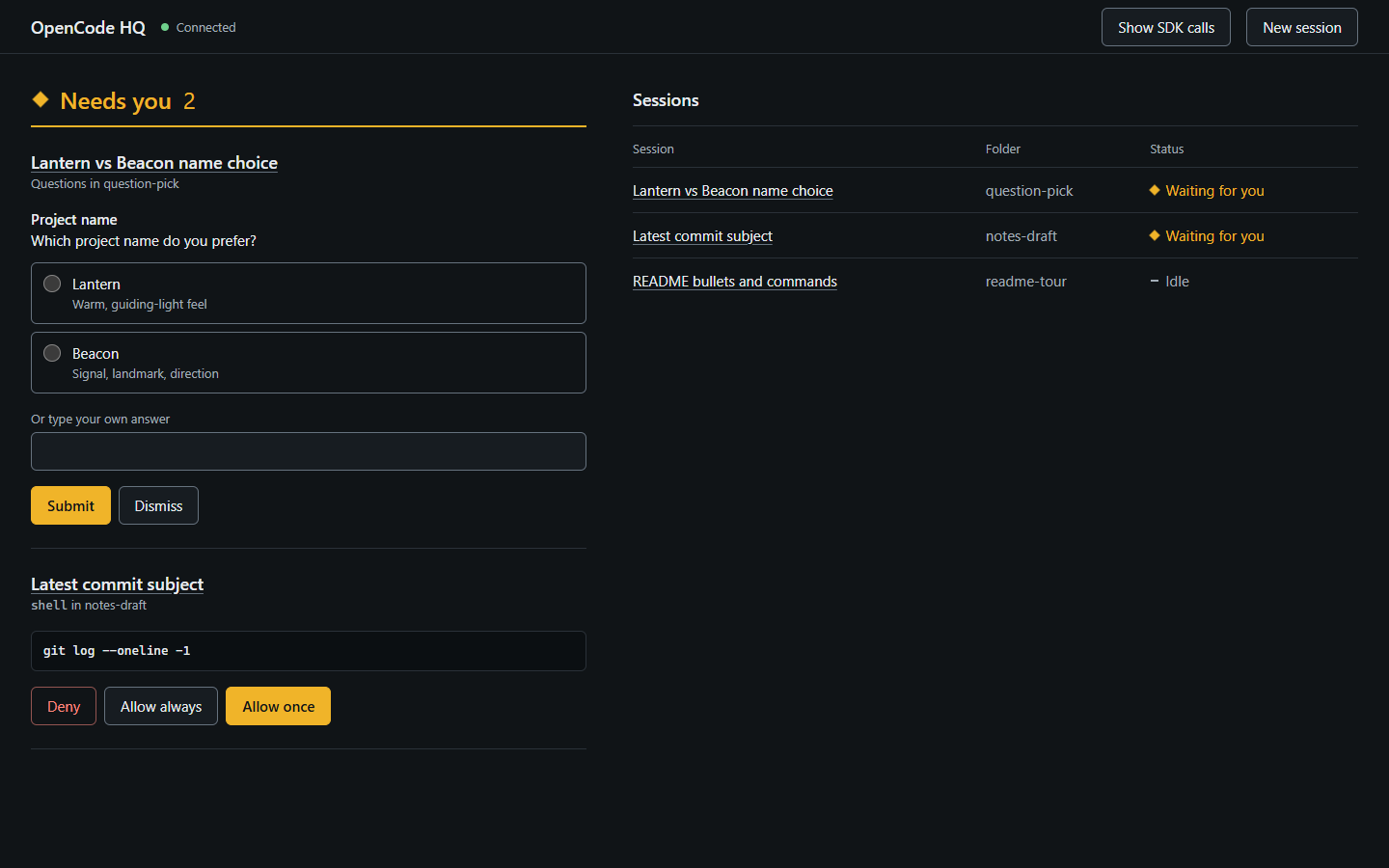
QuickStart and Worker work in the folder you start them from. HQ works in the directory you pick for each session, and it shows the machine's existing opencode history. AotCli takes a path. The server loads that folder's configuration, and a session's prompts go to the model's provider.
🧭 API Coverage
The SDK covers the whole opencode HTTP API at the pinned version, and three of its WebSocket
connections: terminals, persistent terminals and client-hosted MCP. A door for the fourth, the
experimental machine link, is planned. OpenCodeClient exposes one
sub-client per area of the API, and each sub-client is also injectable on its own.
How the client is organised lists each area
with its entry point and guide.
- HTTP operations return typed responses, and take typed requests where the operation has inputs. That includes opencode's unions without a discriminator, which off-the-shelf .NET OpenAPI generators did not represent correctly.
- A call throws a typed exception by default. On calls that accept
OpenCodeRequestOptions.NoThrow, a declared API error such as a 404 comes back in the response. Transport failures still throw. - The same transport pipeline serves every connection mode.
- JSON uses
System.Text.Jsonsource generation, with no reflection. Both packages declareIsAotCompatibleonnet10.0andnet11.0. - The HTTP API has no file-content search:
FileSystemClient.FindEntriesAsyncranks file and directory paths by fuzzy match; it does not search contents.
📚 Documentation
| Guide | What it covers |
|---|---|
| The guide | Index of every page below, in reading order |
| Getting started | Install, nightly builds, first call, and how the client is organised |
| Connection modes | The launcher, a server you already run, the background service, pairing, and dependency injection |
| Streaming | The live event stream and durable session event streams |
| Terminals | PTY and persistent-PTY sessions over WebSocket |
| Errors and responses | Throwing versus NoThrow, and the typed error model |
| Pagination | Cursor-carrying list envelopes, Enumerate*Async, and its Pages |
| Requests | Request records, members that are omitted, null or set, query members, and per-call location |
| Experimental APIs | What opencode serves as experimental, the OPENCODE001 and OPENCODE002 diagnostics, and how to opt in |
| Versioning and support | Supported .NET versions, what a version number promises, and costs on older runtimes |
📌 Versions and support
- .NET versions. Both packages target
netstandard2.0;net472;net10.0;net11.0: every .NET release that is still in support under Microsoft's .NET support policy, plus .NET Framework 4.7.2 or later, plusnetstandard2.0as a compatibility asset. - .NET 8. NuGet selects the
netstandard2.0asset, with a build warning. It installs and builds; it is not tested or supported on that runtime. It brings extra dependencies and misses the optimizations specific to the modern targets. - Version numbers. A version follows the bump type of the opencode release it pins: an upstream patch is an SDK patch, a minor a minor, a major a major. This is not strict SemVer. A release that moves the pin, a patch included, can change the generated protocol types the way opencode changed them, and the CHANGELOG lists each such change as breaking under Protocol changes. The hand-written API breaks only in a major.
- Experimental APIs need an opt-in (
OPENCODE001,OPENCODE002) and may change in any release that moves the pin. - Releases. Each GitHub Release publishes that version's CHANGELOG section. Only the latest release on NuGet.org is supported.
The details are in Versioning and support: the rule behind the targets, why .NET Framework keeps its own asset, and what can break when.
✅ Build, test and package status
| Tests | Status | Targets |
|---|---|---|
| Linux |  |
net10.0, net11.0 |
| Windows | |
net472, net10.0, net11.0 |
| macOS |  |
net10.0, net11.0 |
| Published CLI |  |
Weekly: the core net10.0 tests and three playground apps (AotCli, Worker and HQ) against the published @opencode/cli release |
| Package | NuGet.org | GitHub Packages |
|---|---|---|
| OpenCodeDotNet.Sdk | |
 |
| OpenCodeDotNet.Sdk.Extensions |  |
 |
Known Issues
- The live event stream has no replay. Events published while you are disconnected are lost. A
subscription queues up to 4,096 selected events; the next one that cannot be queued ends it with
OpenCodeEventSubscriberOverflowException: see recovering after subscriber overflow. - A CLI-started server's durable session event stream holds only the sync marker, because the distributed CLI starts its server without event persistence: see a single session's log.
- On
net472andnetstandard2.0, some memory costs are larger than on modern targets: see costs on the older assets. - A terminal queues frames that nobody reads, so a slow or absent reader can grow memory: see the terminal lifetime contract.
🤝 Contributing and support
- Contribute: CONTRIBUTING.md shows the path of a small pull request and the checks it runs.
- Ask a question: read the guide first; if it does not answer, ask in the Q&A category of Discussions.
- Report a bug or propose a feature: SUPPORT.md says which form to use and what is supported.
- Report a vulnerability: privately, as SECURITY.md says. Never in a public issue.
Related Projects
- opencode-mcp: a Model Context Protocol (MCP) server project for opencode.
- opencode-agents-ai: a Microsoft Agent Framework provider project for opencode.
License
Licensed under MIT, see LICENSE for the full text. Content derived from upstream opencode carries its own notice in THIRD-PARTY-NOTICES.md.
| Product | Versions Compatible and additional computed target framework versions. |
|---|---|
| .NET | net5.0 was computed. net5.0-windows was computed. net6.0 was computed. net6.0-android was computed. net6.0-ios was computed. net6.0-maccatalyst was computed. net6.0-macos was computed. net6.0-tvos was computed. net6.0-windows was computed. net7.0 was computed. net7.0-android was computed. net7.0-ios was computed. net7.0-maccatalyst was computed. net7.0-macos was computed. net7.0-tvos was computed. net7.0-windows was computed. net8.0 was computed. net8.0-android was computed. net8.0-browser was computed. net8.0-ios was computed. net8.0-maccatalyst was computed. net8.0-macos was computed. net8.0-tvos was computed. net8.0-windows was computed. net9.0 was computed. net9.0-android was computed. net9.0-browser was computed. net9.0-ios was computed. net9.0-maccatalyst was computed. net9.0-macos was computed. net9.0-tvos was computed. net9.0-windows was computed. net10.0 is compatible. net10.0-android was computed. net10.0-browser was computed. net10.0-ios was computed. net10.0-maccatalyst was computed. net10.0-macos was computed. net10.0-tvos was computed. net10.0-windows was computed. net11.0 is compatible. |
| .NET Core | netcoreapp2.0 was computed. netcoreapp2.1 was computed. netcoreapp2.2 was computed. netcoreapp3.0 was computed. netcoreapp3.1 was computed. |
| .NET Standard | netstandard2.0 is compatible. netstandard2.1 was computed. |
| .NET Framework | net461 was computed. net462 was computed. net463 was computed. net47 was computed. net471 was computed. net472 is compatible. net48 was computed. net481 was computed. |
| MonoAndroid | monoandroid was computed. |
| MonoMac | monomac was computed. |
| MonoTouch | monotouch was computed. |
| Tizen | tizen40 was computed. tizen60 was computed. |
| Xamarin.iOS | xamarinios was computed. |
| Xamarin.Mac | xamarinmac was computed. |
| Xamarin.TVOS | xamarintvos was computed. |
| Xamarin.WatchOS | xamarinwatchos was computed. |
-
.NETFramework 4.7.2
- Microsoft.Extensions.DependencyInjection.Abstractions (>= 10.0.15)
- Microsoft.Extensions.Options.ConfigurationExtensions (>= 10.0.15)
- OpenCodeDotNet.Sdk (>= 2.1.0)
-
.NETStandard 2.0
- Microsoft.Extensions.DependencyInjection.Abstractions (>= 10.0.15)
- Microsoft.Extensions.Options.ConfigurationExtensions (>= 10.0.15)
- OpenCodeDotNet.Sdk (>= 2.1.0)
-
net10.0
- Microsoft.Extensions.DependencyInjection.Abstractions (>= 10.0.15)
- Microsoft.Extensions.Options.ConfigurationExtensions (>= 10.0.15)
- OpenCodeDotNet.Sdk (>= 2.1.0)
-
net11.0
- Microsoft.Extensions.Options.ConfigurationExtensions (>= 10.0.15)
- OpenCodeDotNet.Sdk (>= 2.1.0)
NuGet packages
This package is not used by any NuGet packages.
GitHub repositories
This package is not used by any popular GitHub repositories.
| Version | Downloads | Last Updated |
|---|---|---|
| 2.1.0 | 0 | 11/24/2026 |
| 2.0.1 | 157 | 11/23/2026 |
| 2.0.0 | 173 | 11/17/2026 |
| 1.1.0 | 918 | 11/14/2026 |
| 1.0.1 | 228 | 11/10/2026 |
| 1.0.0 | 358 | 11/6/2026 |
| 0.9.0-preview.15 | 187 | 11/1/2026 |
| 0.9.0-preview.14 | 329 | 10/23/2026 |
| 0.9.0-preview.13 | 111 | 10/18/2026 |
| 0.9.0-preview.12 | 119 | 10/17/2026 |
| 0.9.0-preview.11 | 313 | 10/15/2026 |
| 0.9.0-preview.10 | 98 | 10/14/2026 |
| 0.9.0-preview.9 | 67 | 10/13/2026 |
| 0.9.0-preview.8 | 77 | 10/9/2026 |
| 0.9.0-preview.7 | 66 | 10/6/2026 |
| 0.9.0-preview.6 | 71 | 10/4/2026 |
| 0.9.0-preview.5 | 85 | 9/29/2026 |
| 0.9.0-preview.4 | 72 | 9/27/2026 |
| 0.9.0-preview.3 | 69 | 9/24/2026 |