ProjectZ 2.5.1
dotnet add package ProjectZ --version 2.5.1
NuGet\Install-Package ProjectZ -Version 2.5.1
<PackageReference Include="ProjectZ" Version="2.5.1" />
<PackageVersion Include="ProjectZ" Version="2.5.1" />
<PackageReference Include="ProjectZ" />
paket add ProjectZ --version 2.5.1
#r "nuget: ProjectZ, 2.5.1"
#:package ProjectZ@2.5.1
#addin nuget:?package=ProjectZ&version=2.5.1
#tool nuget:?package=ProjectZ&version=2.5.1
⚡ Project Z 2.5
Familiar XAML. Native DirectX 12. Your UI, accelerated.
Build expressive desktop tools, creative applications, and game interfaces with a GPU-rendered scene system and a WPF-inspired programming model.



Showcase · Port your UI · Get started · Technical reference
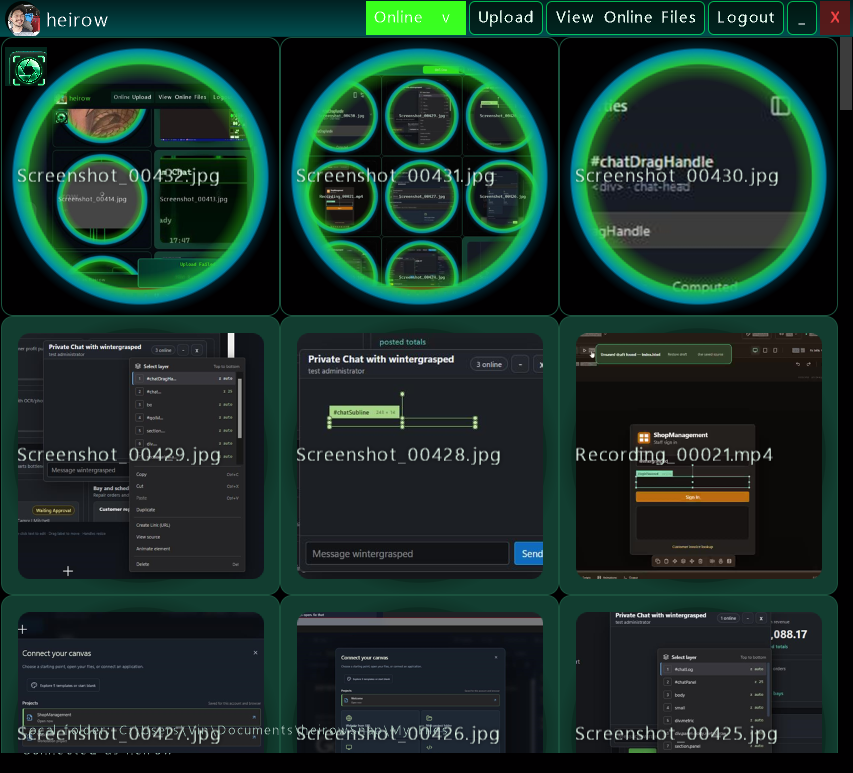
heirowSnap, ported to Project Z: original XAML styling brought into a native DX12 scene.
A new generation of Project Z
The renderer has moved from KNI to MonoGame 3.8.5.1's native DirectX 12 backend, retaining the familiar Microsoft.Xna.Framework drawing API. This update brings the pieces needed to move a real desktop UI: resources, styles, shaders, animation, scaled input, media, and native tool windows.
| New capability | What you can build with it |
|---|---|
| Native DX12 renderer | Hardware-rendered scenes, reusable render targets, FXAA, synchronized viewport resizing, and a build-selectable DX11 fallback. |
| XAML UI porting | Import existing windows, named controls, resource dictionaries, and item templates into native elements. Generate VB event scaffolding from XAML. |
| XAML shader support | GPU blur, shadows, inversion, and chromatic effects on controls and subtrees, with animatable effect properties. |
| XAML animations | Storyboards, double/color keyframes, discrete corner-radius keyframes, easing, repeating tracks, and load/hover/click triggers. |
| Desktop input with scaling | Mouse buttons, drag, hover, wheel, keyboard and editable text, with native client-to-render coordinate mapping and transformed hit testing. |
| Richer layout and styling | Grid, Canvas, WrapPanel, DockPanel, UniformGrid, kinetic scrolling, independent rounded corners, gradients, masks, and resource-based styles. |
| Inline audio/video | Video frames rendered as scene textures, synchronized audio, play/pause/seek, looping, clipping, and bounded decode size. |
| 3D inside your UI | XYZW meshes, cameras, materials, OBJ/FBX models, textures, wireframe, and custom shaders through Surface3DElement. |
| Desktop integration | Borderless/resizable windows, DWM composition requests, shared-device tool windows, tray menus, hotkeys, notifications, and capture workflows in heirowSnap. |
| Creative tooling | Native DX12 VST3 editor with DX11 fallback, granular synthesis, MIDI, XAML design surface, and plugin deployment tooling. |
📦 Release 2.5.1: the framework package includes the DX12 scene library and internal model importer. The VST plugin, heirowSnap application, and sample projects are separate source projects.
📦 Install 2.5.1
dotnet add package ProjectZ --version 2.5.1


🔐 Dependency refresh: ProjectZ 2.5.1 references SocketJack 2026.13.1, which uses SSH.NET 2026.0.0. This replaces the vulnerable SSH.NET 2025.1.0 dependency resolved by the previous local package. Direct and transitive NuGet audit warnings block publication.
🧭 Feature guide
⚡ Native DirectX 12 · scenes and rendering
MonoGame 3.8.5.1 supplies the native DX12 backend while preserving the familiar Microsoft.Xna.Framework drawing API. Render targets, FXAA, viewport resizing, and shared-device tool windows support desktop applications and interactive scenes. Select ProjectZGraphicsBackend=DirectX11 when testing the WindowsDX fallback; the distributed package uses DX12.
🧱 XAML · resources, layout and controls
Import supported windows, named controls, resource dictionaries, and item templates into the scene graph. Grid, Canvas, WrapPanel, DockPanel, UniformGrid, scrolling, gradients, masks, and independent corner radii provide layout and styling. The separate XAML code generator produces VB named-control and event scaffolding. This is a supported XAML subset, not complete WPF compatibility.
✨ GPU effects · blur, shadow and color
Effects can apply to individual controls or subtrees. Blur, shadows, inversion, and chromatic effects integrate with XAML and animatable properties. Build tooling compiles Resources/XamlEffects.fx for the selected graphics backend. Existing WPF shader binaries are not automatically converted; consult the third-party notices for adapter licensing.
🎞️ Animation · storyboards and input triggers
Use double/color keyframes, discrete corner-radius changes, easing, repeating tracks, and load/hover/click triggers. Start a named storyboard after attaching the imported tree. Animation targets include scale, translation, and effect properties.
🖱️ Input · scaling, transformed hit testing and editing
Mouse coordinates map from native client space into render space during resizing and display scaling. Hit testing respects transforms, visibility, and clipping. Controls support mouse buttons, hover, drag, wheel routing, keyboard repeat, editable text, selection, clipboard shortcuts, and password fields. Kinetic scrolling uses bounded impulses and time-based deceleration. Touch, pen, IME, and accessibility-provider parity are not implied.
🎬 Media · inline audio and video
Video frames become scene textures with synchronized audio, play/pause/seek, looping, clipping, and bounded decode sizes. Media and capture applications may require FFmpeg and additional application configuration.
🧊 3D surfaces · meshes, cameras and models
Surface3DElement brings XYZW meshes, cameras, materials, OBJ/FBX import, textures, wireframe, and custom shaders into the UI. The NuGet package includes the internal model-import assembly and declares its public dependencies.
🪟 Desktop composition · windows and native integration
Borderless/resizable hosts and shared-device tool windows connect the scene system to desktop workflows. DWM composition requests depend on the host window and OS configuration; they do not guarantee transparent blur in every application. The heirowSnap source example demonstrates tray menus, shortcuts, notifications, and capture controls.
🎹 Creative projects · VST3, MIDI and design tools
The separate VST3 project combines granular synthesis, MIDI, a native editor, and deployment tooling. The XAML design surface and sample applications demonstrate creative workflows. Installing the framework NuGet package does not install a plugin; plugin deployment is explicit.
📸 heirowSnap showcase · an application built on Project Z
The source port demonstrates galleries, account/file/chat flows, clipboard history, capture controls, notifications, and imported theme resources. The images below show local rendering and UI; remote calling and streaming still require independent two-client validation. These application features are not bundled as a ready-to-run app in the framework package.
heirowSnap built with Project Z
The port brings an existing WPF application's linked XAML and theme resources into Project Z scenes, while native code connects account, file, chat, clipboard, and capture workflows.
Your theme, carried across
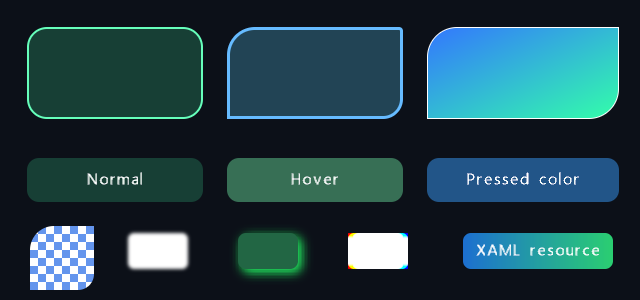
Native surfaces, gradient brushes, state styling, and GPU effects.
A complete desktop settings surface
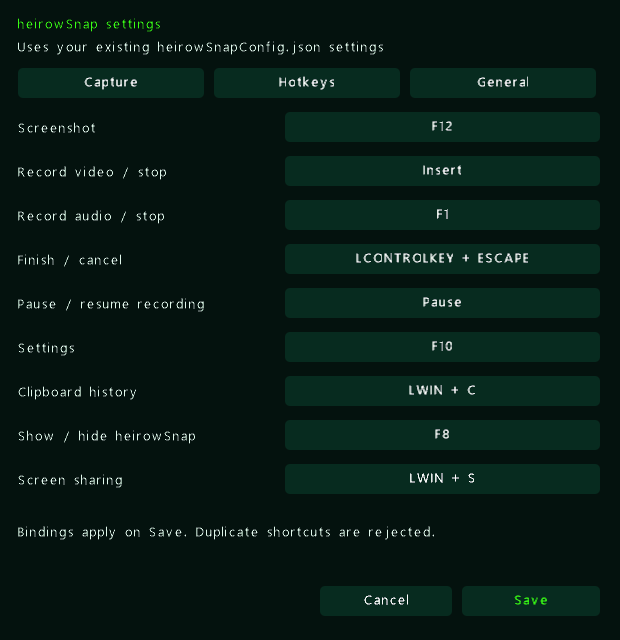
Project Z controls, tabs, shortcuts, and the existing settings model.
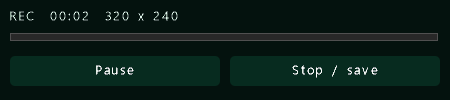
Small windows share the same visual language: recording controls, notifications, settings, and tray surfaces.
- Files and media: local/online galleries, streaming uploads, drag-and-drop, asynchronous video thumbnails, inline playback, and Recycle Bin-confirmed deletion.
- People and conversations: presence, contact menus, chat windows, and wire-compatible SocketJack protocol models.
- Clipboard: persistent history, search, filtering, sorting, and a configurable global shortcut.
- Capture: screenshots, video/audio recording, pause/resume, region indicators, audio levels, and native recording controls.
- Desktop polish: same-process settings, custom tray menus, animated notifications, and preservation of existing configuration fields.
These are real development captures of the port and its DX12 graphics probe. They illustrate rendering and local UI; remote calling and streaming require separate two-client validation. Capture provenance.
Bring your XAML
1. Keep your markup and theme
Link existing .xaml files and resource dictionaries into your app's output. heirowSnap links them directly from its original source tree, keeping the original UI files available to both applications.
2. Import the window into a scene
Inside an initialized Project Z scene:
Imports ProjectZ.Shared.Drawing.Designer
Imports ProjectZ.Shared.Drawing.UI.Input

SceneXamlParser.RegisterApplicationResources("UI\Theme.xaml")

Dim importer As New SceneXamlParser(Me)
Dim root = importer.ParseLegacyWindow("UI\MainWindow.xaml")
AddElement(root)

Dim save = importer.FindName(Of Button)("SaveButton")
If save IsNot Nothing Then
    AddHandler save.MouseLeftClick, Sub(point) SaveSettings()
End If

For Each feature In importer.UnsupportedFeatures
    System.Diagnostics.Debug.WriteLine(feature)
Next
SaveSettings() is your application handler; paths are relative to the working directory. Use ParseFile for scene markup, ParseNamedElement for a single control, or ParseItemTemplate for repeated items. RegisterFactory maps custom controls to native implementations.
3. Connect the behavior
The code generator creates named-element fields and event scaffolding for documents with x:Class, preserving code inside its designated custom-code region:
dotnet run --project "Project Z XAML Codegen" -- "MyApp\UI" "MyApp\Generated"
Keep the UI; adapt the application logic. Supported controls and styles import directly. WPF code-behind, arbitrary bindings, complex templates, and custom controls may need adapters. Review UnsupportedFeatures and generated compatibility notes. This is a supported XAML subset, not a full WPF runtime.
Style it. Shade it. Animate it.
Familiar XAML, native effects
<Border xmlns="http://schemas.microsoft.com/winfx/2006/xaml/presentation"
        Width="320" Height="100" CornerRadius="18"
        Background="#103D30" BorderBrush="#35E7C4" BorderThickness="1">
    <Border.Effect>
        <DropShadowEffect Color="#35E7C4" BlurRadius="16"
                          ShadowDepth="3" Opacity="0.65" />
    </Border.Effect>
    <TextBlock Text="Hello, native DX12" Foreground="White" />
</Border>
Application and merged dictionaries, local overrides, BasedOn styles, solid brushes, and linear/radial gradients carry your visual language across controls. Rounded surfaces support independent corner radii and antialiased edges; buttons retain normal, hover, and pressed brushes.
Effects capture subtrees into reusable GPU render targets and respect ancestor scroll clipping. Storyboards can animate blur radius, shadow depth, opacity, color, and chromatic amount. RegisterEffectAdapter extends the mappings.
The supported WPFPixelShaderLibrary inversion and linear/spastic chromatic adapters use the original shader calculations. Generic chromatic effects and WPF box blur use approximations. Arbitrary compiled WPF .ps files are not automatically converted. Shader details and licensing.
Motion stays in the markup
<Grid xmlns="http://schemas.microsoft.com/winfx/2006/xaml/presentation"
      xmlns:x="http://schemas.microsoft.com/winfx/2006/xaml">
    <Grid.Resources>
        <Storyboard x:Key="Reveal">
            <DoubleAnimation Storyboard.TargetName="Card"
                             Storyboard.TargetProperty="Opacity"
                             From="0" To="1" Duration="0:0:0.35" />
        </Storyboard>
    </Grid.Resources>
    <Border x:Name="Card" Width="320" Height="100"
            Background="#103D30" CornerRadius="18" />
</Grid>
After parsing and attaching the tree, call importer.BeginStoryboard("Reveal") from the scene's event/update path. Imported Loaded, MouseEnter, MouseLeave, and click triggers can also start storyboards. Keyframes, spline/easing interpolation, repeating tracks, scale/translation targets, and effect properties support richer transitions. heirowSnap notifications use imported load, hover, and click animations.
Input that follows the UI
Native mouse coordinates map into render coordinates during resizing and across monitor scale changes. Parent transforms, visibility, and clipping participate in hit testing, keeping interaction aligned with the rendered control.
- Left/right clicks, movement, hover, dragging, and wheel routing through nested controls.
- Keyboard press/release and repeat, editable text, selection, clipboard shortcuts, and password input.
- Kinetic scrolling with bounded impulses, time-based deceleration, and edge stopping.
- Native tool-window input forwarded into the shared scene renderer.
This covers desktop mouse/keyboard input; touch, pen, IME, and accessibility-provider parity are not implied.
Run it from source
Use Windows, the .NET 8 SDK, and a DX12-capable GPU/driver. Windows apps target x64 by default. Visual Studio 2022 can open Project Z.sln.
# Build the framework. Native DX12 is the default.
dotnet build "Project Z Windows.vbproj" -c Release

# Run the application demo.
dotnet run --project "Project Z Application\Project Z Application (Windows).vbproj" -c Release

# Select the DX11 migration fallback.
dotnet build "Project Z Windows.vbproj" -c Release -p:ProjectZGraphicsBackend=DirectX11
The build restores the pinned MGFXC tool and compiles XAML shaders for the selected backend. Edit Resources/XamlEffects.fx; generated binaries belong under obj.
The framework Release build also creates bin/Release/ProjectZ.2.5.1.nupkg.
The project and assembly version is 2.5.1.0; NuGet normalizes the package version
to 2.5.1. The package includes the internal model-import DLL and restores its
public dependencies, including SocketJack, from NuGet. Local SocketJack source
development is opt-in with -p:UseLocalSocketJack=true; leave this off when
building a package for distribution.
Solution builds do not install the VST plugin. To explicitly build and deploy it,
use dotnet build "Project Z VST/Project Z VST.csproj" -c Release -p:DeployVst3OnBuild=true.
For heirowSnap, provide the original wShare checkout. WShareRoot defaults to %USERPROFILE%\source\repos\wShare; legacy settings also references InputHelper.dll in the adjacent AI.NET output. See the project file for the expected path.
dotnet build "heirowSnap Project Z\heirowSnap Project Z.vbproj" -c Release -p:WShareRoot="C:\src\wShare"
dotnet run --project "heirowSnap Project Z\heirowSnap Project Z.vbproj" -c Release --no-build
Network workflows need a configured service/account; recording and thumbnail workflows need FFmpeg. For the published package separately: dotnet add package ProjectZ.
Explore the solution
| Project / area | Purpose |
|---|---|
Project Z Windows.vbproj |
Scene graph, controls, layout, input, animations, XAML, and rendering. |
heirowSnap Project Z |
Desktop port and practical integration example. |
heirowSnap Protocol / heirowSnap Legacy Settings |
Network models and linked settings implementation. |
Project Z XAML Codegen |
XAML-to-VB named-control and event scaffolding. |
Project Z Model Import |
Assimp-backed model import for 3D surfaces. |
Project Z VST / Project Z VST SmokeHost |
Granular synthesizer, native editor, and embedded-host checks. |
Project Z Application |
UI demo and playable Tetris. |
Project Z Audio / Project Z Video FX |
Audio analysis and reactive visuals. |
Project Z Tower Defense |
Networked game and WPF-hosted designer. |
ProjectTemplate |
Application starting point. |
Go deeper
- Backends, composition, inline video, and 3D
- Rounded corners, XAML resources, and effects
- Desktop integration and focused smoke checks
- VST3 editor and deployment
- Third-party notices
Contributions and reproducible issues are welcome. For rendering problems, include the backend, GPU/driver, display scaling, and a small XAML example.
Project Z · Declarative UI with a native GPU canvas.
Built with MonoGame, .NET, SocketJack, and the libraries in third-party notices. Imported WPFPixelShaderLibrary adapters include GPL-3.0 material; review the notices and bundled license before redistribution.
| Product | Versions Compatible and additional computed target framework versions. |
|---|---|
| .NET | net8.0-windows7.0 is compatible. net9.0-windows was computed. net10.0-windows was computed. |
-
net8.0-windows7.0
- LibTessDotNet (>= 1.1.15)
- MonoGame.Framework.Native (>= 3.8.5.1)
- MonoGame.Runtime.Windows.DX12 (>= 3.8.5.1)
- Silk.NET.Assimp (>= 2.23.0)
- SocketJack (>= 2026.13.1)
NuGet packages
This package is not used by any NuGet packages.
GitHub repositories
This package is not used by any popular GitHub repositories.
Native DX12, XAML scenes, GPU effects, animation, scaled input, inline media, and 3D model import. Updates SocketJack to 2026.13.1 with SSH.NET 2026.0.0, adds dependency audit gates and NuGet Trusted Publishing.