Render.NET.Jbig2
0.3.17
See the version list below for details.
dotnet add package Render.NET.Jbig2 --version 0.3.17
NuGet\Install-Package Render.NET.Jbig2 -Version 0.3.17
<PackageReference Include="Render.NET.Jbig2" Version="0.3.17" />
<PackageVersion Include="Render.NET.Jbig2" Version="0.3.17" />
<PackageReference Include="Render.NET.Jbig2" />
paket add Render.NET.Jbig2 --version 0.3.17
#r "nuget: Render.NET.Jbig2, 0.3.17"
#:package Render.NET.Jbig2@0.3.17
#addin nuget:?package=Render.NET.Jbig2&version=0.3.17
#tool nuget:?package=Render.NET.Jbig2&version=0.3.17
<p align="center"> <img src="https://raw.githubusercontent.com/bvdcode/Render.NET/main/Sources/Render.NET/packageIcon.png" alt="Render.NET" width="160" /> </p>
Render.NET


Render STL, OBJ, 3MF, PDF, SVG, and TGS/Lottie files to PNG previews in managed C#. Runs on the CPU using .NET 10, without a native graphics dependency, GPU, display server, or external renderer process. Core, Mesh, Jpeg2000, Jbig2, Svg and Tgs use the base class library; Pdf uses our JPEG 2000 and JBIG2 decoders, the managed PdfPig reader and StbImageSharp JPEG decoder.
<p align="center"> <img src="https://raw.githubusercontent.com/bvdcode/Render.NET/main/docs/images/stl-preview.png" alt="A torus knot loaded from STL and rendered with Render.NET.Mesh" width="512" /> </p>
Packages
| Package | Available now |
|---|---|
| Render.NET | RGBA8 pixels, vector paths and boolean operations, fills and strokes, clipping, affine images, alpha compositing, and metadata-free PNG encoding. |
| Render.NET.Mesh | STL, OBJ, and 3MF geometry, explicit assembly selection, indexed triangle meshes, and studio-lit orthographic previews. Depends on Render.NET. |
| Render.NET.Pdf | PDF page interpretation and CPU rendering: font outlines and Type 3 glyph programs, vector graphics, raster images, clipping, transparency, crop boxes, and rotation. Includes Cyrillic fallback fonts, gradients, colored/stencil tiling patterns, transparency groups, soft masks and annotation/form appearances. JPEG 2000 and JBIG2 scans use our own managed decoders. |
| Render.NET.Jpeg2000 | Original managed JPEG 2000 Part 1 decoder: JP2/J2K, lossless/lossy wavelets, 1–16-bit component samples, tiles and subsampling. No runtime dependencies. Supported subset and API. |
| Render.NET.Jbig2 | Original managed monochrome JBIG2 decoder: MMR, arithmetic/Huffman symbols, globals, refinement, and halftones. No runtime dependencies. Supported subset and API. |
| Render.NET.Svg | Managed SVG text with Cyrillic fallback, masks, filters, embedded PNG images, paths/shapes, styles, gradients, references and clipping. Supported subset and API. |
| Render.NET.Tgs | Selected-frame PNG previews from Telegram TGS or Lottie JSON, animated shapes/keyframes, masks/mattes, blend modes, effects, repeat/merge/round/offset modifiers, gradients and precompositions. Supported subset and API. |

<p align="center"> <img src="https://raw.githubusercontent.com/bvdcode/Render.NET/main/docs/images/mech-managed.png" alt="A 66-part 3MF robot rendered from geometry" width="320" /> <img src="https://raw.githubusercontent.com/bvdcode/Render.NET/main/docs/images/benchy-lime.png" alt="3DBenchy rendered from STL with a caller-supplied lime color" width="320" /> </p>
SVG and TGS/Lottie to PNG
using Render.NET;
using Render.NET.Svg;
using Render.NET.Tgs;

SvgDocument drawing = await SvgReader.ReadFileAsync("drawing.svg");
PixelBuffer svg = SvgRenderer.Render(drawing, new SvgRenderOptions { Width = 800 });

TgsDocument animation = await TgsReader.ReadFileAsync("sticker.tgs");
PixelBuffer frame = TgsRenderer.RenderFrame(animation, 30,
    new SvgRenderOptions { Width = 512, Supersampling = 2 });
await using var output = File.Create("frame.png");
await PngEncoder.WriteAsync(frame, output);
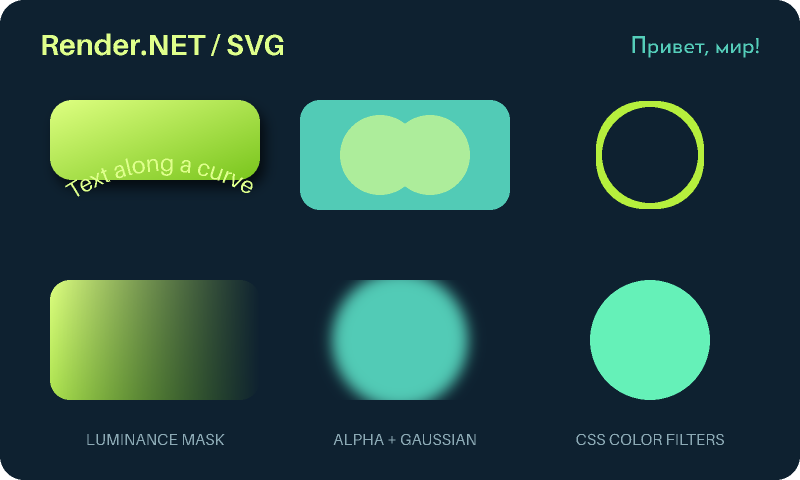
Both packages use our managed vector canvas and add no third-party runtime dependencies. SVG supports text, masks, filters and embedded PNG images. TGS adds multiple masks, track mattes, layer blend modes, common effects and geometric modifiers. Both reject detected unsupported features by default; the guides list the remaining limits. See the SVG guide and TGS guide for features, resource limits, reference comparisons and CLI examples. PNG output contains no metadata.
PDF to PNG
dotnet add package Render.NET.Pdf
using Render.NET;
using Render.NET.Pdf;

using PdfDocument document = await PdfReader.ReadFileAsync("document.pdf");
PdfPage page = document.GetPage(1); // One-based, out of document.PageCount pages.
PixelBuffer image = PdfRenderer.Render(page, new PdfRenderOptions
{
    Dpi = 144,
    MaximumWidth = 1600,
    Supersampling = 2
});

await using var destination = File.Create("page.png");
await PngEncoder.WriteAsync(image, destination);
<p align="center"> <img src="https://raw.githubusercontent.com/bvdcode/Render.NET/main/docs/images/pdf-preview.png" alt="A PDF page with embedded fonts, rounded vector shapes, a chart, and text rendered by Render.NET.Pdf" width="420" /> </p>
The PDF renderer also supports Type 3 glyph programs (colored and stencil glyphs, nested text/forms and images), all seven PDF shading types, colored and stencil tiling patterns for paths and text, all 16 blend modes, transparency groups, soft masks and existing annotation/form appearances. PDF remains a large format: known unsupported features include shading-pattern graphics-state overrides and optional-content visibility. They are listed on page.UnsupportedFeatures, and rendering rejects them by default. See the PDF guide for the support matrix, fonts, limits, and CLI example.
<p align="center"> <img src="https://raw.githubusercontent.com/bvdcode/Render.NET/main/docs/images/pdf-patterns.png" alt="Colored and lime stencil patterns, rotation, patterned strokes, transparency, nested forms and images rendered by Render.NET.Pdf" width="600" /> </p>
Mesh performance
512 × 512 CPU previews in 186–537 ms inside a running .NET process, including model loading and PNG/file writing, on the five models below. This is the repeated-call scenario used by a service such as a thumbnail worker.
For a separate comparison of new processes, both columns below include startup, loading, rendering, PNG encoding, and file writing:
| Model | Triangles | Render.NET.Mesh | F3D 4.0 |
|---|---|---|---|
| Spot (OBJ) | 5,856 | 509 ms | 641 ms |
| Mug (3MF) | 2,290 | 527 ms | 671 ms |
| Robot, 66 build items (3MF) | 19,116 | 978 ms | 1,235 ms |
| Dog, 28 build items (3MF) | 35,256 | 848 ms | 745 ms |
| 3DBenchy (STL) | 225,706 | 932 ms | 808 ms |
Medians of five runs, measured October 26, 2026, on an Intel Core i5-12450H under Linux with .NET 10. Quality profile: Render.NET uses 2× supersampling, studio lighting, shadows, and ambient occlusion; F3D uses FXAA, ambient occlusion, and tone mapping. F3D runs with Mesa llvmpipe software OpenGL and a new Xvfb display per invocation, whose startup time is included. Filesystem caches are warm. The images and algorithms differ, and these results do not measure GPU rendering or a persistent F3D service.
See the full benchmark for 1024-pixel output, the fast profile, repeated-call timings, comparison images, raw samples, and reproduction commands.
Mesh to PNG
dotnet add package Render.NET.Mesh
using Render.NET;
using Render.NET.Mesh;

TriangleMesh mesh = await MeshReader.ReadFileAsync("model.3mf"); // Also .stl and .obj

PixelBuffer image = MeshRenderer.Render(mesh, new MeshRenderOptions
{
    Width = 768,
    Height = 768,
    Supersampling = 2,
    BaseColor = new System.Numerics.Vector3(163 / 255f, 230 / 255f, 53 / 255f) // Lime #A3E635
});

await using var destination = File.Create("preview.png");
await PngEncoder.WriteAsync(image, destination);
The camera automatically frames the complete model with padding. Rendering includes depth testing, area-weighted smooth normals with a configurable crease angle, three studio lights, a roughness/metallic material, filtered self-shadows, screen-space ambient occlusion, tone mapping, and supersampling. Lighting and downsampling use linear color; output pixels are straight-alpha sRGB. The default background is transparent.
MeshRenderOptions controls model rotation, camera direction and up vector, dimensions, padding, surface color, roughness, metallic fraction, exposure, background, smoothing, shadows, and occlusion. Model coordinates are treated as Z-up by default. Camera direction points from the model toward the camera. Coordinates are normalized internally so preview framing does not depend on source units. Rotation is applied around the model's bounding-box center before automatic framing.
using System.Numerics;

var options = new MeshRenderOptions
{
    CameraDirection = new Vector3(1.6f, -2.4f, 1.5f),
    CameraUp = Vector3.UnitZ,
    ModelRotation = Quaternion.CreateFromAxisAngle(Vector3.UnitZ, MathF.PI / 4),
    BaseColor = new Vector3(0.55f, 0.65f, 0.88f), // sRGB components, 0–1
    Roughness = 0.32f,
    Metallic = 0.15f,
    CreaseAngle = 45,
    Shadows = true,
    ShadowMapSize = 1024,
    ShadowSoftness = 0.02f,
    AmbientOcclusion = true
};
Formats and 3MF selection
| Format | Geometry behavior |
|---|---|
| STL | Binary and ASCII, including multiple ASCII solids. Facet normals are recomputed. |
| OBJ | Positive and negative position/UV/normal indices, triangles and concave planar polygons, line continuations, authored normals, and smoothing groups. All objects and groups are combined. |
| 3MF | Core meshes, all root build instances, nested components, transforms, units converted to millimeters, mirrored winding, and Production Extension references to other model parts. |
OBJ material libraries, texture images, UV shading, and vertex colors are not loaded. Free-form curves and surfaces must be tessellated first. Authored vn normals and explicit smoothing groups take precedence over generated crease normals; set UseSourceNormals = false to regenerate them. OBJ files without a smoothing declaration use the renderer's crease smoothing.
A 3MF package may contain many resources and positioned instances. MeshReader renders every item in the root build, preserving placement and excluding unused resources. It never guesses which object is the main one and never substitutes an embedded image. An empty build is an error when creating the build mesh; resources can still be selected explicitly.
await using var source = File.OpenRead("project.3mf");
ThreeMfDocument document = await ThreeMfReader.ReadAsync(source);

TriangleMesh entireBuild = document.CreateBuildMesh();
TriangleMesh firstInstance = document.CreateBuildItemMesh(0); // Zero-based, keeps placement

// IDs belong to a model part, not to the whole ZIP. Inspect document.Objects
// and document.BuildItems to present an application-specific selection.
ThreeMfObject selected = document.Objects[0];
TriangleMesh resource = document.CreateObjectMesh(selected.Id, selected.ModelPart);
The package thumbnail is a separate, explicit operation. It may show an entire project, another camera angle, or an outdated scene, so it cannot identify a selected model:
await using var source = File.OpenRead("project.3mf");
ThreeMfThumbnail? thumbnail = await ThreeMfReader.ReadThumbnailAsync(source);
if (thumbnail is not null)
{
    await File.WriteAllBytesAsync("embedded-preview" +
        (thumbnail.ContentType == "image/png" ? ".png" : ".jpg"), thumbnail.Data.ToArray());
}
Thumbnail extraction does not parse geometry. It returns original encoded bytes, including original metadata, and checks the PNG/JPEG signature without decoding the image. Newly rendered PNGs contain no metadata. Source materials and the Materials and Properties Extension are deliberately replaced by the caller's preview material, including when that extension is marked required. Per-object thumbnails and alternative Production representations are unsupported; unknown required extensions fail explicitly. This library loads preview geometry and does not validate printability or implement the entire 3MF specification.
Streams and limits
StlReader.ReadAsync reads from the stream's current position, supports non-seekable streams, and leaves the source open. It accepts ASCII STL with invariant-culture numbers, an optional UTF-8 BOM, and multiple solids. Binary detection uses the declared triangle count and exact file length, including binary files whose header begins with solid. Truncated files, malformed facets, and non-finite coordinates are rejected. Stored facet normals are recomputed from geometry.
All format readers read from the current stream position, support non-seekable streams, leave the source open, and accept cancellation. Loaders default to a 128 MiB input limit and one million triangles. Configure format-specific limits for your application:
TriangleMesh mesh = await StlReader.ReadAsync(source, new StlReaderOptions
{
    MaxInputBytes = 64 * 1024 * 1024,
    MaxTriangleCount = 500_000
}, cancellationToken);

PixelBuffer image = MeshRenderer.Render(mesh, options, cancellationToken);
await PngEncoder.WriteAsync(image, destination, cancellationToken);
ObjReaderOptions also bounds vertex and polygon sizes. ThreeMfReaderOptions bounds ZIP entries, compressed/decompressed bytes, part and thumbnail sizes, objects, component depth, and expanded instances/geometry. Its default uncompressed budget is 256 MiB, with 64 MiB per part and a component depth of 64. ZIP parts stay in memory; paths cannot resolve outside the package, external model references and XML DTDs are rejected. These are resource limits, not a process-level memory or CPU sandbox.
Rendering is synchronous and cancellable. Supersampling supports 1–4 samples per axis; the internal raster is limited to 16,777,216 samples. Geometry and raster buffers are held in memory, so services should also limit concurrent renders. PNG encoding is asynchronous, leaves the destination open, and writes only IHDR, IDAT, and IEND chunks.
Sample
Render an existing STL, OBJ, or 3MF model:
dotnet run --project Samples/Render.NET.Mesh.Sample -c Release -- model.3mf preview.png 768
Reproduce the image above from a generated 20,480-triangle torus knot. The sample writes preview.stl, loads it through StlReader, and renders preview.png:
dotnet run --project Samples/Render.NET.Mesh.Sample -c Release -- --demo preview.png 768
The command reports load, render, and total PNG generation times. Ctrl+C cancels the operation.
Current scope
This is an initial renderer for static previews, with opaque surfaces, an orthographic camera, and a single material. STL does not provide a standard scene orientation or material system; camera and color can be configured by the caller. Crease smoothing joins vertices at identical positions and retains flat normals at unusually high-valence vertices to bound processing work.
Textures, perspective projection, transparent materials, ground planes, animation, and PDF rendering are not implemented. Filtered shadow maps and screen-space occlusion are approximations. See the F3D comparison for measured timings, matching inputs, images, and the limits of that comparison.
Build and test
Requires the .NET 10 SDK.
dotnet restore Sources/Render.NET.sln
dotnet build Sources/Render.NET.sln --configuration Release --no-restore
dotnet test Sources/Render.NET.sln --configuration Release --no-build --no-restore
dotnet pack Sources/Render.NET.sln --configuration Release --no-build --output artifacts/packages
Tests cover STL, OBJ triangulation/normals, 3MF build selection and cross-part components, malformed inputs, limits, cancellation, camera rotation/framing, depth ordering, transparent antialiasing, shadows, occlusion, and PNG decoding/checksums. The repository includes eight public-domain model files, with source declarations and SHA-256 checks. Tests run offline after package restore. Fixtures and benchmarks are excluded from NuGet packages.
GitHub Actions builds, tests, and packs changes on main and pull requests. Successful builds on main publish both packages to NuGet.org using Trusted Publishing and create a GitHub release with package summaries and all commits since the previous release. GitVersion increments the patch version on main from release tags; commit messages cannot trigger minor or major bumps. Minor and major releases require an explicit versioning decision.
Each NuGet package includes the project icon, this README, XML API documentation, and the MIT license. Debug symbols are distributed in separate .snupkg files.
License
MIT. Copyright © 2026 Vadim Belov.
| Product | Versions Compatible and additional computed target framework versions. |
|---|---|
| .NET | net10.0 is compatible. net10.0-android was computed. net10.0-browser was computed. net10.0-ios was computed. net10.0-maccatalyst was computed. net10.0-macos was computed. net10.0-tvos was computed. net10.0-windows was computed. |
-
net10.0
- No dependencies.
NuGet packages (1)
Showing the top 1 NuGet packages that depend on Render.NET.Jbig2:
| Package | Downloads |
|---|---|
|
Render.NET.Pdf
Managed PDF page rendering to RGBA and PNG for .NET. Vector paths, font outlines, images, clipping, transparency, page selection, and configurable resolution without native graphics libraries. |
GitHub repositories
This package is not used by any popular GitHub repositories.
| Version | Downloads | Last Updated |
|---|---|---|
| 0.3.22 | 134 | 10/31/2026 |
| 0.3.21 | 118 | 10/29/2026 |
| 0.3.20 | 222 | 10/29/2026 |
| 0.3.19 | 116 | 10/27/2026 |
| 0.3.18 | 123 | 10/27/2026 |
| 0.3.17 | 111 | 10/27/2026 |
| 0.3.16 | 108 | 10/27/2026 |
| 0.3.15 | 114 | 10/27/2026 |
| 0.3.14 | 114 | 10/27/2026 |
| 0.3.13 | 110 | 10/27/2026 |
| 0.3.12 | 116 | 10/27/2026 |
| 0.3.11 | 111 | 10/27/2026 |
| 0.3.10 | 117 | 10/27/2026 |
| 0.3.9 | 119 | 10/27/2026 |
Compatibility release with the expanded managed SVG/Lottie renderer and vector geometry APIs. This package retains its existing format support.