RequestBatcher 0.4.2
See the version list below for details.
dotnet add package RequestBatcher --version 0.4.2
NuGet\Install-Package RequestBatcher -Version 0.4.2
<PackageReference Include="RequestBatcher" Version="0.4.2" />
<PackageVersion Include="RequestBatcher" Version="0.4.2" />
<PackageReference Include="RequestBatcher" />
paket add RequestBatcher --version 0.4.2
#r "nuget: RequestBatcher, 0.4.2"
#:package RequestBatcher@0.4.2
#addin nuget:?package=RequestBatcher&version=0.4.2
#tool nuget:?package=RequestBatcher&version=0.4.2
RequestBatcher


Full documentation, design notes, benchmarks, and samples
RequestBatcher is an in-process .NET library for submitting individual or explicitly grouped requests to an application handler. It opportunistically combines requests already queued in the same partition, limits handler-batch concurrency, and bounds queued capacity. It is useful when a database, cache, or downstream API can process several items together.
How Requests Are Batched: Opportunistic Merging
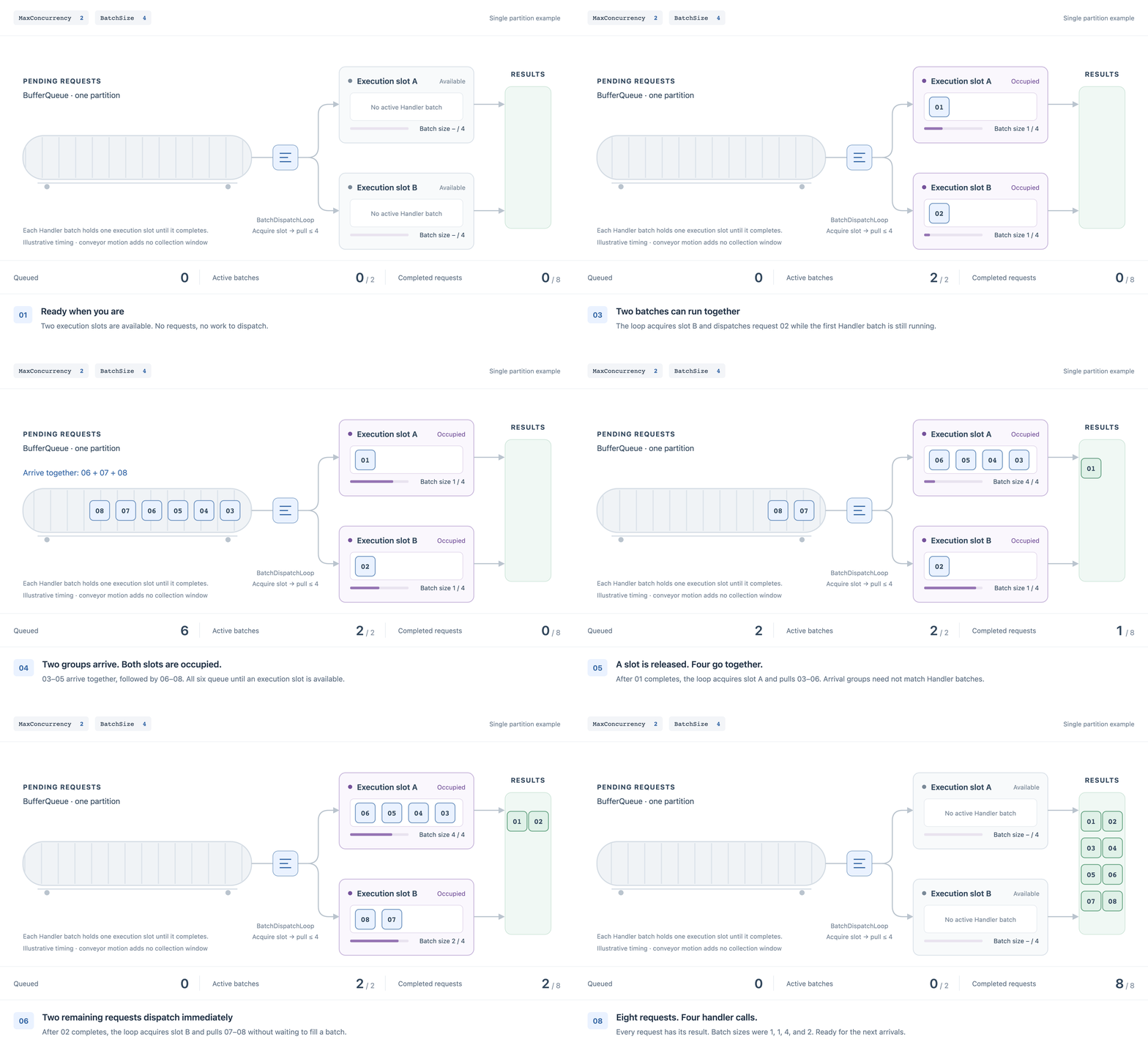
Illustration: one partition, MaxConcurrency=2, and BatchSize=4. When an execution slot is available, the dispatch
loop pulls queued requests without waiting to fill a batch. See the animation source.
RequestBatcher uses MaxConcurrency to limit concurrent Handler batches; its consumption loop pulls and dispatches
batches. See the
internal dispatch design.
RequestBatcher does not wait to fill a batch or add a fixed collection window. When an execution slot is available,
it dispatches up to BatchSize requests already queued in one partition. Requests still queue when all slots are occupied;
normal scheduling and downstream execution also take time. Single-request callers can share a batch, and one explicit
group can span several Handler batches. See the batching flow.
A lower MaxConcurrency may let more requests accumulate while waiting for an execution slot. This is concurrency
queueing, not an added collection delay: even with one slot, a lone queued request runs as soon as that slot is available.
See Configuring Partitions and MaxConcurrency for configuration tradeoffs,
and the low-concurrency throughput estimate and downstream batching example.
Calling ExecuteAsync in a loop and awaiting each call before submitting the next gives RequestBatcher no concurrent
work from that caller to merge. Use a bounded number of concurrent submissions when measuring actual handler batch sizes;
concurrency can share a batch, but does not guarantee one batch or a full BatchSize.
When to Use It
Prefer independent read-only queries, such as database lookups, cache multi-gets, and downstream batch APIs. It is also useful for short bursts where queue capacity and downstream concurrency need explicit limits.
RequestBatcher is not a durable queue, transaction coordinator, retry system, or exactly-once mechanism. Requests are held in memory and are not recovered after process failure. It does not wait for a minimum batch size or fixed collection window. A caller cancellation can remove work only before handler dispatch; it cannot cancel a shared handler call after dispatch. Do not use it when a side effect must remain inside the caller's transaction or must stop immediately when one caller disconnects.
Redis workloads are not necessarily a good fit. StackExchange.Redis already supports pipelining and connection
multiplexing, so batching savings may not offset RequestBatcher's queueing, scheduling, and result dispatch costs.
Poorly chosen BatchSize, MaxConcurrency, or other settings can also reduce throughput and increase tail latency.
If the caller already has a set of keys, consider using MGET/MSET directly. Before introducing RequestBatcher to
combine individual requests, compare throughput, P95/P99 latency, and memory allocations against direct Redis client use.
Installation and DI Registration
dotnet add package RequestBatcher
The package supports .NET 8 and .NET 10.
The current version does not support NativeAOT publishing or trimming.
Two registration styles are available:
- Handler type:
AddRequestBatcherregisters a separate Handler class with an explicitServiceLifetime. - Delegate Handler:
AddDelegateRequestBatcherregisters a pipeline whose static Handler delegate is supplied toExecuteAsync; services are injected through its parameters. Delegate binding is not supported for NativeAOT or trimming. See Delegate Handlers.
For primitive request types such as int or string, prefer Named RequestBatcher
to distinguish operations that share the same request type.
Typed registration supports both completion-only and per-request responses:
services.AddRequestBatcher<TRequest, THandler>(ServiceLifetime.Scoped);
services.AddRequestBatcher<TRequest, TResponse, THandler>(ServiceLifetime.Scoped);
RequestBatchCoordinator<TRequest> is internal. Code that previously referenced it directly must use the public
IRequestBatcher<TRequest> abstraction instead.
AddRequestBatcher registers the handler, coordinator, and internal queue in the application's existing
IServiceCollection. The application does not register or configure BufferQueue separately. Scoped and transient typed
handlers are resolved in an async scope once per handler batch; singleton handlers are reused and must be thread-safe
when MaxConcurrency > 1.
Handler execution uses an independent batch context and a DI scope separate from the HTTP request scope; pass needed business data explicitly in the request. See Handler Execution Context.
Quickstart
Create an ASP.NET Core empty project with dotnet new web, install the package, and replace Program.cs with this
complete example. It uses an in-memory catalog and the default single partition; no database is required.
using Microsoft.Extensions.DependencyInjection;
using RequestBatcher;

var builder = WebApplication.CreateBuilder(args);
builder.Services.AddRequestBatcher<PriceLookup, decimal?, CatalogHandler>(ServiceLifetime.Singleton);

var app = builder.Build();
app.MapGet("/prices/{productId:long}", async (
    long productId,
    IRequestBatcher<PriceLookup, decimal?> batcher,
    CancellationToken cancellationToken) =>
{
    var price = await batcher.ExecuteAsync(new PriceLookup(productId), cancellationToken);
    return price is { } value ? Results.Ok(value) : Results.NotFound();
});
app.Run();

public sealed record PriceLookup(long ProductId);

public sealed class CatalogHandler : IRequestBatchHandler<PriceLookup, decimal?>
{
    private static readonly Dictionary<long, decimal> Prices = new() { [101] = 17.90m };

    public ValueTask HandleAsync(
        IReadOnlyList<RequestBatchEntry<PriceLookup, decimal?>> entries,
        CancellationToken cancellationToken = default)
    {
        entries.SetResponses(request => Prices.TryGetValue(request.ProductId, out var price) ? price : null);

        // Alternatively, replace the call above with per-entry assignment.
        // foreach (var entry in entries)
        // {
        //     entry.SetResponse(Prices.TryGetValue(entry.Request.ProductId, out var price) ? price : null);
        // }

        return ValueTask.CompletedTask;
    }
}
Run dotnet run --urls http://localhost:5080, then request GET http://localhost:5080/prices/101 for 17.90;
an unknown product returns 404. Assign exactly one response to every entry before the Handler completes.
An explicit null is valid; a missing assignment fails the entire Handler batch.
Inject IRequestBatcher<TRequest> or IRequestBatcher<TRequest, TResponse> into application services. A single call
uses ExecuteAsync(request); an explicit group uses ExecuteAsync(requests) and returns results in input order.
For request-only processing, implement IRequestBatchHandler<TRequest> with an
IReadOnlyList<TRequest> parameter and register it with the first overload. A successful handler call completes every
request in that handler batch.
Response Assignment APIs
Response handlers assign one response to each RequestBatchEntry<TRequest, TResponse>. The following signatures omit implementation details:
public sealed class RequestBatchEntry<TRequest, TResponse>
{
    public TRequest Request { get; }
    public void SetResponse(TResponse response);
}

public static class RequestBatchEntryExtensions
{
    public static void SetResponses<TRequest, TResponse>(
        this IReadOnlyList<RequestBatchEntry<TRequest, TResponse>> entries,
        Func<TRequest, TResponse> responseFactory);

    public static void SetResponses<TRequest, TResponse>(
        this IReadOnlyList<RequestBatchEntry<TRequest, TResponse>> entries,
        IEnumerable<TResponse> responses);
}
Use one assignment approach per handler batch. SetResponse assigns an individual entry. The factory overload evaluates
the factory in entry order and creates every response before assigning any entry. The sequence overload requires exactly
one response per entry and assigns them in entry order. Assigning null is valid for nullable response types; every entry
must be assigned exactly once before the handler returns successfully.
Each entry has one writer. Await all response-producing work before the handler returns. The helpers reject an already assigned entry and preserve its value; earlier assignments from the same helper call remain in place. An unhandled assignment error fails the entire Handler batch.
Delegate Handlers
Use AddDelegateRequestBatcher for short handling logic supplied to ExecuteAsync as a static delegate.
Services are injected through parameters and resolved per Handler batch. A pipeline binds one delegate; use a separate
named batcher for a different Handler. Registration has no lifetime argument. Delegate binding requires dynamic code
and does not support NativeAOT or trimming. See the complete delegate example and parameter rules.
Named Batchers and Primitive Requests
For int, string, and other shared request types, prefer a distinct batcher name for each business operation.
Names select independent Handlers, queues, capacities, and concurrency limits. Both typed and delegate registrations
accept batcherName; callers resolve the matching keyed service. Names are case-sensitive and cannot be empty or
whitespace. See Named RequestBatcher and keyed injection.
Partition-Key Routing
Partition-key routing is optional. It keeps equal finite integer-valued numeric keys or equal non-null string keys in the same queue partition, but it does not deduplicate requests, serialize a key, or force all requests for that key into one handler batch. Different keys can share a partition. Use a deterministic, side-effect-free selector:
options.UsePartitionKey(query => query.ProductId, partitionCount: 4);
partitionCount: 1 behaves like no keyed routing and does not invoke the selector. Counts below one are rejected. Exact
partition assignments are internal and may change between versions.
Configuring Partitions and MaxConcurrency
Partition count and handler concurrency are independent:
partitionCountcontrols queue locality and routing;MaxConcurrencylimits concurrent handler batches for the registered batcher across all partitions;- one partition can supply multiple concurrent handler batches;
- no handler execution ordering is guaranteed, including when
MaxConcurrency = 1.
Use one partition by default; add partitions only for a clear keyed-routing need with measured benefits. At low traffic, multiple partitions can split requests that could otherwise be combined, producing more small batches and increasing handler and downstream calls even with explicit batch submission.
Avoid MaxConcurrency = 1 unless you have carefully evaluated its queueing cost and downstream constraints. Start with 2 for typical workloads.
Too many slots can produce smaller batches and reduce merging; too few can increase queueing.
Lower concurrency can improve merging but increase tail latency: with one slot, a slow Handler batch delays queued
requests even at low traffic, and Task.WhenAll holds the slot until the slowest child query completes. Two slots let
a later batch run while one batch is still awaiting I/O. Compare downstream work saved with end-to-end P95/P99;
increase the limit if measured throughput or latency requires it and downstream capacity permits.
Low Handler concurrency can still support substantial traffic: each batch processes multiple requests and can run
multiple downstream calls within a single Handler batch. Under sustained load, item throughput is roughly
MaxConcurrency × actual mean batch size / mean Handler seconds; use measured batch sizes and durations.
After deduplication, query directly if the items fit in one downstream call. Otherwise, split with Chunk, start each async query, and await
Task.WhenAll before assigning responses. Neither MaxConcurrency nor Task.WhenAll caps those child calls. For this approach, a BatchSize of
3–10 times the desired downstream batch size is a tuning starting point; validate it against downstream capacity.
See Estimating Handler and Downstream Concurrency Separately.
Do not evaluate only high-load results; compare performance before and after adopting RequestBatcher under typical traffic too. Test typical, peak, and short-burst traffic with matched resources, downstream configuration, request arrival patterns, item counts, and data distributions. Compare throughput, mean and P95/P99 end-to-end latency, actual batch sizes, downstream call counts, and resource costs. Typical traffic may offer fewer batching opportunities, so batching savings may not offset admission and scheduling overhead; requests also queue when no execution slot is available. High-load throughput gains do not replace this comparison.
Pay particular attention to single-item submissions through ExecuteAsync(request) at low traffic levels: overall
performance may be slightly worse than direct downstream calls. Multiple single-item submissions can still form one
Handler batch, but sparse arrivals offer fewer batching opportunities, and waiting for an execution slot may not bring
many additional requests into the next batch. Evaluate this submission mode at your actual arrival rates.
Before tuning, collect the existing system's per-instance typical and peak QPS, request-item counts, downstream RT and batch limits, and latency target; see Preparing Inputs for an Agent. These inputs support an initial configuration proposal, not a performance guarantee.
Configuration Reference
| Option | Default | Behavior |
|---|---|---|
BatchSize |
128 |
Maximum requests passed to one handler invocation; it is not a minimum. |
MaxConcurrency |
1 |
Maximum concurrent handler batches across all partitions. Explicitly configure 2 as a typical starting point; retain 1 only after careful evaluation. |
MaxPendingRequests |
8192 |
Capacity for requests still queued in memory; pulled requests can already be executing. |
FullMode |
Wait |
Wait waits for capacity; an oversized explicit group is admitted in capacity-sized slices. Fail rejects the whole group immediately when it cannot fit. |
UsePartitionKey(selector, partitionCount) |
Not set (one partition) | Routes equal supported keys together when the count is greater than one; it does not serialize execution. |
Processing Contract
RequestBatcher forms handler batches opportunistically from requests currently queued in one partition. It does not add a
collection delay. Therefore, a low-traffic batch may contain one request, and one explicit ExecuteAsync(requests) call
may be split by BatchSize or partition routing. Separate submissions can share a handler batch.
Even with one partition, an explicit submission can be split into multiple handler batches; it does not guarantee
one handler call. Each handler batch contains at most BatchSize requests available when the queue is pulled,
without preserving caller grouping boundaries.
Handler Execution Context
A Handler batch can combine requests from multiple callers, and the Handler runs in its own batch execution context.
Do not rely on access to an originating request's HttpContext through IHttpContextAccessor, or on caller ambient
state such as AsyncLocal values, ILogger.BeginScope scopes, Activity.Current, or Baggage. The Handler's DI scope
is also separate from the HTTP request scope: a scoped dependency does not reuse the originating request-scoped
instance or state initialized there.
Read values the Handler needs before submission, such as currency, language, or a business correlation ID, and carry
them as immutable request data. Do not pass an HttpContext, request service provider, or request-scoped service
instance to preserve caller context. RequestBatcher tracing connects Execute and Handle spans with links; those
links do not restore caller ambient context. Activities created inside a Handler still use the Handler batch span as
their parent.
Completion, Cancellation, and Draining
- A successful handler call completes every request in that handler batch.
- A non-cancellation handler exception fails every request in that handler batch with that exception.
- A handler
OperationCanceledExceptionproduces canceled response tasks. RequestBatcher does not retry failed handlers. - A group task waits for every item; some items may succeed before another handler batch fails, and successful side effects
are not rolled back. If several handler batches fail,
Task.Exception.InnerExceptionsretains each distinct exception instance, while one handler exception fanned out to multiple requests is recorded once. - Caller cancellation removes work only before dispatch. After dispatch, the caller observes the actual handler outcome. The token passed to the handler belongs to RequestBatcher's processing lifetime, not to one caller. For an explicit group, cancellation can leave a mix of canceled undispatched items and dispatched items that report their actual outcome. Its task waits for all items, faults if any item faults, and otherwise is canceled if any item was canceled.
- In
FullMode.Fail, a submission that cannot fit immediately, including one larger thanMaxPendingRequests, fails withRequestBatchQueueFullExceptionand admits no item.MaxPendingRequestsis not a limit on explicit group size or callers waiting for capacity. - For a response handler, assign exactly one response to every
RequestBatchEntrybefore returning successfully. An unset entry causesInvalidOperationExceptionand fails that handler batch. Explicitly assigningnullis valid for nullable responses.SetResponseswith a factory evaluates all responses before assigning any entry. - Explicit group responses preserve input order and duplicates even when the group spans handler batches or partitions.
- Queue capacity excludes executing requests: up to
MaxConcurrency * BatchSizepulled requests may be in flight in addition. DisposeAsyncstops new admissions, drains accepted work including submissions waiting for capacity, and releases owned resources after the canceled consumer loop exits and final batch cleanup completes. Concurrent and repeated disposal calls share one operation. When registered through DI, the application container owns async disposal. When handlers need DI scopes, stop producers and await outstanding calls before disposing the container; pending batches cannot create new scopes once container disposal begins.
The default is FullMode = Wait. MaxPendingRequests bounds queued requests, not callers or submissions waiting for
capacity, and is not a process-wide memory limit; apply an ingress concurrency or rate limit when total waiting work must
be bounded. See the root documentation's Capacity and Backpressure
section for the HTTP admission example. A caller cancellation timer can cancel capacity waits and undispatched requests;
it does not impose a deadline on ExecuteAsync after dispatch.
Caller cancellation cannot abort a shared Handler after dispatch, even when all callers cancel; configure downstream
timeouts independently. The downstream operation must support cancellation or its own timeout mechanism. See
Caller Cancellation for an example. Disposal drains
accepted work before stopping the consumer, so a stalled downstream call can keep DisposeAsync waiting.
Observability
The core package exposes the RequestBatcher ActivitySource and Meter through built-in .NET APIs and has no
OpenTelemetry dependency. Install the optional
RequestBatcher.OpenTelemetry package for registration
extensions and coordinated sampling between submission (Execute) and handler-batch (Handle) spans:
dotnet add package RequestBatcher.OpenTelemetry
Register the extension in the application's existing providers, alongside the hosting and exporter packages used by the application:
using Microsoft.Extensions.DependencyInjection;
using OpenTelemetry.Metrics;
using OpenTelemetry.Trace;

builder.Services.AddOpenTelemetry()
    .WithTracing(tracing => tracing.AddRequestBatcherInstrumentation())
    .WithMetrics(metrics => metrics.AddRequestBatcherInstrumentation());
Without the integration package, register AddSource("RequestBatcher") and/or AddMeter("RequestBatcher") directly.
The application's sampler then decides Handle sampling independently, which may omit the Handler span even when
an Execute span was sampled. The integration package samples Handle if any corresponding Execute span is sampled,
and does not sample it if none are. Metrics-only consumers can use AddMeter("RequestBatcher") without the integration
package, or a MeterListener that calls EnableMeasurementEvents for the desired instruments. Built-in logs use the
application logging pipeline with category prefix RequestBatcher.RequestBatchCoordinator; set the RequestBatcher
log-level prefix to configure the whole library.
The Meter exposes four histograms: requestbatcher.submission.size and requestbatcher.batch.size are Histogram<long>
in {request}; requestbatcher.handle.duration and requestbatcher.execute.duration are Histogram<double> in ms.
requestbatcher.backlog is an ObservableGauge<long> in {request} for approximate enqueued items not yet pulled,
excluding capacity waits and active Handler work.
Core supplies size-histogram bucket advice from the largest BatchSize registered in the same service collection.
Direct AddMeter and the integration extension use the same advice; custom AddView settings override it.
When using MeterListener or a library built on it, check whether the consumer honors this advice; listeners receive raw
measurements and do not automatically bucket them. If advice is ignored, configure buckets explicitly at the consumer.
Choose separate boundaries for request counts and durations (ms); unsuitable defaults can reduce P95/P99 accuracy.
Histogram sum / count gives the mean. For metric semantics, tags, queries, and bucket rules, see the
RequestBatcher Metrics guide.
See the full observability documentation for span names, links, sampling details, and exporters.
Samples and Upgrade Notes
When upgrading code that used RequestBatchItem<TRequest, TResponse>, rename it to
RequestBatchEntry<TRequest, TResponse> and rename RequestBatchItemExtensions to
RequestBatchEntryExtensions. This is a source and binary breaking change; response assignment behavior is unchanged.
- Typed-handler PostgreSQL sample
- Delegate-handler PostgreSQL sample
- Observability sample
- Upgrade notes and complete API documentation
License
RequestBatcher is released under the MIT License.
| Product | Versions Compatible and additional computed target framework versions. |
|---|---|
| .NET | net8.0 is compatible. net8.0-android was computed. net8.0-browser was computed. net8.0-ios was computed. net8.0-maccatalyst was computed. net8.0-macos was computed. net8.0-tvos was computed. net8.0-windows was computed. net9.0 was computed. net9.0-android was computed. net9.0-browser was computed. net9.0-ios was computed. net9.0-maccatalyst was computed. net9.0-macos was computed. net9.0-tvos was computed. net9.0-windows was computed. net10.0 is compatible. net10.0-android was computed. net10.0-browser was computed. net10.0-ios was computed. net10.0-maccatalyst was computed. net10.0-macos was computed. net10.0-tvos was computed. net10.0-windows was computed. |
-
net10.0
- BufferQueue (>= 2.2.0)
- Microsoft.Extensions.DependencyInjection.Abstractions (>= 10.0.11)
- Microsoft.Extensions.Logging (>= 10.0.11)
- Microsoft.Extensions.Logging.Abstractions (>= 10.0.11)
- Microsoft.Extensions.Options (>= 10.0.11)
-
net8.0
- BufferQueue (>= 2.2.0)
- Microsoft.Extensions.DependencyInjection.Abstractions (>= 10.0.11)
- Microsoft.Extensions.Logging (>= 10.0.11)
- Microsoft.Extensions.Logging.Abstractions (>= 10.0.11)
- Microsoft.Extensions.Options (>= 10.0.11)
- System.Diagnostics.DiagnosticSource (>= 10.0.11)
NuGet packages (1)
Showing the top 1 NuGet packages that depend on RequestBatcher:
| Package | Downloads |
|---|---|
|
RequestBatcher.OpenTelemetry
Optional OpenTelemetry registration and linked-batch sampling for RequestBatcher. |
GitHub repositories
This package is not used by any popular GitHub repositories.
| Version | Downloads | Last Updated |
|---|---|---|
| 0.4.3 | 111 | 11/5/2026 |
| 0.4.2 | 106 | 11/3/2026 |
| 0.4.1 | 96 | 11/2/2026 |
| 0.4.0 | 132 | 10/30/2026 |
| 0.3.4 | 151 | 10/24/2026 |
| 0.3.3 | 113 | 10/23/2026 |
| 0.3.2 | 106 | 10/22/2026 |
| 0.3.1 | 96 | 10/22/2026 |
| 0.3.0 | 111 | 10/22/2026 |
| 0.2.4 | 111 | 10/19/2026 |
| 0.2.3 | 101 | 10/18/2026 |
| 0.2.1 | 108 | 10/17/2026 |
| 0.2.0 | 106 | 10/16/2026 |
| 0.1.1 | 102 | 10/14/2026 |
| 0.1.0 | 103 | 10/14/2026 |
| 0.0.9 | 108 | 10/13/2026 |
| 0.0.8 | 96 | 10/12/2026 |
| 0.0.7 | 116 | 10/10/2026 |
| 0.0.6 | 126 | 9/22/2026 |