Scrubkit 2.1.0
Prefix Reserveddotnet add package Scrubkit --version 2.1.0
NuGet\Install-Package Scrubkit -Version 2.1.0
<PackageReference Include="Scrubkit" Version="2.1.0" />
<PackageVersion Include="Scrubkit" Version="2.1.0" />
<PackageReference Include="Scrubkit" />
paket add Scrubkit --version 2.1.0
#r "nuget: Scrubkit, 2.1.0"
#:package Scrubkit@2.1.0
#addin nuget:?package=Scrubkit&version=2.1.0
#tool nuget:?package=Scrubkit&version=2.1.0
Scrubkit




🌐 Website · 📦 NuGet · 📝 Changelog
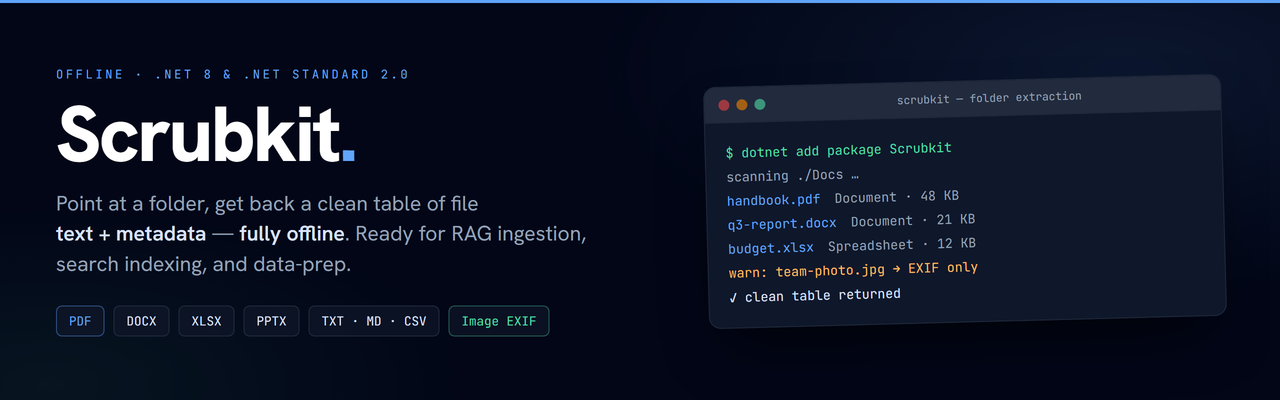
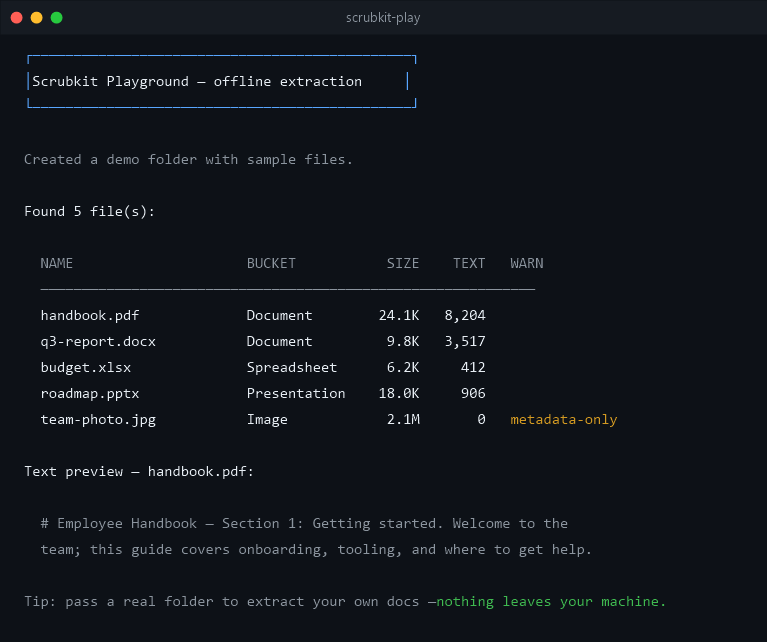
Point it at a folder — get back a clean table of file text + metadata, fully offline.
Scrubkit walks a directory and pulls text and metadata out of common file types, returning one row per file. Everything runs locally — no network calls, no telemetry — so it's a natural first step for RAG ingestion, search indexing, and on-device data prep.
Highlights
- Offline — no network calls, no telemetry.
- Small, fast core — PDF, Office, text, and image metadata out of the box.
- Scrub PII & secrets — opt-in redaction of emails, cards, IPs, and secrets (API keys, JWTs, private keys, connection strings).
- RAG-ready — a
Chunkerfor overlapping windows and CSV / JSON / JSON Lines / Parquet output. - Incremental — re-scan only what changed via a lightweight
Manifest(ReadChangesAsync). - Runs from a shell — the
scrubkitCLI (dotnet tool) scans a folder with zero code. - Pluggable — add or override formats with
IFileExtractor. - Scales — stream results and process files in parallel for large trees.
- Multi-target —
net8.0,net10.0, andnetstandard2.0.
Install
dotnet add package Scrubkit
Quick start
using Scrubkit;

var scrubber = new FolderScrubber(new ReadOptions { Recursion = Recursion.AllNested });

IReadOnlyList<FileRecord> table = await scrubber.ReadAsync(@"C:\Docs");

foreach (var r in table)
    Console.WriteLine($"{r.Name} — {r.TypeBucket} — {r.Text.Length} chars");
Each FileRecord gives you the file's Text, Metadata, TypeBucket, SizeBytes,
Modified, and any Warnings.
Supported formats
| Category | Extensions |
|---|---|
| Documents | PDF, DOCX, RTF |
| Spreadsheets | XLSX, CSV |
| Presentations | PPTX |
| Web / markup | HTML, HTM |
| Text | TXT, MD, LOG, JSON, XML |
| Images | JPG, PNG, TIFF, HEIC, WebP, GIF, BMP (EXIF only) |
HTML and RTF are stripped to clean text (tags/control words removed, entities decoded).
Plain-text formats are read as-is — markup in XML is not stripped.
Images yield EXIF metadata only (make / model / software) — no pixels, no OCR.
Unknown types return a metadata-only row. Extraction never throws to the caller —
per-file problems land in FileRecord.Warnings.
Large folders: stream & parallelize
ReadAsync buffers the whole table. For big trees, stream records as they're produced
and process files concurrently:
var options = new ReadOptions { MaxDegreeOfParallelism = 4 };

await foreach (var r in new FolderScrubber(options).ReadStreamAsync(@"C:\Docs"))
    Index(r);
Output order is preserved. Above a degree of 1, custom extractors should be thread-safe (the built-ins are).
Incremental: re-scan only what changed
Keep a lightweight Manifest (size + last-write time per file) and, on the next run, extract
only the added or modified files — unchanged ones are never re-read:
var scrubber = new FolderScrubber();
var baseline = File.Exists("state.txt")
    ? Manifest.Load(new StreamReader("state.txt"))
    : Manifest.Empty;

IncrementalResult result = await scrubber.ReadChangesAsync(@"C:\Docs", baseline);

foreach (var doc in result.Changed) Index(doc);        // added + modified — (re)embed these
foreach (var gone in result.Removed) index.Delete(gone); // drop deleted files downstream

using var w = new StreamWriter("state.txt");
result.Manifest.Save(w);                                // persist for next time
Change detection is size + last-write time (no re-read), so a touched-but-identical file counts as modified. The manifest is a zero-dependency text sidecar.
Recipe: prepare a folder for RAG
Stream a document folder straight into a vector store — text + metadata ready to embed, rows with no text skipped:
var scrubber = new FolderScrubber(new ReadOptions
{
    MaxTextLength = 8_000,   // keep chunks index-friendly
});

var chunker = new Chunker(new ChunkOptions { MaxChars = 1_000, OverlapChars = 100 });

await foreach (var doc in scrubber.ReadStreamAsync(@"C:\Docs"))
{
    if (doc.Text.Length == 0) continue;   // skip metadata-only rows

    foreach (var chunk in chunker.Chunk(doc))   // overlapping windows, carrying path + metadata
        await index.UpsertAsync(
            id: $"{chunk.Path}#{chunk.Index}",
            text: chunk.Text,                    // ready to embed
            metadata: chunk.Metadata);
}
The Chunker splits each file's text into overlapping windows (whitespace-snapped by default so
words aren't cut), and TableWriter.ToJsonLines(chunker.Chunk(table)) writes them straight to
JSON Lines for a batch embedding pipeline.
Redact PII & secrets
Redaction is opt-in — set a Redaction level (or supply your own IRedactor). The built-in
StandardRedactor masks emails, phones, Luhn-checked cards, SSNs, IPs, IBANs, and secrets in
recognisable formats — PEM private keys, JWTs, credentialed connection strings, and AWS /
Google / GitHub / Slack keys. Aggressive additionally catches key = value credential
assignments and high-entropy tokens.
var scrubber = new FolderScrubber(new ReadOptions { Redaction = RedactionLevel.Standard });
// "AWS key AKIAIOSFODNN7EXAMPLE" → "AWS key [API_KEY]"
Add your own custom rules (matched before the built-ins) plus allow/deny/disable lists via
StandardRedactorOptions — or from a JSON file with the CLI's --rules:
var options = new StandardRedactorOptions { Level = RedactionLevel.Standard };
options.CustomRules.Add(new CustomRedactionRule { Category = "EmployeeId", Pattern = @"\bE\d{6}\b", Token = "[EMP]" });
var scrubber = new FolderScrubber(new ReadOptions { Redactor = new StandardRedactor(options) });
De-identify while keeping data joinable. Turn on StableTokens so identical values collapse
to the same deterministic token (jane@example.com → [EMAIL_3f9a1c8e]), and use RevealLast
for a format-preserving mask that keeps a value's tail (e.g. the last 4 of a card):
var options = new StandardRedactorOptions { Level = RedactionLevel.Standard, StableTokens = true };
options.TokenSalt = "per-deployment-secret";   // so tokens can't be correlated or reversed
options.RevealLast["Card"] = 4;                 // 4111 1111 1111 1111 -> **** **** **** 1111
De-identification is best-effort, not a cryptographic guarantee — with a low-entropy value and no
salt, a stable token can be recovered by hashing candidates; set TokenSalt to mitigate that.
Export the table
Serialize the records to CSV, JSON, or JSON Lines with the zero-dependency TableWriter (or
to Parquet via the separate Scrubkit.Parquet package):
string csv   = TableWriter.ToCsv(table);
string json  = TableWriter.ToJson(table);
string jsonl = TableWriter.ToJsonLines(table);   // one record per line — RAG / log pipelines
Timestamps (Modified) are written in UTC with a trailing Z. Need machine-local time
instead? Pass utc: false — the value is emitted with an explicit offset (e.g.
2026-07-19T15:30:00+05:30) so it stays unambiguous:
string localJson = TableWriter.ToJson(table, utc: false);
string localCsv  = TableWriter.ToCsv(table, utc: false);
FileRecord.Modified is itself always DateTimeKind.Utc, so you can equally convert
consumer-side with record.Modified.ToLocalTime(). (Parquet always stores UTC — a Parquet
timestamp is an instant, so convert on read if you want a local view.)
Extend it
Add a format by implementing IFileExtractor — it's tried before the built-ins, so you
can also override one:
public sealed class MyExtractor : IFileExtractor
{
    public bool CanHandle(string ext) => ext == ".xyz";
    public ExtractedContent Extract(string path) => new(metadata, text);
}

options.Extractors.Add(new MyExtractor());
Extracted text is returned exactly as read. To transform it — redaction, masking,
normalization — supply an IRedactor via ReadOptions.Redactor; it's entirely opt-in and
your choice.
Shipping an add-on as its own package? Reference Scrubkit.Abstractions (contracts
only) to stay lightweight.
Privacy & disclaimer
Private by design — 100% offline, no network calls, no telemetry; your files never leave your machine (enforced by an offline-guarantee test).
Best-effort, not a guarantee — redaction is opt-in, best-effort pattern matching that will miss things; it is not a compliance tool. Provided as-is under the MPL-2.0, no warranty.
100% offline — no network calls, no telemetry.
| Product | Versions Compatible and additional computed target framework versions. |
|---|---|
| .NET | net5.0 was computed. net5.0-windows was computed. net6.0 was computed. net6.0-android was computed. net6.0-ios was computed. net6.0-maccatalyst was computed. net6.0-macos was computed. net6.0-tvos was computed. net6.0-windows was computed. net7.0 was computed. net7.0-android was computed. net7.0-ios was computed. net7.0-maccatalyst was computed. net7.0-macos was computed. net7.0-tvos was computed. net7.0-windows was computed. net8.0 is compatible. net8.0-android was computed. net8.0-browser was computed. net8.0-ios was computed. net8.0-maccatalyst was computed. net8.0-macos was computed. net8.0-tvos was computed. net8.0-windows was computed. net9.0 is compatible. net9.0-android was computed. net9.0-browser was computed. net9.0-ios was computed. net9.0-maccatalyst was computed. net9.0-macos was computed. net9.0-tvos was computed. net9.0-windows was computed. net10.0 is compatible. net10.0-android was computed. net10.0-browser was computed. net10.0-ios was computed. net10.0-maccatalyst was computed. net10.0-macos was computed. net10.0-tvos was computed. net10.0-windows was computed. |
| .NET Core | netcoreapp2.0 was computed. netcoreapp2.1 was computed. netcoreapp2.2 was computed. netcoreapp3.0 was computed. netcoreapp3.1 was computed. |
| .NET Standard | netstandard2.0 is compatible. netstandard2.1 was computed. |
| .NET Framework | net461 was computed. net462 was computed. net463 was computed. net47 was computed. net471 was computed. net472 was computed. net48 was computed. net481 was computed. |
| MonoAndroid | monoandroid was computed. |
| MonoMac | monomac was computed. |
| MonoTouch | monotouch was computed. |
| Tizen | tizen40 was computed. tizen60 was computed. |
| Xamarin.iOS | xamarinios was computed. |
| Xamarin.Mac | xamarinmac was computed. |
| Xamarin.TVOS | xamarintvos was computed. |
| Xamarin.WatchOS | xamarinwatchos was computed. |
-
.NETStandard 2.0
- Microsoft.Bcl.AsyncInterfaces (>= 10.0.12)
- Scrubkit.Abstractions (>= 2.1.0)
-
net10.0
- Scrubkit.Abstractions (>= 2.1.0)
-
net8.0
- Scrubkit.Abstractions (>= 2.1.0)
-
net9.0
- Scrubkit.Abstractions (>= 2.1.0)
NuGet packages (4)
Showing the top 4 NuGet packages that depend on Scrubkit:
| Package | Downloads |
|---|---|
|
Scrubkit.Extensions.DependencyInjection
Microsoft.Extensions.DependencyInjection integration for Scrubkit. Call services.AddScrubkit(...) to register a configured FolderScrubber for constructor injection in ASP.NET Core, worker services, and other generic hosts. Configure recursion, limits, add-on extractors, and an optional redactor via the ReadOptions hook. |
|
|
Scrubkit.All
Convenience meta-package that references the entire Scrubkit family: core engine, PDF extractor, Image EXIF extractor, email (.eml/.msg), OpenDocument, .epub, legacy binary Office (.doc/.xls/.ppt), Parquet, DI integration, Microsoft.Extensions.AI, and Semantic Kernel. Ships .AddAllExtractors() auto-registration. |
|
|
Scrubkit.Extensions.SemanticKernel
Semantic Kernel integration for Scrubkit. Provides helper extension methods to easily ingest, redact, chunk, and index folder contents directly into Semantic Kernel's ISemanticTextMemory or modern IVectorStoreRecordCollection stores. |
|
|
Scrubkit.Extensions.MicrosoftExtensionsAI
Microsoft.Extensions.AI integration for Scrubkit. Provides RedactingChatClient (inheriting from DelegatingChatClient) and RedactingEmbeddingGenerator (inheriting from DelegatingEmbeddingGenerator) to redact user prompts and inputs locally and offline before sending them to external/cloud LLM providers. |
GitHub repositories
This package is not used by any popular GitHub repositories.
| Version | Downloads | Last Updated |
|---|---|---|
| 2.1.0 | 138 | 10/2/2026 |
| 2.0.0 | 137 | 10/2/2026 |
| 1.12.0 | 260 | 8/24/2026 |
| 1.11.0 | 332 | 8/4/2026 |
| 1.10.0 | 303 | 7/31/2026 |
| 1.9.0 | 242 | 7/27/2026 |
| 1.8.0 | 216 | 7/24/2026 |
| 1.7.0 | 203 | 7/22/2026 |
| 1.6.0 | 219 | 7/22/2026 |
| 1.5.0 | 228 | 7/21/2026 |
| 1.4.0 | 213 | 7/20/2026 |
| 1.3.0 | 172 | 7/19/2026 |
| 1.2.0 | 122 | 7/18/2026 |
| 1.1.0 | 127 | 7/17/2026 |
| 1.0.0 | 133 | 7/15/2026 |
| 0.1.0-preview.1 | 82 | 7/12/2026 |
2.1.0 — Multi-Targeting Expansion & Tool Enhancements. Added explicit .NET 9.0 (STS) alongside .NET 8.0 (LTS), .NET 10.0, and .NET Standard 2.0 across all 14 packages; enabled Scrubkit.Pdf and Scrubkit.Images out of the box in Scrubkit.Tool CLI; updated test suites and docs. Full changelog: https://github.com/jjopensoftworks-blip/Scrubkit/blob/main/CHANGELOG.md