TheBuilder.WebAnalytics 0.3.2

dotnet add package TheBuilder.WebAnalytics --version 0.3.2
                    
NuGet\Install-Package TheBuilder.WebAnalytics -Version 0.3.2
                    
This command is intended to be used within the Package Manager Console in Visual Studio, as it uses the NuGet module's version of Install-Package.
<PackageReference Include="TheBuilder.WebAnalytics" Version="0.3.2" />
                    
For projects that support PackageReference, copy this XML node into the project file to reference the package.
<PackageVersion Include="TheBuilder.WebAnalytics" Version="0.3.2" />
                    
Directory.Packages.props
<PackageReference Include="TheBuilder.WebAnalytics" />
                    
Project file
For projects that support Central Package Management (CPM), copy this XML node into the solution Directory.Packages.props file to version the package.
paket add TheBuilder.WebAnalytics --version 0.3.2
                    
#r "nuget: TheBuilder.WebAnalytics, 0.3.2"
                    
#r directive can be used in F# Interactive and Polyglot Notebooks. Copy this into the interactive tool or source code of the script to reference the package.
#:package TheBuilder.WebAnalytics@0.3.2
                    
#:package directive can be used in C# file-based apps starting in .NET 10 preview 4. Copy this into a .cs file before any lines of code to reference the package.
#addin nuget:?package=TheBuilder.WebAnalytics&version=0.3.2
                    
Install as a Cake Addin
#tool nuget:?package=TheBuilder.WebAnalytics&version=0.3.2
                    
Install as a Cake Tool

Web Analytics

NuGet version NuGet downloads License

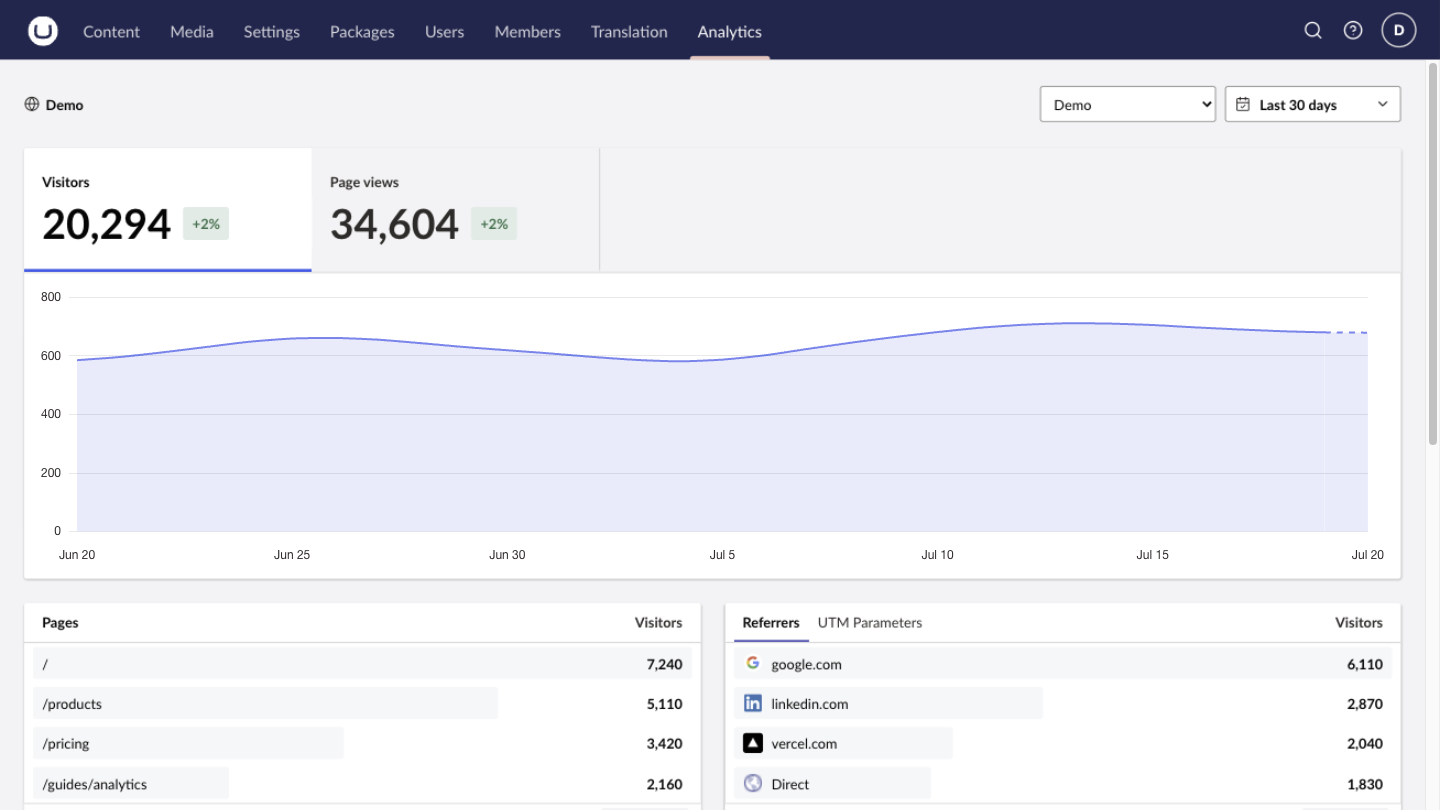
Web Analytics brings Vercel and Plausible analytics into Umbraco, giving editors site-wide and page-level insights without leaving the backoffice.

Web Analytics overview in the Umbraco backoffice

What you get

  • A dedicated Analytics section for visitors, page views, traffic trends, audience, referrers, pages, routes, campaigns, and provider-supported activity.
  • Page-level analytics on configured, published documents, automatically filtered to the document's route.
  • Date comparisons and drill-down views that turn site-wide trends into useful content context.
  • Multiple provider connections for multi-site Umbraco installations.
  • Server-side provider API access, keeping access tokens out of the browser and Umbraco content.

The package reads analytics already collected by the configured provider. It does not add or replace tracking on your website.

Supported providers

The connection and reporting workflow is provider-neutral. Availability of individual panels and drill-downs depends on the selected provider's capabilities.

Provider Connection identifier Credential Provider-specific capabilities
Vercel Web Analytics Project ID (prj_...) and optional team Scoped access token Custom-event property exploration and feature flags
Plausible Site ID, normally the registered domain Stats API key Goal and custom-event totals, filtering, and property drill-downs

Plausible's Stats API requires a Business plan. Self-hosted Plausible is not currently supported.

Install

Web Analytics supports Umbraco CMS 17.1–18.x. Add the package to the Umbraco web project:

dotnet add package TheBuilder.WebAnalytics

The package registers its services and backoffice extensions automatically. No changes to Program.cs are required.

Build and deploy the Umbraco application as usual. The package's App_Plugins assets are included in the publish output through NuGet static web assets.

Configure a production connection

Configuration uses two sources:

  • Project details, mappings, and display settings are stored in Umbraco.
  • Provider credentials stay in the application's secret configuration.

1. Create a provider credential

Create a credential for the provider and grant it read access to the site or project being connected.

Vercel

Create a token in the account settings and scope it to the account or team that owns the project. For a team-owned project, also copy either the team ID (team_...) or team slug.

Plausible

Create a Stats API key from the Plausible account API Keys settings. The site ID must exactly match the domain registered in Plausible.

2. Add the credential to the Umbraco deployment

Configure a shared credential for each provider you use:

WebAnalytics__Providers__Vercel__AccessToken
WebAnalytics__Providers__Plausible__AccessToken

Examples:

# Local shell or container environment
export WebAnalytics__Providers__Vercel__AccessToken="your_token"
export WebAnalytics__Providers__Plausible__AccessToken="your_stats_api_key"

# .NET user-secrets
dotnet user-secrets init \
  --project path/to/Your.Umbraco.Web.csproj

dotnet user-secrets set \
  "WebAnalytics:Providers:Vercel:AccessToken" \
  "your_token" \
  --project path/to/Your.Umbraco.Web.csproj

Use the equivalent secret/app-setting facility in Azure App Service, Kubernetes, Docker, or the hosting platform. Do not commit credentials to appsettings.json or source control.

Restart every Umbraco application instance after adding or rotating a credential. Credentials are loaded from server configuration at application startup.

Each provider credential is used by connections of that provider. If a connection needs a different credential, expand Token override and use WebAnalytics__ConnectionAccessTokens__{connection-guid}.

3. Configure the connection in Umbraco

Sign in as an administrator and open Settings → Web Analytics.

  1. Select Add connection.
  2. Choose a provider when adding the connection. The provider is fixed after creation.
  3. Enter the identifier requested for that provider.
  4. Configure page analytics mappings if document-level reports are required.
  5. Select the document types that should display the Analytics workspace view, or enable all document types.
  6. Enable the package. The first connection is used as the initial default.
  7. Select Save settings, then Test connection.

The test confirms that the provider accepts the token and connection identifier. The settings screen reports whether the provider token or a connection override was found; it never displays or stores the token itself.

Document analytics mappings

Mappings are optional. A connection without mappings is available in the global Analytics section but does not add reports to document workspaces.

For document analytics, select each Umbraco site's root document. The nearest mapped ancestor determines which analytics connection a document uses.

The document Analytics view is shown only when all of these conditions are met:

  • The document is published and has a published route.
  • Its nearest configured document root resolves to a connection.
  • Its document type is enabled for that connection.
  • The current user has Content-section access and read permission for the document.

Backoffice permissions

On the first successful package startup, the Analytics section is added to the built-in Administrators user group. This initialization runs once and does not re-add the section if it is removed later.

To give other users access, add the Analytics section to their Umbraco user group. Global reports require Analytics-section access. Document reports additionally require Content-section access and document read permission.

Only administrators can open or update Settings → Web Analytics.

Configuration-only setup

The backoffice settings screen is the normal configuration path. A deployment can instead bootstrap all non-secret settings from appsettings.json:

{
  "WebAnalytics": {
    "Enabled": true,
    "DefaultRangeDays": 30,
    "CacheDuration": "00:05:00",
    "Connections": [
      {
        "Key": "aaaaaaaa-aaaa-aaaa-aaaa-aaaaaaaaaaaa",
        "Provider": "Vercel",
        "ProjectId": "prj_...",
        "Team": "team_...",
        "DocumentRootKeys": [
          "11111111-1111-1111-1111-111111111111"
        ],
        "EnableAllDocumentTypes": false,
        "EnabledDocumentTypeKeys": [
          "22222222-2222-2222-2222-222222222222"
        ]
      }
    ]
  }
}

For Plausible, use "Provider": "Plausible" and set SiteId instead of ProjectId and Team. Add EventPropertyNames when the site records custom event properties beyond Plausible's built-in url property for outbound-link and file-download goals and path property for 404 goals.

Configuration reference

Package settings use the WebAnalytics section.

Key Default Description
Enabled true Enables the Analytics section and configured document workspace views.
DefaultRangeDays 30 Initial report range in days. Valid values are 1–730.
CacheDuration 00:05:00 Per-instance in-memory cache duration. Valid values are zero to one hour.
Connections [] Provider connection definitions. The first connection becomes the initial default.
ConnectionAccessTokens Empty Optional secret dictionary keyed by a connection GUID. Prefer the copyable environment-variable name shown in the settings UI.
Provider credentials

Provider credentials are shared by every connection using that provider unless a connection-specific override is configured.

Provider Configuration key Description
Vercel Providers:Vercel:AccessToken Scoped access token for the account or team that owns the configured projects.
Plausible Providers:Plausible:AccessToken Stats API key from a Plausible Business account.

Each entry under Connections supports:

Key Default Description
Key Generated GUID Stable internal identity. The settings UI creates this automatically; provide a fixed GUID for deterministic configuration-only setup.
DisplayName Empty Cached connection name used until a display name can be loaded from the provider.
Provider Vercel Analytics provider: Vercel or Plausible.
ProjectId Vercel only Vercel project ID beginning with prj_.
Team Empty Optional team ID (team_...) or team slug. Leave empty for a personal project.
SiteId Plausible only Plausible site ID, normally the registered domain.
EventPropertyNames [] Plausible-only custom event property names to include in event-property discovery and drill-downs. Up to 20 names, each at most 100 characters. Plausible's url property is built in for outbound-link and file-download goals, and path is built in for 404 goals.
DocumentRootKeys [] Umbraco document-root GUIDs that map document analytics to this connection.
EnableAllDocumentTypes false Shows document analytics for every document type beneath a mapped root.
EnabledDocumentTypeKeys [] Document-type GUIDs that show document analytics when all types are not enabled.
EnabledDocumentTypes [] Document-type aliases used by configuration-only bootstrapping. Prefer stable document-type keys for settings managed in Umbraco.

Keep credentials out of appsettings.json and source control. Supply the provider keys above through secret configuration. A connection-specific credential under ConnectionAccessTokens takes precedence over its provider credential.

Before the settings screen has saved anything, Umbraco uses these server options as the initial configuration. After an administrator saves the settings screen, the non-secret settings are stored in Umbraco's database and become the source of truth.

In a load-balanced deployment, restart all Umbraco instances after changing saved connection settings or server-side tokens so every process uses the same configuration.

The default cache duration is five minutes. Each Umbraco instance maintains its own in-memory report cache.

Verify the deployment

After deployment:

  1. Open Settings → Web Analytics and confirm the provider says Shared credential detected.
  2. Select Save settings, then Test connection.
  3. Open the global Analytics section and confirm totals and history load.
  4. If document analytics is enabled, open a mapped published document and select its Analytics workspace view.
  5. Grant the Analytics section to any non-administrator user groups that need global reports.

The available reporting window and dimensions depend on the provider, plan, and recorded data. Unsupported panels are hidden rather than treated as connection failures. Plausible supports goal and custom-event lists, filtering, and event-property drill-downs, but not Vercel feature flags. Add custom property names to the Plausible connection when needed; url is built in for outbound-link and file-download goals, and path for 404 goals.

Troubleshooting

Symptom Check
Token missing Configure the matching WebAnalytics__Providers__{Provider}__AccessToken, or a connection-specific override, and restart the application.
Vercel returns 401 or 403 Confirm the token is valid, scoped to the owning account/team, and has access to the configured project.
Vercel returns 400 Verify the project ID and the optional Team value.
Plausible returns 401 or 403 Confirm the Stats API key can read the configured site.
Plausible rejects the query Verify SiteId exactly matches the domain registered in Plausible.
Analytics section is not visible Add the Analytics section to the user's Umbraco user group. The automatic administrator grant runs only once.
Document Analytics view is not visible Confirm the document is published, beneath a configured document root, uses an enabled document type, and the user can read it.
No data appears Confirm the selected provider is tracking the public site, production traffic has been recorded, and the selected date is inside the provider's available reporting window.
Settings differ between application instances Restart every instance after changing settings or tokens.

Development

The example app opts into development data through WebAnalytics:EnableMockConnections in its development settings. Settings → Web Analytics then includes presets for a full demo, UTM campaigns, feature flags, and custom events. Mock reports are deterministic, require no access token, and never call an external provider. The package keeps mock connections disabled by default.

The client uses pnpm 11. From src/TheBuilder.WebAnalytics/Client:

pnpm install
pnpm check
pnpm test
pnpm build

The generated API client is checked in with the package source. The example host registers the package's OpenAPI document for development without adding version-specific OpenAPI dependencies to the distributed package.

Run the example host against the Umbraco version whose document you want to use:

dotnet run \
  --project samples/TheBuilder.WebAnalytics.Example \
  -p:UmbracoVersion=17.4.0

Then regenerate the client from the matching development endpoint:

cd src/TheBuilder.WebAnalytics/Client

pnpm generate-client -- \
  https://localhost:44389/umbraco/swagger/thebuilderwebanalytics/swagger.json
Product Compatible and additional computed target framework versions.
.NET net10.0 is compatible.  net10.0-android was computed.  net10.0-browser was computed.  net10.0-ios was computed.  net10.0-maccatalyst was computed.  net10.0-macos was computed.  net10.0-tvos was computed.  net10.0-windows was computed. 
Compatible target framework(s)
Included target framework(s) (in package)
Learn more about Target Frameworks and .NET Standard.

NuGet packages

This package is not used by any NuGet packages.

GitHub repositories

This package is not used by any popular GitHub repositories.

Version Downloads Last Updated
0.3.2 0 7/22/2026
0.3.1 0 7/22/2026
0.3.0 0 7/21/2026
0.2.0 53 7/20/2026
0.1.3 54 7/20/2026
0.1.2 55 7/20/2026
0.1.1 54 7/20/2026
0.1.0 68 7/19/2026