Twia.StateMachine
1.1.1
dotnet add package Twia.StateMachine --version 1.1.1
NuGet\Install-Package Twia.StateMachine -Version 1.1.1
<PackageReference Include="Twia.StateMachine" Version="1.1.1" />
<PackageVersion Include="Twia.StateMachine" Version="1.1.1" />
<PackageReference Include="Twia.StateMachine" />
paket add Twia.StateMachine --version 1.1.1
#r "nuget: Twia.StateMachine, 1.1.1"
#:package Twia.StateMachine@1.1.1
#addin nuget:?package=Twia.StateMachine&version=1.1.1
#tool nuget:?package=Twia.StateMachine&version=1.1.1
Twia.StateMachine
A generator of simple state machines, defined by attributes and conventions, for C# applications.
Getting started
- Install the Twia.StateMachine package from NuGet.
- Create a state machine class with triggers, states and transitions.
- See Overview for a quick but insightful overview.
- See Attributes for a detailed description of the attributes that can be used to define the state machine.
- Use the state machine.
Overview
Generates state machines based on attributes applied to a class and methods of that class.
The following UML state machine diagram:
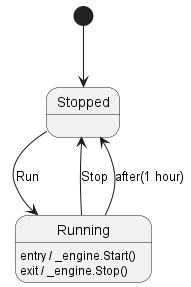
Can be defined in code as:
[StateMachine]
public partial class MyStateMachine
{
    private readonly IEngine _engine;

    public MyStateMachine(IEngine engine)
    {
        _engine = engine;
    }

    [InitialState]
    [Transition(nameof(Run), nameof(Running))]
    private partial void Stopped();

    [State]
    [OnEntry("_engine.Run()")]
    [OnExit("_engine.Stop()")]
    [Transition(nameof(Stop), nameof(Stopped))]
    [TransitionAfter("1:00:00", nameof(Stopped))]
    private partial void Running();

    [Trigger]
    public partial void Run();

    [Trigger]
    public partial void Stop();
}
The state machine will start in de Stopped state.
When the Run method is called, it will transition to the Running state, executing the _engine.Run() method on entry.
After one hour in the Running state, it will automatically transition back to the Stopped state, executing the _engine.Stop() method on entry if the engine is running.
When the Stop method is called, it will transition to the Stopped state, executing the _engine.Stop() method on entry if the engine is running.
To use the above state machine:
var engine = new StrongEngine();
var stateMachine = new MyStateMachine(engine);
stateMachine.InitializeStateMachine(); // Initialize the state machine. Brings it to the initial state.

stateMachine.Run(); // Transitions to Running state.
stateMachine.Stop(); // Transitions to Stopped state.

...

if(stateMachine.CurrentState == MyStateMachine.State.Running)
{
    stateMachine.Stop();
}
Attributes
A number of attributes are available to define the state machine.
The state machine class
The state machine class must be marked with the StateMachineAttribute attribute.
The class must be declared as partial to allow the code generator to generate the implementation.
[StateMachine]
public partial class MyStateMachine
{
}
A state machine class can be embedded in another class.
The state machine attribute has two optional parameters:
StateAccessible: defautls totrue. Set tofalseto not add theIStateAccess<TState>interface to the state machine class, and thus not generate theCurrentStateproperty.Observable: defaults tofalse. Set totrueto add theIStateMachineEvents<TState>interface to the state machine class, and thus generate theStateChangedevent.
If both parameters are set to false, the state machine will not generate the State enum as a public type.
[StateMachine(Observable = false, StateAccessible = false)]
public partial class MyStateMachine
{
}
Triggers
Triggers may initiate a transition from one state to another.
A trigger is represented by a method. This method must be marked with the TriggerAttribute attribute.
To send the trigger the method must be invoked.
These methods must:
- be declared as
partial - have no implementation
- have a
voidreturn type - have no parameters
[StateMachine]
public partial class MyStateMachine
{
    [Trigger]
    public partial void Run();
}
States
Methods that represent states must be marked with the StateAttribute attribute.
These methods must:
- be declared as
partial - and have no implementation
- preferably be private, as they should not be called by users of the state machine
[StateMachine]
public partial class MyStateMachine
{
    [State]
    private partial void Running();
}
Exactly one of the states must be marked with the InitialStateAttribute attribute to indicate the starting state of the state machine. The method must follow the same rules as methods marked with the StateAttribute.
[StateMachine]
public partial class MyStateMachine
{
    [InitialState]
    private partial void Stopped();
}
Transitions
A transition is triggered by a given trigger and will bring the state machine to the target state.
A transition may have a guard condition that must evaluate to true for the transition to activate.
A transition may have an action that is executed when the transition executes.
Transitions are defined on the state the transition originates from, the source state. The target state of a transition may be another state, or it may transition back to the source state.
[StateMachine]
public partial class MyStateMachine
{
    [State]
    [Transition(nameof(Stop), nameof(Stopped))]
    private partial void Running();
}
The example shows that, when in state Running, on reception of the trigger Stop the state should transition to the state Stopped.
⚠️ The Transition attribute can only be used on methods that also have the State or InitialState attribute.
Guard conditions
[StateMachine]
public partial class MyStateMachine
{
    [State]
    [Transition(nameof(Stop), nameof(Stopped), Condition = "_engine.Speed > 1000")]
    private partial void Running();
}
The example shows that, when in state Running, on reception of the trigger Stop, and when the condition _engine.Speed > 1000 is true, then the state should transition to the state Stopped.
Action on transition
[StateMachine]
public partial class MyStateMachine
{
    [State]
    [Transition(nameof(Stop), nameof(Stopped), Action = "_engine.Stop()")]
    private partial void Running();
}
The example shows that, when in state Running, on reception of the trigger Stop, the action _engine.Stop() will be executed, and the state will transition to the state Stopped.
Entry and Exit actions
Actions can be define that should be executed on entry of a state, or on exit of a state.
[StateMachine]
public partial class MyStateMachine
{
    [InitialState]
    [Transition(nameof(Run), nameof(Running))]
    private partial void Stopped();

    [State]
    [OnEntry("_engine.Run()")]
    [OnExit("_engine.Stop()")]
    [Transition(nameof(Stop), nameof(Stopped))]
    [TransitionAfter("1:00:00", nameof(Stopped))]
    private partial void Running();
 }
Generated methods, types, and properties
In addition to the states and trigger, the following methods, types and properties are generated for each state machine class:
- Method
void InitializeStateMachine(). Initializes the state machine and brings it to the initial state. - Enum
State, embedded in the state machine class. Contains all states of the state machine as enum members. EnumStateis only generated if at least on of theStateAccessibleandObservableparameters of theStateMachineAttributeistrue. - Raad-only property
State CurrentState { get; }. Returns the current state of the state machine. PropertyCurrentStateis only generated if theStateAccessibleparameter of theStateMachineAttributeistrue. - Event
event EventHandler<StateChangedEventArgs<TState>>? OnStateChanged;. Event to be notified about state changes. EventOnStateChangedis only generated if theObservableparameter of theStateMachineAttributeistrue.
| Product | Versions Compatible and additional computed target framework versions. |
|---|---|
| .NET | net5.0 was computed. net5.0-windows was computed. net6.0 was computed. net6.0-android was computed. net6.0-ios was computed. net6.0-maccatalyst was computed. net6.0-macos was computed. net6.0-tvos was computed. net6.0-windows was computed. net7.0 was computed. net7.0-android was computed. net7.0-ios was computed. net7.0-maccatalyst was computed. net7.0-macos was computed. net7.0-tvos was computed. net7.0-windows was computed. net8.0 was computed. net8.0-android was computed. net8.0-browser was computed. net8.0-ios was computed. net8.0-maccatalyst was computed. net8.0-macos was computed. net8.0-tvos was computed. net8.0-windows was computed. net9.0 was computed. net9.0-android was computed. net9.0-browser was computed. net9.0-ios was computed. net9.0-maccatalyst was computed. net9.0-macos was computed. net9.0-tvos was computed. net9.0-windows was computed. net10.0 was computed. net10.0-android was computed. net10.0-browser was computed. net10.0-ios was computed. net10.0-maccatalyst was computed. net10.0-macos was computed. net10.0-tvos was computed. net10.0-windows was computed. |
| .NET Core | netcoreapp2.0 was computed. netcoreapp2.1 was computed. netcoreapp2.2 was computed. netcoreapp3.0 was computed. netcoreapp3.1 was computed. |
| .NET Standard | netstandard2.0 is compatible. netstandard2.1 was computed. |
| .NET Framework | net461 was computed. net462 was computed. net463 was computed. net47 was computed. net471 was computed. net472 was computed. net48 was computed. net481 was computed. |
| MonoAndroid | monoandroid was computed. |
| MonoMac | monomac was computed. |
| MonoTouch | monotouch was computed. |
| Tizen | tizen40 was computed. tizen60 was computed. |
| Xamarin.iOS | xamarinios was computed. |
| Xamarin.Mac | xamarinmac was computed. |
| Xamarin.TVOS | xamarintvos was computed. |
| Xamarin.WatchOS | xamarinwatchos was computed. |
-
.NETStandard 2.0
- No dependencies.
NuGet packages
This package is not used by any NuGet packages.
GitHub repositories
This package is not used by any popular GitHub repositories.
1.1.1:
- FIX: Generate full namespace for the EventHandler and StateChangedEventArgs usage in the state machine.
1.1.0:
- ADD: Ability in the `StateMachineAttribute` to hide current state from the outside world.
- ADD: Support to report state changes as an event.
- FIX: Version of generator in GeneratedCodeAttribute.
1.0.1:
-FIX: Library is now available in the project that includes the NuGet package.
1.0.0:
Initial Version.
- ADD: Initial implementation of the code generator for state machines.