Umbraco.Community.UmbraDesktop
17.4.0
See the version list below for details.
dotnet add package Umbraco.Community.UmbraDesktop --version 17.4.0
NuGet\Install-Package Umbraco.Community.UmbraDesktop -Version 17.4.0
<PackageReference Include="Umbraco.Community.UmbraDesktop" Version="17.4.0" />
<PackageVersion Include="Umbraco.Community.UmbraDesktop" Version="17.4.0" />
<PackageReference Include="Umbraco.Community.UmbraDesktop" />
paket add Umbraco.Community.UmbraDesktop --version 17.4.0
#r "nuget: Umbraco.Community.UmbraDesktop, 17.4.0"
#:package Umbraco.Community.UmbraDesktop@17.4.0
#addin nuget:?package=Umbraco.Community.UmbraDesktop&version=17.4.0
#tool nuget:?package=Umbraco.Community.UmbraDesktop&version=17.4.0
UmbraDesktop
A desktop for the Umbraco backoffice. Open your sections and tools as real windows, and work in several of them side by side.



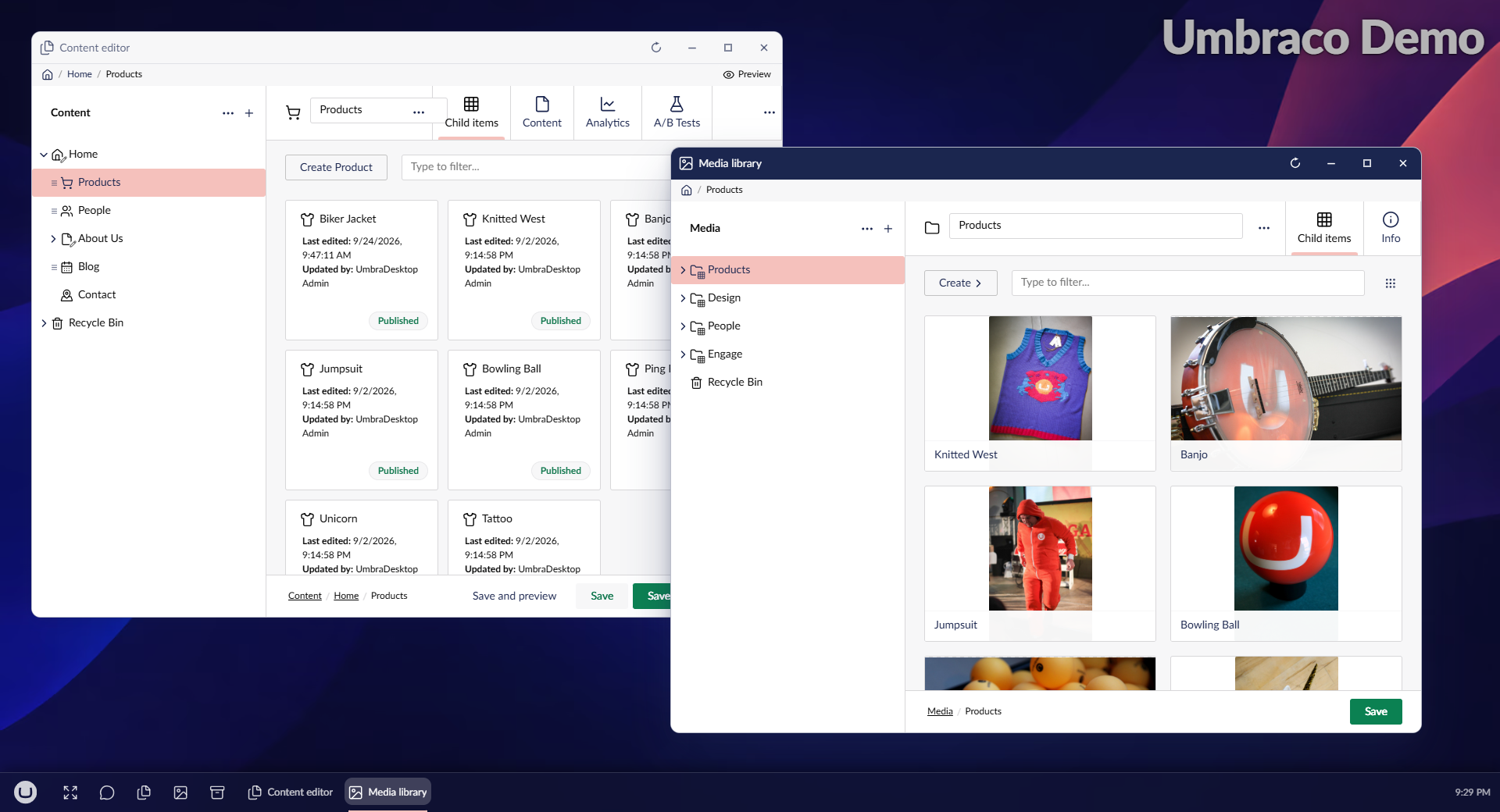
The Umbraco backoffice shows you one thing at a time. That is fine for editing one page, and it fights you the moment two things belong together: a page and the media it uses, an editor and the page it renders, a setting and the thing it affects.
UmbraDesktop turns the backoffice into a desktop. A launcher opens your sections and tools as windows you can move, resize and snap next to each other. Inside each window is the backoffice you already know, with the same trees, editors and shortcuts, so there is nothing new to learn and nothing to set up beyond one permission.
What you get
- Real windows, side by side. Drag, resize, maximise, or snap two windows into halves. Windows
- A warning before you overwrite someone. Plain Umbraco lets the second save win silently; the desktop tells you, and never throws away unsaved work without asking. Overwrite protection
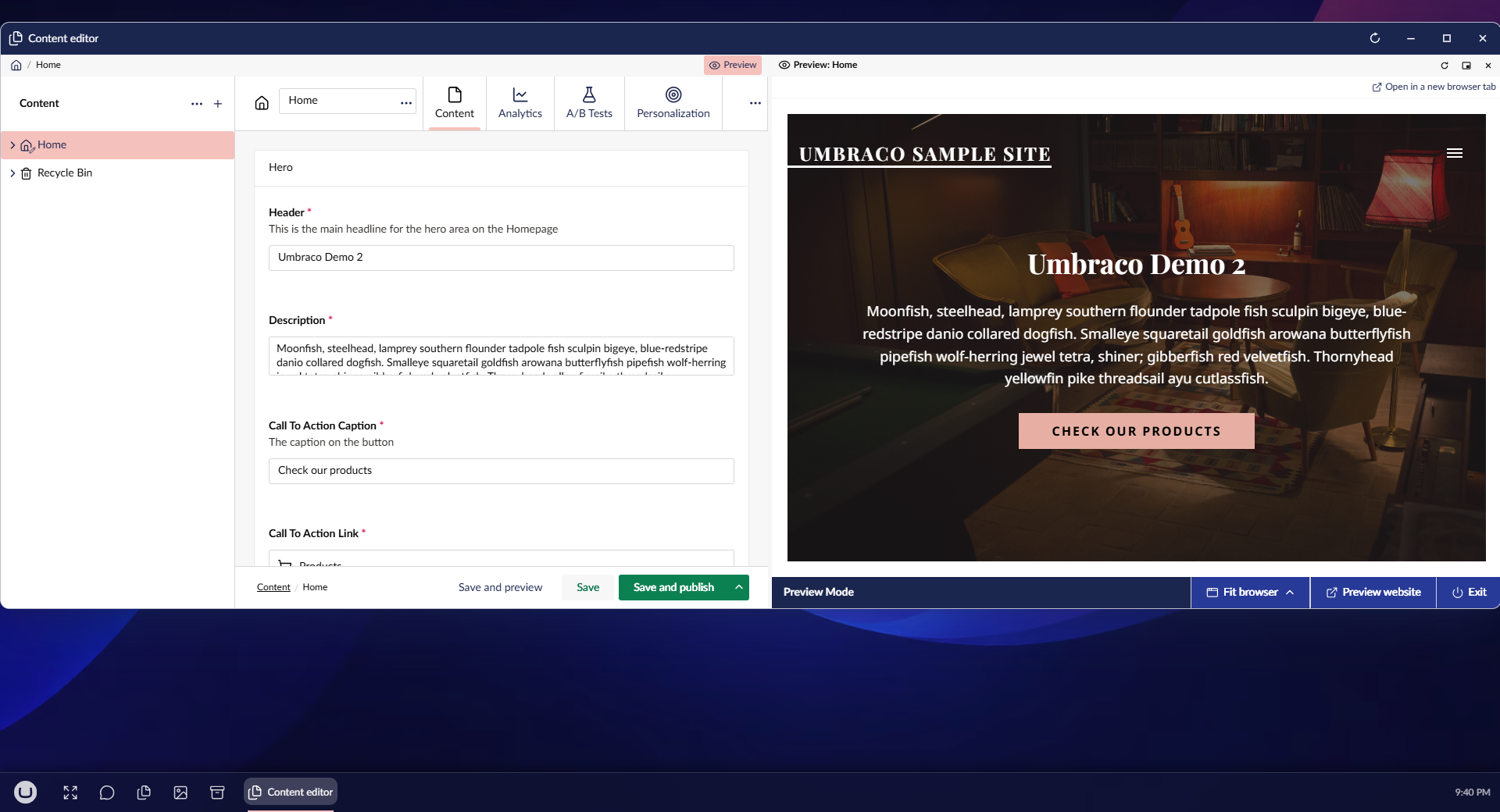
- Your page beside its editor. A live preview that reloads on every save, headless sites included, and the document's Info kept open beside it too. Live preview, Views beside the editor
- A launcher that fits how you work. Apps grouped by what they do, pinned to the taskbar, arranged the way you like. Launcher
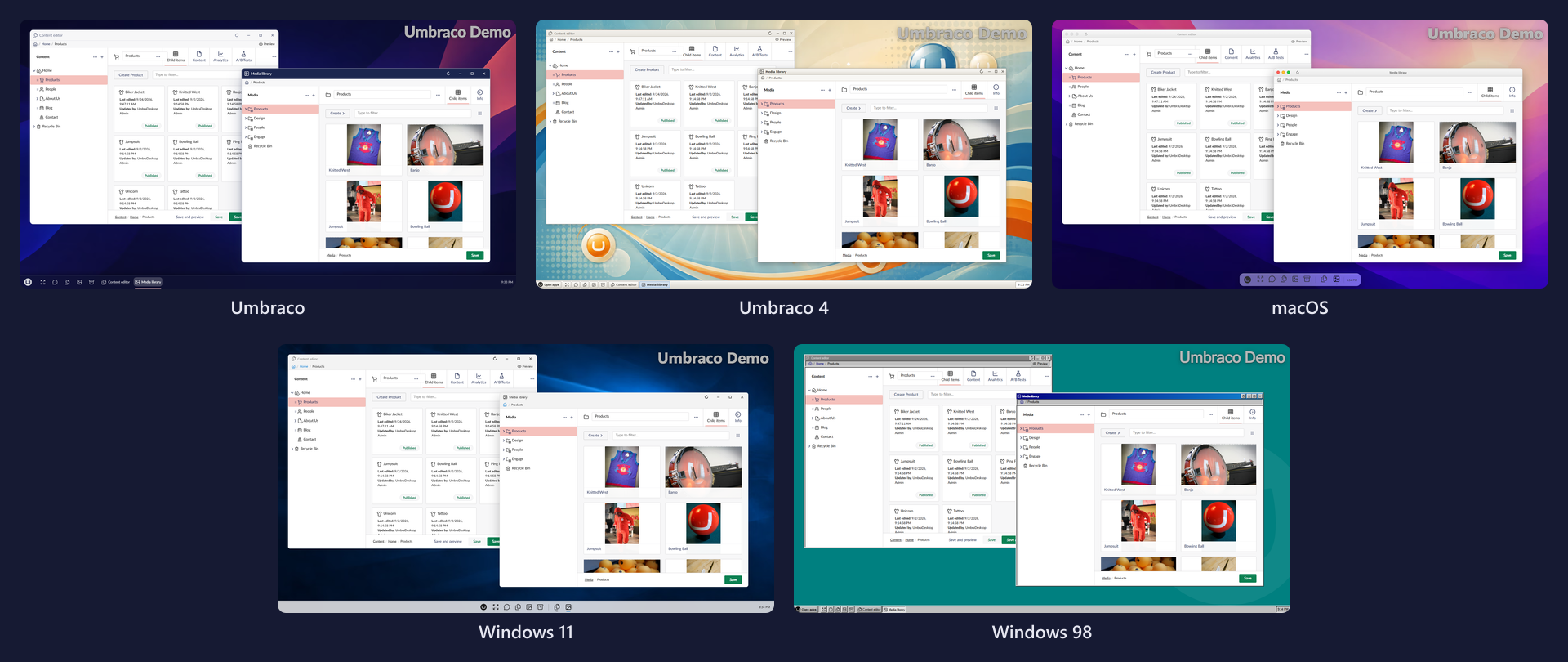
- Five themes. Umbraco, Umbraco 4, macOS, Windows 11 and Windows 98, each with a wallpaper to match. Appearance
- It follows you. Your settings live on your Umbraco account, and your windows come back after a reload. Settings
- It knows your packages. Forms, Deploy, Workflow, Commerce and the rest get proper apps, and Umbraco AI's chat sits in a window beside your pages. Apps
- Help on the desktop. The documentation for the version you run, for the desktop and its add-ons, in a window of its own. Help
- Built to be extended. Your own package can add apps, tiles, launcher groups and themes. Developer guide
Make it yours
Pick the chrome you like working in. A theme restyles the launcher, the taskbar and the window frames, and leaves the backoffice inside the windows alone.
Get started
You need Umbraco 17 and .NET 10.
dotnet add package Umbraco.Community.UmbraDesktop
Then give a user group access to the Desktop section, under Settings > User Groups, and have its users sign out and back in. That step is required: until it is done, nothing appears. After it, the desktop icon shows in the backoffice header, top right.
UmbraDesktop grants no access of its own. A user only sees apps for the sections they could already reach.
Installation has the details, and First steps shows you around.
Small tools, if you want them
Umbraco.Community.UmbraDesktop.Accessories is an optional add-on with the tools Windows kept under Accessories: Notepad and Paint that edit files in your media library, Sticky Notes of your own and shared with your team, Calculator, Character Map, Clock, a screen saver, Disk Cleanup and System Information. The desktop is unchanged without it.
Games and umbraCoffee, if you want them
Umbraco.Community.UmbraDesktop.Entertainment is an optional add-on that puts Minesweeper, Snake and Solitaire on the desktop, and umbraCoffee, the community's monthly live show, each in a window of its own and themed along with everything else. The desktop is unchanged without it.
Documentation
- The user guide covers installing, using and setting up the desktop, one short page per feature.
- The developer guide explains how it works and how to extend it from your own package.
License
| Product | Versions Compatible and additional computed target framework versions. |
|---|---|
| .NET | net10.0 is compatible. net10.0-android was computed. net10.0-browser was computed. net10.0-ios was computed. net10.0-maccatalyst was computed. net10.0-macos was computed. net10.0-tvos was computed. net10.0-windows was computed. |
-
net10.0
- Umbraco.Cms.Api.Common (>= 17.0.0 && <= 17.99999999.0)
- Umbraco.Cms.Api.Management (>= 17.0.0 && <= 17.99999999.0)
- Umbraco.Cms.Core (>= 17.0.0 && <= 17.99999999.0)
- Umbraco.Cms.Infrastructure (>= 17.0.0 && <= 17.99999999.0)
NuGet packages (5)
Showing the top 5 NuGet packages that depend on Umbraco.Community.UmbraDesktop:
| Package | Downloads |
|---|---|
|
Umbraco.Community.UmbraDesktop.Entertainment
Games and media for UmbraDesktop. An optional add-on that puts Minesweeper, Snake, Solitaire and umbraCoffee on the desktop, each in a window of its own and themed along with the rest of it. |
|
|
Umbraco.Community.UmbraDesktop.Accessories
The small tools for UmbraDesktop. An optional add-on that puts Notepad, Paint, Sticky Notes, Calculator, Character Map, Clock, Screen Saver, Disk Cleanup and System Information on the desktop, each in a window of its own and themed along with the rest of it. |
|
|
Umbraco.Community.UmbraDesktop.Services.Arcade
High scores and leaderboards for UmbraDesktop games. A service package: you get it with a game that uses it, such as the UmbraDesktop Entertainment Add-on, and do not need to install it yourself. |
|
|
Umbraco.Community.UmbraDesktop.Services.Media
Opening and saving media library files for UmbraDesktop apps. A service package: you get it with an add-on that uses it, such as the UmbraDesktop Accessories Add-on or the UmbraDesktop Media Add-on, and do not need to install it yourself. |
|
|
Umbraco.Community.UmbraDesktop.Media
Media apps for UmbraDesktop. A Media Manager that opens the media library in desktop windows, one folder per window, with dragging between them, cut, copy and paste, files from your computer, background transfers and undo; and an Image Editor that crops, adjusts, marks up, redacts and resizes images and saves them back or as a copy. |
GitHub repositories
This package is not used by any popular GitHub repositories.
| Version | Downloads | Last Updated |
|---|---|---|
| 18.0.0-beta.1 | 71 | 10/25/2026 |
| 17.4.0 | 177 | 10/20/2026 |
| 17.4.0-rc.1 | 82 | 10/20/2026 |
| 17.3.0 | 123 | 10/11/2026 |
| 17.3.0-rc.1 | 83 | 10/4/2026 |
| 17.3.0-beta.1 | 74 | 9/30/2026 |
| 17.2.0 | 141 | 9/23/2026 |
| 17.2.0-rc.1 | 81 | 9/21/2026 |
| 17.1.0 | 131 | 9/10/2026 |
| 17.1.0-rc.1 | 85 | 9/9/2026 |
| 17.0.0 | 249 | 9/3/2026 |
| 17.0.0-rc.1 | 81 | 9/2/2026 |
| 17.0.0-beta.1 | 94 | 8/10/2026 |