XperienceCommunity.FieldPermissions
1.1.0
dotnet add package XperienceCommunity.FieldPermissions --version 1.1.0
NuGet\Install-Package XperienceCommunity.FieldPermissions -Version 1.1.0
<PackageReference Include="XperienceCommunity.FieldPermissions" Version="1.1.0" />
<PackageVersion Include="XperienceCommunity.FieldPermissions" Version="1.1.0" />
<PackageReference Include="XperienceCommunity.FieldPermissions" />
paket add XperienceCommunity.FieldPermissions --version 1.1.0
#r "nuget: XperienceCommunity.FieldPermissions, 1.1.0"
#:package XperienceCommunity.FieldPermissions@1.1.0
#addin nuget:?package=XperienceCommunity.FieldPermissions&version=1.1.0
#tool nuget:?package=XperienceCommunity.FieldPermissions&version=1.1.0
Xperience Community: Field Permissions


Role-based field-level access control for Xperience by Kentico admin form editors. Restrict editing of individual fields per content type based on user roles.
⚠️ Internal API Warning: This library depends on Kentico internal APIs that are not part of the public API surface and may change between Xperience by Kentico versions without notice —
ReusableFieldSchemaUtils(CMS.ContentEngine.Internal, used to resolve fields contributed by reusable field schemas), andContentItemInfo/WebPageItemInfo(CMS.ContentEngine.Internal/CMS.Websites.Internal, used to resolve the edited content type). It also relies on Kentico admin URL/request conventions to detect create mode and the current content type. Upgrading to a newer version of Xperience by Kentico may temporarily break this library until a compatible update is released.
Description
This module provides role-based field-level permissions that can be configured per content type through the Kentico admin interface:
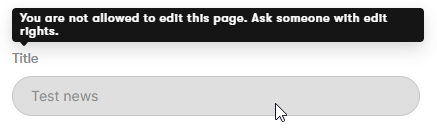
- Disable fields — Fields are shown as read-only with an optional message for users without the required role
- Hide fields — Fields are completely hidden from users without the required role
- Show in create mode — Optionally bypass a field's restrictions while creating a new item, so a restricted (e.g. required) field can still be filled in; restrictions still apply when editing
- Per content type — Configure field permissions through a "Field permissions" tab on each content type (fields shared via reusable field schemas are resolved to the correct content type)
Field permissions are enforced using FormComponentExtender<T>, the official Xperience by Kentico extension point for modifying form component behavior.
Requirements
Library Version Matrix
| Xperience Version | Library Version |
|---|---|
| >= 31.3.0 | 1.0.0 |
Dependencies
Package Installation
Add the package to your application using the .NET CLI
dotnet add package XperienceCommunity.FieldPermissions
Quick Start
1. Register in Program.cs
using XperienceCommunity.FieldPermissions;

builder.Services.AddFieldPermissions();
2. Configure Field Permissions in the Admin
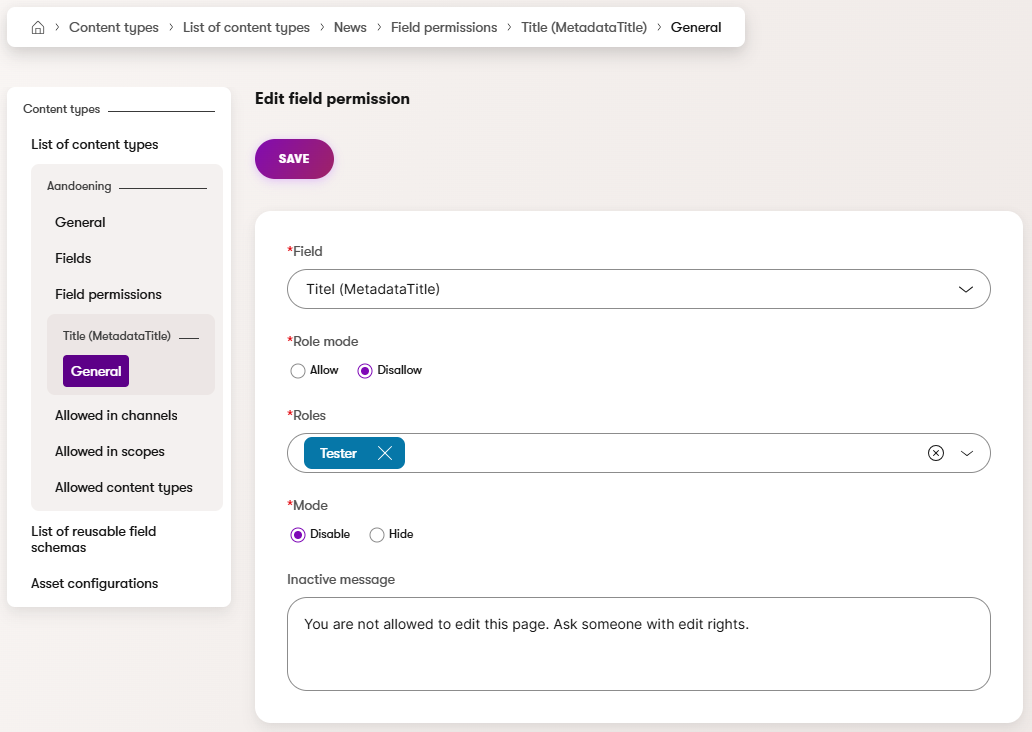
Navigate to Content types → select a content type → Field permissions tab.
From there you can:
- Select a field from the content type
- Choose the role mode — Allow (only the selected roles can edit the field) or Disallow (the selected roles cannot edit the field; everyone else can)
- Select the roles the rule applies to
- Set the restriction mode (Disable or Hide)
- Optionally set a message shown to restricted users
- Optionally enable Show field in create mode — the field's restrictions are bypassed while creating a new item (they still apply when editing)
Multiple Rules per Field
You can create multiple permission rules for the same field. Each rule is evaluated independently using OR logic:
- If the user passes any rule → the field is unrestricted (fully editable)
- If the user fails all rules → the most restrictive mode is applied (Hide > Disable)
Global administrators always bypass all permission checks.
How each rule is evaluated:
| Role Mode | User matches role? | Result |
|---|---|---|
| Allow | Yes | Passes (unrestricted) |
| Allow | No | Fails (restricted) |
| Disallow | Yes | Fails (restricted) |
| Disallow | No | Passes (unrestricted) |
Example — two rules on the same field:
| Rule | Role Mode | Roles | Mode |
|---|---|---|---|
| A | Allow | Editor | Disable |
| B | Allow | Author | Hide |
- An Editor passes rule A → unrestricted
- An Author passes rule B → unrestricted
- A user who is neither fails both → Hidden (most restrictive mode wins)
3. Extending Custom Form Components
The package includes built-in extenders for all standard Xperience form components. If your project uses custom form components (e.g., from a shared library), you can add support with a one-liner:
using XperienceCommunity.FieldPermissions.Extenders;

using Kentico.Xperience.Admin.Base.Forms;

[assembly: FormComponentExtender(typeof(RoleAwareCustomDropdownExtender))]

namespace MyProject;

// One-liner: inherit the base — that's it.
// XbyK matches extenders by exact component type, so each custom
// component needs its own extender class.
public sealed class RoleAwareCustomDropdownExtender()
    : RoleAwareFormComponentExtenderBase<CustomDropdownComponent>;
⚠️ Breaking change when upgrading from 1.0.0 — custom form component extenders.
RoleAwareFormComponentExtenderBase<T>no longer takesIFieldPermissionService(or any service) via its constructor; it now resolves its dependencies internally. Update custom extenders to a parameterless constructor:// Before public sealed class RoleAwareMyComponentExtender(IFieldPermissionService svc) : RoleAwareFormComponentExtenderBase<MyComponent>(svc); // After public sealed class RoleAwareMyComponentExtender() : RoleAwareFormComponentExtenderBase<MyComponent>;Registration via
[assembly: FormComponentExtender(...)]is unchanged.
Full Instructions
View the Usage Guide for complete documentation including:
- How field permission enforcement works
- Extending custom form components
- Key types reference
- Database structure
- Troubleshooting
Contributing
Feel free to submit issues or pull requests to the repository, this is a community package and everyone is welcome to support.
License
Distributed under the MIT License. See LICENSE.md for more information.
| Product | Versions Compatible and additional computed target framework versions. |
|---|---|
| .NET | net8.0 is compatible. net8.0-android was computed. net8.0-browser was computed. net8.0-ios was computed. net8.0-maccatalyst was computed. net8.0-macos was computed. net8.0-tvos was computed. net8.0-windows was computed. net9.0 was computed. net9.0-android was computed. net9.0-browser was computed. net9.0-ios was computed. net9.0-maccatalyst was computed. net9.0-macos was computed. net9.0-tvos was computed. net9.0-windows was computed. net10.0 was computed. net10.0-android was computed. net10.0-browser was computed. net10.0-ios was computed. net10.0-maccatalyst was computed. net10.0-macos was computed. net10.0-tvos was computed. net10.0-windows was computed. |
-
net8.0
- Kentico.Xperience.Admin (>= 31.3.0)
NuGet packages
This package is not used by any NuGet packages.
GitHub repositories
This package is not used by any popular GitHub repositories.
| Version | Downloads | Last Updated |
|---|---|---|
| 1.1.0 | 100 | 6/11/2026 |
| 1.0.0 | 96 | 6/10/2026 |
| 1.0.0-prerelease-1 | 86 | 6/9/2026 |
| 0.0.1 | 108 | 6/9/2026 |