kojamori.SFS.Templates.CodeMod
1.2.4
See the version list below for details.
dotnet new install kojamori.SFS.Templates.CodeMod@1.2.4
SFS Code Mod Template
A .NET Framework 4.8 template for creating SFS code mods easily and quickly, no more writing boilerplate yourself.
This template attempts to automatically locate the SFS game folder and reference all managed DLLs by searching common Steam installation paths on Windows and MacOS, but is untested on the latter OS.
Automatic Mod Copying to SFS Mods Folder
One of the features of this template is that MSBuild can copy the build DLL into the SFS mods folder after building the mod successfully. You can enable/disable this by changing the AutoCopyMod value in the project's .csproj from True/False.
The default value is False, so you will have to manually copy the mod DLL into the SFS mods folder after building.
You can set "Automatic Mod Copying" (autoCopyMod) to true when creating the project with the template, and it will automatically set this value to True in the generated .csproj.
Implicit References
This template also has an option to use implicit references for all of the managed DLLs, which means you don't have to manually add them as references in your project. You can enable/disable this by changing the ImplicitManagedReferences value in the project's .csproj from True/False, and instead you get only essential references including:
Assembly-CSharp.dllUnityEngine.dllUnityEngine.CoreModule.dll0Harmony.dll.
The default value is True, so you will have to disable this if you don't want implicit references and want to manually add them yourself.
You can also set "Implicit Managed References" (implicitManagedReferences) to false when creating the project with the template, and it will automatically set this value to False in the generated .csproj.
Requirements
- .NET SDK 6.0 and newer
- SFS installed via Steam
Installation
Run the following command to install the template from NuGet:
dotnet new install kojamori.SFS.Templates.CodeMod@1.2.3
Updating
Run the following command to update the template from NuGet:
dotnet new update
Usage
IDE Usage
Visual Studio
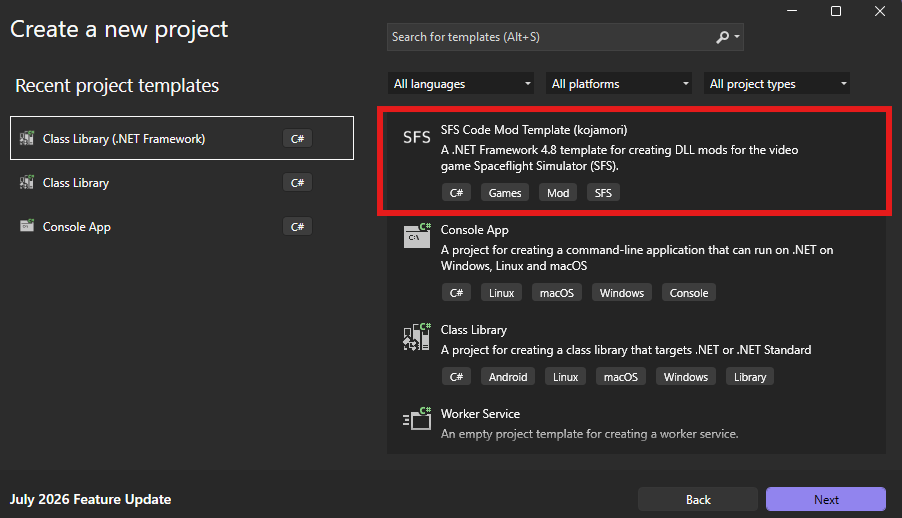
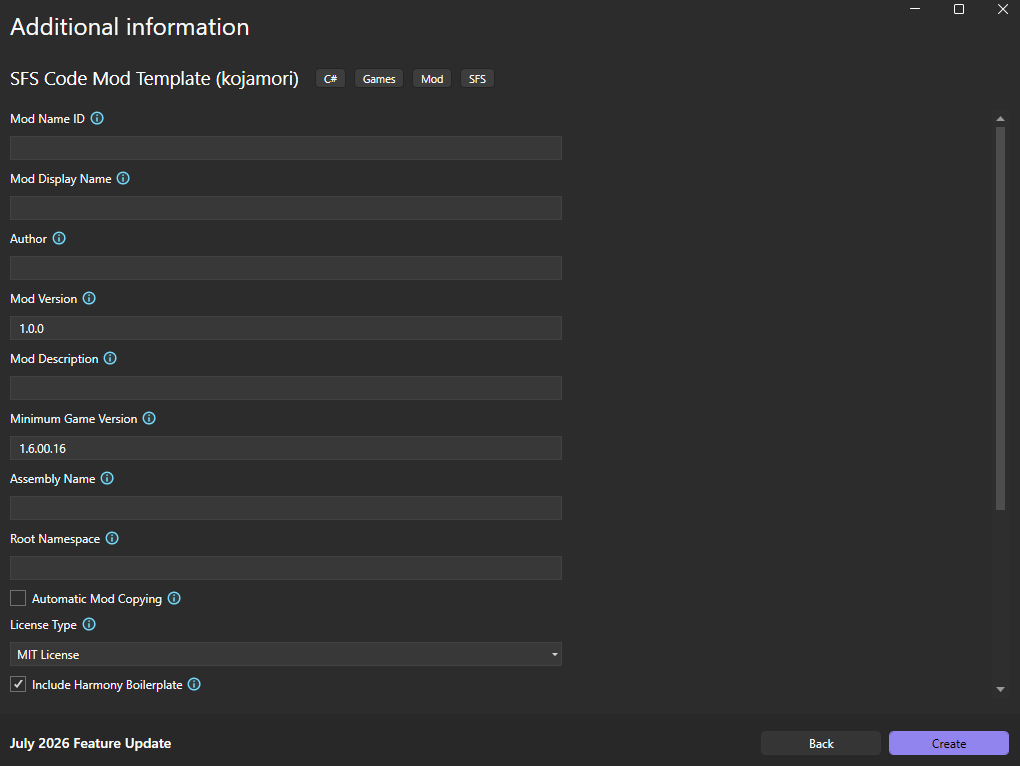
When using Visual Studio, you can also use the "Create a new project" dialog and search for "SFS Code Mod Template" to create a new SFS mod project, as seen in the screenshots below.
JetBrains Rider
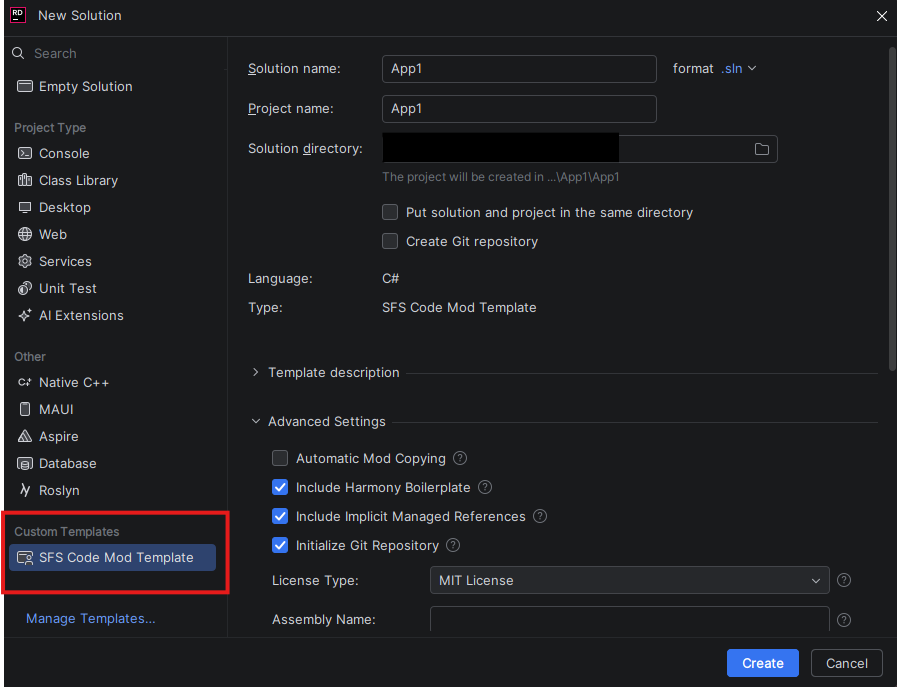
When using JetBrains Rider, you can also use the "New Solution" dialog and select the "SFS Code Mod Template" on the bottom-left side, below "Custom Templates" to create a new SFS mod project, as seen in the screenshot below.
Command Line Usage
dotnet new sfsmod -n BestSFSMod -p:a kojamori --modDisplayName "Best SFS Mod"
Template Parameters
Required Parameters
These are the required options for creating a new SFS mod project using this template. They won't necessarily prevent the project from being created, but these will cause issues if not specified.
-nor-m: The name of the project and mod. This is also used as the root namespace and assembly name if not specified otherwise. (Default:"")
Most Common Mod Parameters
-n,--name <name>: The name of the project and mod.-m,--modNameId <modNameId>: The unique identifier for the mod (Mod.ModNameID). (Default: Falls back to--name)- This should not contain spaces or special characters, otherwise you'll have to manually change broken strings like the root namespace in the generated project, as a namespace cannot contain spaces or special characters.
-mo,--modDisplayName <modDisplayName>: The user-friendly display name shown in-game. (Default: Falls back to--modNameId)-p:a,--param:author <param:author>: The author's name. (Default:"")-p:m,--modVersion <modVersion>: The current version of the mod. (Default:1.0.0)-p:mo,--modDescription <modDescription>: A short summary explaining what the mod does. (Default:"")-mi,--minimumGameVersion <minimumGameVersion>: The minimum game version required to run the mod. (Default:1.6.00.18)-li,--licenseType <MIT|LGPL (v3)|...>: The open-source license type for the mod code. (Default:MIT)-ha,--harmony <harmony>: Whether to include Harmony patching boilerplate code. (Default:true)-au,--autoCopyMod: Automatically copies the mod toSpaceflight Simulator Game/Mods/modNameId/directory on build. (Default:false)
All Parameters
-as,--assemblyName <assemblyName>: The assembly name for the compiled mod. (Default: Falls back to--modNameIdor--name)-au,--autoCopyMod: Automatically copies the mod toSpaceflight Simulator Game/Mods/modNameId/directory on build. (Default:false)-r,--rootNamespace <rootNamespace>: The root namespace for the C# project. (Default: Falls back to--modNameIdor--name)-m,--modNameId <modNameId>: TheMod.ModNameID. (Default: Falls back to--name)- This should not contain spaces or special characters, otherwise you'll have to manually change broken strings like the root namespace in the generated project, as a namespace cannot contain spaces or special characters.
-mo,--modDisplayName <modDisplayName>: The user-friendly display name of the mod shown in-game. (Default: Falls back to--modNameId)-p:a,--param:author <param:author>: The author's name. (Default:"")-mi,--minimumGameVersion <minimumGameVersion>: The minimum game version required to run this mod. (Default:1.6.00.18)-p:m,--modVersion <modVersion>: The version of the mod. (Default:1.0.0)-p:mo,--modDescription <modDescription>: A short description of what the mod does. (Default:"")-up,--updateLink <updateLink>: DLL source for mod updates. (Default:"").- Automatic updating using Neptune-Sky's UITools' IUpdatable interface. Details at https://github.com/cucumber-sp/UITools.
-li,--licenseType <MIT|LGPL (v3)|...>: The open-source license type for the mod code. (Default:MIT)- License options:
MIT: MIT LicenseLGPL (v3): GNU Lesser General Public License v3GPL (v3): GNU General Public License v3AGPL (v3): GNU Affero General Public License v3apache2.0: Apache License 2.0mozilla2.0: Mozilla Public License 2.0unlicense: The Unlicense
-c,--copyrightHolder <copyrightHolder>: The copyright holder for the license. (Default: Falls back to--param:author)-g,--git: Whether to initialise a local Git repository upon creation. (Default:true)-di,--discordLink <discordLink>: A link to the mod's or author's Discord community. (Default:"")-re,--readMeDescription <readMeDescription>: Description text for the README file, under the first H1. (Default: Falls back to--modDescription)-ha,--harmony <harmony>: Whether to include Harmony patching boilerplate code. (Default:true)-im,--implicitManagedReferences <implicitManagedReferences>: Whether to include implicit managed references. (Default:true)
Social Media
Discord
License
See LICENSE.
-
.NETFramework 4.8
- No dependencies.
NuGet packages
This package is not used by any NuGet packages.
GitHub repositories
This package is not used by any popular GitHub repositories.