libopx 2.3.0
See the version list below for details.
dotnet add package libopx --version 2.3.0
NuGet\Install-Package libopx -Version 2.3.0
<PackageReference Include="libopx" Version="2.3.0" />
<PackageVersion Include="libopx" Version="2.3.0" />
<PackageReference Include="libopx" />
paket add libopx --version 2.3.0
#r "nuget: libopx, 2.3.0"
#:package libopx@2.3.0
#addin nuget:?package=libopx&version=2.3.0
#tool nuget:?package=libopx&version=2.3.0
libopx


A .NET 9 C# library for parsing and extracting data from MXF (Material Exchange Format) files and their ancillary data streams (ANC), raw Vertical Blanking Interval (VBI), Teletext packet stream (T42), and MPEG-TS (Transport Stream) files, with SMPTE timecode and Teletext caption support.
Why "opx"?
The opx in libopx is a play on both MXF's "Operational Pattern" designations, such as OP-1a and OP-Atom, and the Free TV Australia "Operational Practice" standards OP-42 and OP-47 for closed captions and Teletext subtitles (the primary focus of this library).
Features
- Multi-format support: MXF, ANC, VBI, T42, and MPEG-TS file parsing
- Format and Subtitle conversion: Automatic VBI ↔ T42 conversion, plus RCWT (Raw Captions With Time) and EBU STL output
- MPEG-TS teletext extraction: Automatic PAT/PMT parsing with DVB teletext support
- Teletext filtering: Magazine and row-based filtering with Unicode mapping
- SMPTE timecode: Full timecode calculations with various frame rates
- MXF processing: Stream extraction and demuxing capabilities
- CLI tool: Unified
opxcommand-line interface for easy access to all features
Convert between HD and SD T42 and VBI formats or vice versa. You can even pipe that data to other applications like ffmpeg or mpv.
Examples
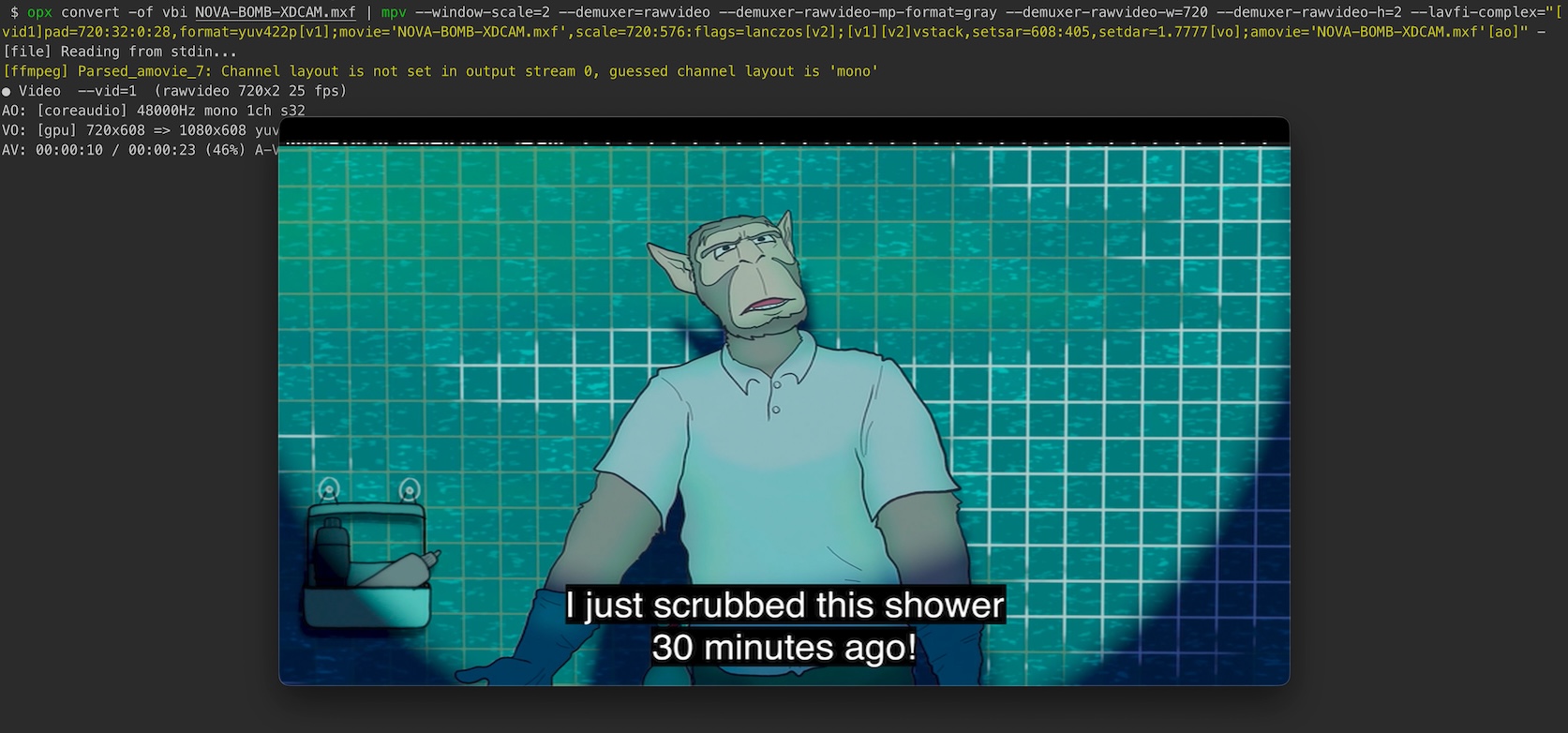
Piping Teletext Data: Extract ancillary data from an MXF file, convert it to vertical blanking interval (VBI) format, and pipe it directly to mpv for display:
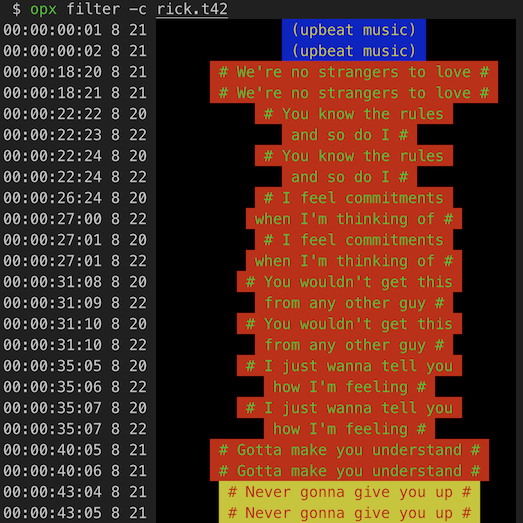
ANSI Escaped Teletext: Supports parsing and filtering of teletext data with ANSI escape sequences:
Quick Start
Installation
Add the package reference to your project file from NuGet.org.
dotnet add package libopx
Or download the latest release from GitHub Releases.
Using the CLI Tool
# Filter teletext data by magazine and rows
opx filter -m 8 -r 20,22 input.vbi

# Filter MPEG-TS teletext (auto-detects PIDs)
opx filter input.ts

# Filter MPEG-TS with specific PID
opx filter --pid 70 input.ts

# Convert between formats (auto-detected from extension)
opx convert input.vbi output.t42

# Convert MPEG-TS to T42
opx convert --pid 70 input.ts output.t42

# Convert to EBU STL subtitle format
opx convert -c input.mxf output.stl

# Extract specific streams from MXF files (data, video, audio, etc.)
opx extract -k d,v input.mxf
Using the Library
using nathanbutlerDEV.libopx.Formats;

// Parse and filter teletext data from VBI
using var vbi = new VBI("input.vbi");
foreach (var line in vbi.Parse(magazine: 8, rows: new[] { 20, 22 }))
{
    Console.WriteLine(line);
}

// Parse and filter teletext from MPEG-TS (auto-detects PIDs)
using var ts = new TS("input.ts");
foreach (var line in ts.Parse(magazine: 8))
{
    Console.WriteLine(line);
}

// Parse MPEG-TS with specific PID
using var ts2 = new TS("input.ts") { PIDs = new[] { 70 } };
foreach (var line in ts2.Parse())
{
    Console.WriteLine(line);
}
Documentation
- Library Documentation - Detailed API reference and usage examples
- CLI Tool Documentation - Complete command reference and examples
Project Structure
libopx/            # Root directory
├── .github/       # GitHub configuration
│   └── workflows/ # CI workflows
├── apps/opx/      # CLI tool
├── assets/        # Images and media samples for documentation
├── docs/          # Documentation files
├── lib/           # Main library
│   ├── Core/      # Core functionality
│   ├── Enums/     # Enumerations
│   ├── Formats/   # Format parsers (MXF, ANC VBI, T42, TS)
│   ├── Handlers/  # Data handlers
│   └── SMPTE/     # SMPTE metadata system
├── scripts/       # Development scripts
└── tests/         # xUnit test suite
    ├── Core/      # Core tests
    ├── Formats/   # Format parser tests
    └── Handlers/  # Data handler tests
Development
# Clone and build
git clone https://github.com/nathanpbutler/libopx
cd libopx
dotnet build

# Run tests
dotnet test
Requirements
- .NET 9 or later
- Supported platforms: Windows, Linux, macOS
Dependencies
- System.CommandLine (v2.0.0) (command-line parsing)
- xUnit (testing)
- coverlet (code coverage)
Contributing
- Fork the repository
- Create a feature branch
- Make your changes
- Add tests for new functionality
- Ensure all tests pass
- Submit a pull request
License
MIT - see the LICENSE file for details.
Acknowledgments
- vhs-teletext - Software to recover teletext data from VHS recordings (inspiration for
filtercommand) - MXFInspect - Tool for displaying the internal structure of MXF files (was super helpful for understanding MXF parsing and the intricacies of SMPTE timecodes)
- bmxtranswrap - BBC's MXF processing library and utilities (inspiration for
extractcommand) - SubtitleEdit - An incredibly useful C# library and software for subtitle editing and processing
- CCExtractor - Closed caption and subtitle extraction and processing
- ffmpeg - The swiss army knife of multimedia processing
Support
For questions and support, please open an issue.
| Product | Versions Compatible and additional computed target framework versions. |
|---|---|
| .NET | net9.0 is compatible. net9.0-android was computed. net9.0-browser was computed. net9.0-ios was computed. net9.0-maccatalyst was computed. net9.0-macos was computed. net9.0-tvos was computed. net9.0-windows was computed. net10.0 was computed. net10.0-android was computed. net10.0-browser was computed. net10.0-ios was computed. net10.0-maccatalyst was computed. net10.0-macos was computed. net10.0-tvos was computed. net10.0-windows was computed. |
-
net9.0
- No dependencies.
NuGet packages
This package is not used by any NuGet packages.
GitHub repositories
This package is not used by any popular GitHub repositories.
| Version | Downloads | Last Updated |
|---|---|---|
| 2.4.2 | 114 | 1/25/2026 |
| 2.4.1 | 108 | 1/25/2026 |
| 2.4.0 | 110 | 1/24/2026 |
| 2.3.0 | 141 | 1/9/2026 |
| 2.2.0 | 345 | 11/7/2025 |
| 2.1.2 | 343 | 11/4/2025 |
| 2.1.1 | 349 | 10/30/2025 |
| 2.1.0 | 340 | 10/30/2025 |
| 2.0.0 | 344 | 10/30/2025 |
| 1.4.0 | 334 | 9/2/2025 |
| 1.3.0 | 307 | 8/17/2025 |
| 1.2.0 | 260 | 8/16/2025 |
| 1.1.0 | 356 | 8/13/2025 |
| 1.0.0 | 251 | 8/3/2025 |
v2.3.0: Added STL (EBU Tech 3264) export support via new STLExporter class. Convert T42/VBI teletext data to EBU STL subtitle format with automatic GSI header generation, teletext-to-STL character mapping, and proper TTI block encoding. Includes support for double-height text, box mode detection, and configurable output options.