SqlServer.AdministrativeViews.McpServer.linux-arm64
1.1.320
dotnet add package SqlServer.AdministrativeViews.McpServer.linux-arm64 --version 1.1.320
NuGet\Install-Package SqlServer.AdministrativeViews.McpServer.linux-arm64 -Version 1.1.320
<PackageReference Include="SqlServer.AdministrativeViews.McpServer.linux-arm64" Version="1.1.320" />
<PackageVersion Include="SqlServer.AdministrativeViews.McpServer.linux-arm64" Version="1.1.320" />
<PackageReference Include="SqlServer.AdministrativeViews.McpServer.linux-arm64" />
paket add SqlServer.AdministrativeViews.McpServer.linux-arm64 --version 1.1.320
#r "nuget: SqlServer.AdministrativeViews.McpServer.linux-arm64, 1.1.320"
#:package SqlServer.AdministrativeViews.McpServer.linux-arm64@1.1.320
#addin nuget:?package=SqlServer.AdministrativeViews.McpServer.linux-arm64&version=1.1.320
#tool nuget:?package=SqlServer.AdministrativeViews.McpServer.linux-arm64&version=1.1.320
SQL Server Queries with metrics and execition plan MCP Server
Prompts
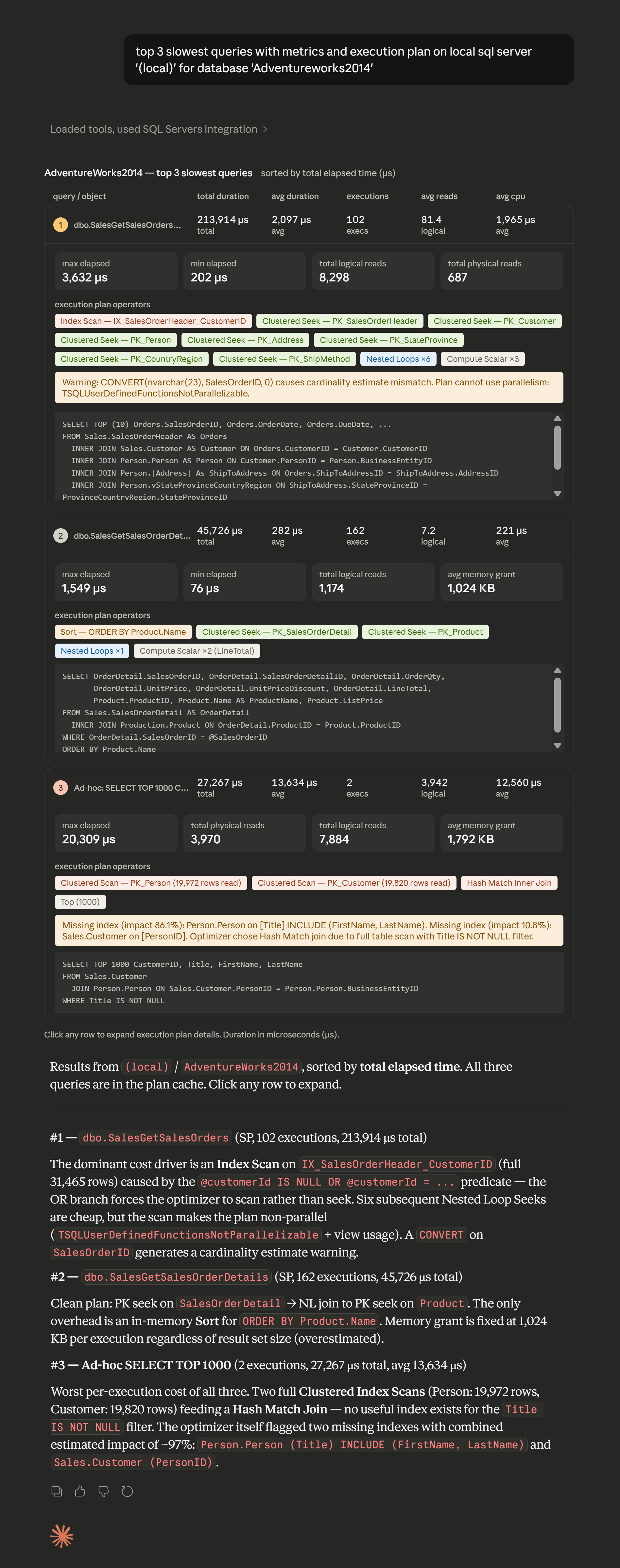
Top 3 slowest queries with metrics and execution plan on local sql server '(local)' for database 'Adventureworks2014'
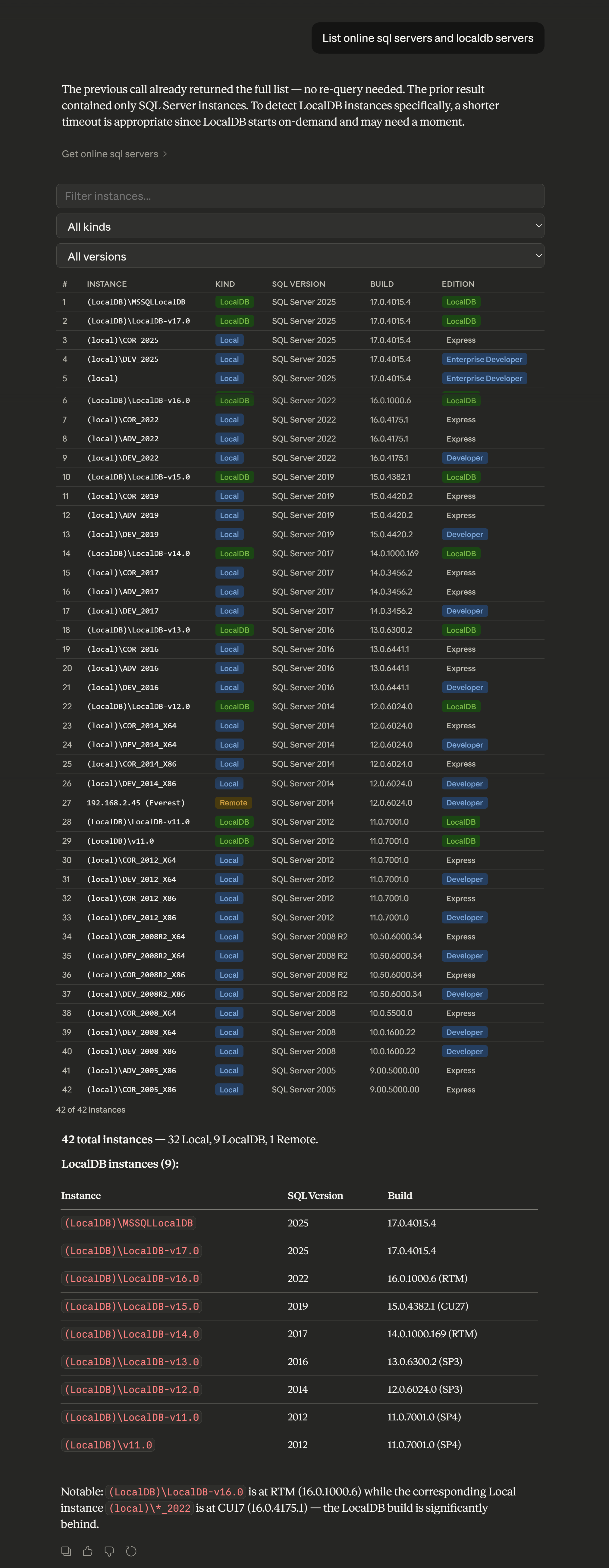
List online sql servers and localdb servers
List top 5 heaviest queries on SQL Server '(local)' of any database (or 'database AdventureWorks') ordered by average | cumulative IO reads. Explain execution plan, find potential problems with performance and scalability, suggest resolutions, and highlight recommendations by engine.
Supported sorting
| Sort option | Description |
|---|---|
| Count | Number of executions |
| Avg Duration | Average elapsed time per execution (μs) |
| Total Duration | Total elapsed time across all executions (μs) (default) |
| Avg CPU Time | Average CPU time / WorkerTime per execution (μs) |
| Total CPU Time | Total CPU time / WorkerTime across executions (μs) |
| Avg Reads | Average logical reads per execution |
| Total Reads | Total reads across all executions |
| Avg Writes | Average writes per execution |
| Total Writes | Total writes across all executions |
| Avg Rows | Average rows returned/affected per execution |
| Total Rows | Total rows across all executions |
| Avg Memory | Average memory used per execution (KB) |
AI-Free CLI
This tool is also available for CI build agents as CLI tool:
https://www.nuget.org/packages/SqlServer.AdministrativeViews
Build info
The MCP server is built as a self-contained application and does not require the .NET runtime to be installed on targets:
- win-x64
- win-arm64
- osx-arm64
- osx-x64
- linux-x64
- linux-arm64
- linux-musl-x64
Developing locally
To test this MCP server from source code (locally) without using a built MCP server package, you can configure your IDE to run the project directly using dotnet run.
{
  "servers": {
    "SqlServer.AdministrativeViews.McpServer": {
      "type": "stdio",
      "command": "dotnet",
      "args": [
        "run",
        "--project",
        "<PATH TO PROJECT DIRECTORY>"
      ]
    }
  }
}
Refer to the VS Code or Visual Studio documentation for more information on configuring and using MCP servers:
Using the MCP Server from NuGet.org
Once the MCP server package is published to NuGet.org, you can configure it in your preferred IDE. Both VS Code and Visual Studio use the dnx command to download and install the MCP server package from NuGet.org.
- VS Code: Create a
<WORKSPACE DIRECTORY>/.vscode/mcp.jsonfile - Visual Studio: Create a
<SOLUTION DIRECTORY>\.mcp.jsonfile - Claude: Add local mcp server
Example
:: Windows
claude mcp add --transport stdio local-sql-servers -- cmd /c dnx SqlServer.AdministrativeViews.McpServer --yes
# Linux and MAC
claude mcp add --transport stdio --env SQLSERVER_WELLKNOWN_1="<Connection String>" local-sql-servers -- dnx SqlServer.AdministrativeViews.McpServer --yes
For both VS Code and Visual Studio, the configuration file uses the following server definition:
{
  "servers": {
    "Local SQL Servers": {
      "type": "stdio",
      "command": "dnx",
      "args": [
        "SqlServer.AdministrativeViews.McpServer",
        "--yes"
      ]
    }
  }
}
Non-local SQL Server with alias
{
  "mcpServers": {
    "SQL Servers": {
      "command": "cmd",
      "args": [
        "/c",
        "dnx",
        "SqlServer.AdministrativeViews.McpServer",
        "--yes",
        "--",
        "--alias",
        "Everest",
        "--connection-string",
        "Data Source=<network or cloud sql server>; User ID=...; Password=...; TrustServerCertificate=true; Encrypt=False; Pooling=True"
      ]
    }
  }
}
Parameters --alias (-a) and --connection-string (-cs) can be specified multiple times.
Learn more about Target Frameworks and .NET Standard.
This package has no dependencies.
NuGet packages
This package is not used by any NuGet packages.
GitHub repositories
This package is not used by any popular GitHub repositories.
| Version | Downloads | Last Updated |
|---|---|---|
| 1.1.320 | 71 | 4/8/2026 |
| 1.1.319 | 75 | 4/8/2026 |
| 1.1.318 | 80 | 4/6/2026 |
| 1.1.317 | 77 | 4/6/2026 |
| 1.1.316 | 75 | 4/6/2026 |
| 1.1.313 | 81 | 4/5/2026 |
| 1.1.312 | 85 | 4/4/2026 |
| 1.1.311 | 85 | 4/4/2026 |
| 1.1.310 | 89 | 4/3/2026 |
| 1.1.309 | 78 | 4/3/2026 |
| 1.1.308 | 84 | 4/3/2026 |
| 1.1.307 | 79 | 4/3/2026 |
| 1.1.306 | 81 | 4/3/2026 |
| 1.1.305 | 77 | 4/3/2026 |
| 1.1.304 | 82 | 4/3/2026 |
| 1.1.303 | 75 | 4/3/2026 |