uaParser.Net
2.0.0
See the version list below for details.
dotnet add package uaParser.Net --version 2.0.0
NuGet\Install-Package uaParser.Net -Version 2.0.0
<PackageReference Include="uaParser.Net" Version="2.0.0" />
<PackageVersion Include="uaParser.Net" Version="2.0.0" />
<PackageReference Include="uaParser.Net" />
paket add uaParser.Net --version 2.0.0
#r "nuget: uaParser.Net, 2.0.0"
#:package uaParser.Net@2.0.0
#addin nuget:?package=uaParser.Net&version=2.0.0
#tool nuget:?package=uaParser.Net&version=2.0.0
<p align="center"> <a href="https://www.nuget.org/packages/uaParser.Net"><img alt="NuGet" src="https://img.shields.io/nuget/v/uaParser.Net.svg?style=flat-square"></a> <a href="https://github.com/Dariuosh/uaParser.Net/actions/workflows/ci.yml"><img alt="CI" src="https://github.com/Dariuosh/uaParser.Net/actions/workflows/ci.yml/badge.svg"></a> </p>
uaParser.Net
Detects the browser, engine, operating system, CPU and device from a User-Agent string, in .NET.
Version 2 is a faithful port of ua-parser-js 1.0.41: every one of its 200 rules (307 regexes) is generated from the original by a tool in this repository, and the results are tested to be identical, field by field, on more than 1,300 user agents (and were checked on 58,000 more).
- Same results as ua-parser-js 1.0.41, including rarely used browsers and devices
- Immutable, thread-safe results; a missing value is
null - About 25-30 µs per user agent, about 40 ns when cached
- ASP.NET Core integration: a per-request
ClientInfo,HttpContext.GetClientInfo(), a shared cache - GPU detection from WebGL renderer strings
- .NET 10
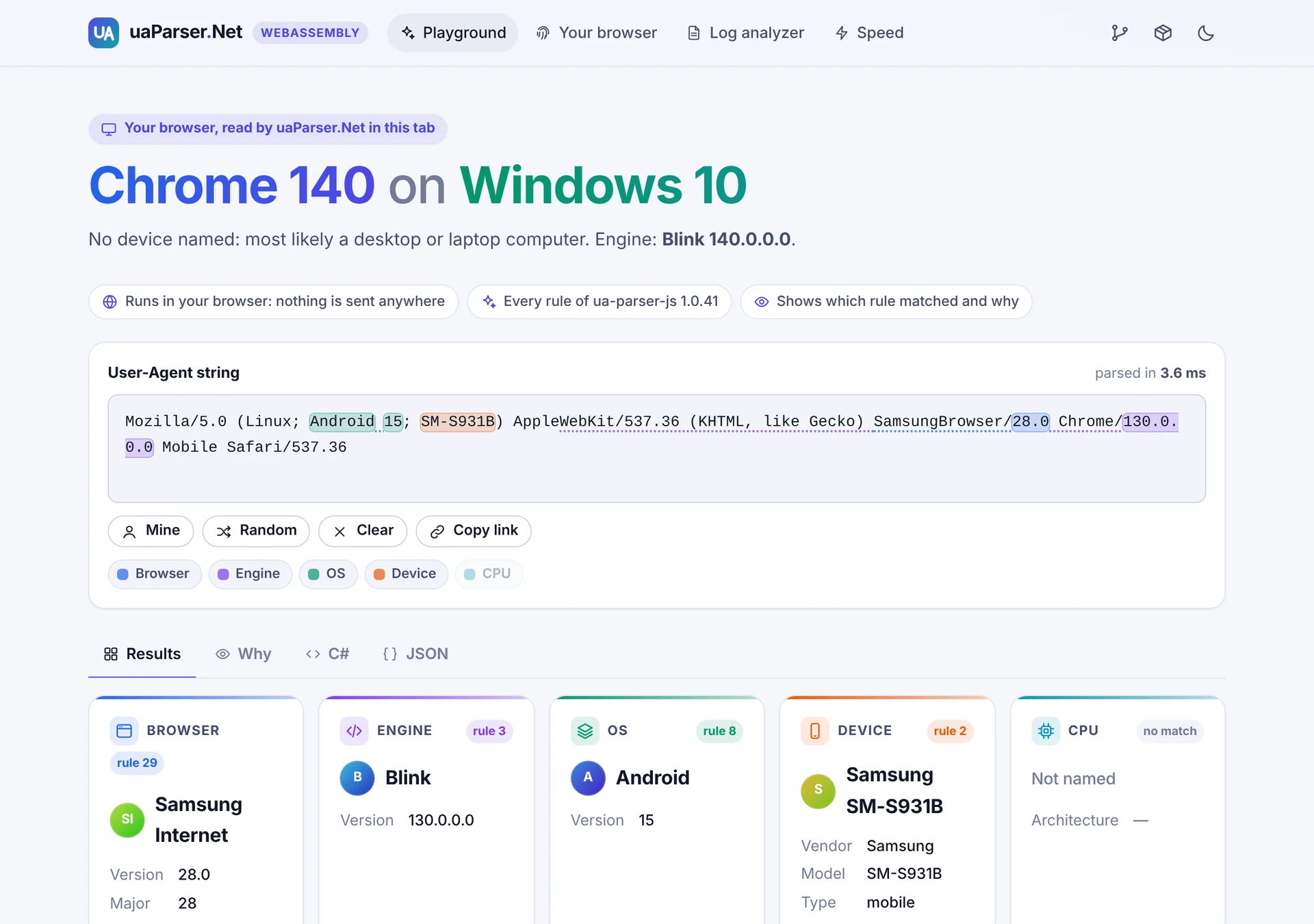 <sub>The playground of the demos: each value is highlighted where it was found, and the Why tab shows the rule that matched.</sub>
Install
dotnet add package uaParser.Net
dotnet add package uaParser.Net.AspNetCore   # for ASP.NET Core
Quick start
using uaParserLibrary;
using uaParserLibrary.Models;

var ua = "Mozilla/5.0 (Linux; Android 15; SM-S931B) AppleWebKit/537.36 (KHTML, like Gecko) " +
         "SamsungBrowser/28.0 Chrome/130.0.0.0 Mobile Safari/537.36";

ClientInfo info = UAParser.GetClientInfo(ua);

Console.WriteLine(info.Browser);                            // Browser: Samsung Internet 28.0
Console.WriteLine(info.Browser.Major);                      // 28
Console.WriteLine(info.Engine);                             // Engine : Blink 130.0.0.0
Console.WriteLine(info.OS);                                 // OS     : Android 15
Console.WriteLine(info.Device);                             // Device : Samsung SM-S931B mobile
Console.WriteLine(info.Device.Type == DeviceTypes.Mobile);  // True
Console.WriteLine(info.CPU.Architecture is null);           // True: not in this user agent
Each part can also be read on its own: UAParser.GetBrowser, GetEngine, GetOS, GetDevice,
GetCPU. UAParser.GetGPU reads a WebGL renderer string, and GetClientInfo(userAgent, renderer)
includes it.
Results
| Type | Properties |
|---|---|
Browser |
Name, Version, Major |
Engine |
Name, Version |
OS |
Name, Version |
Device |
Vendor, Model, Type (one of DeviceTypes: mobile, tablet, smarttv, console, wearable, embedded) |
CPU |
Architecture (for example amd64, arm64, ia32) |
GPU |
Vendor, Model |
ClientInfo |
UserAgent and all of the above (GPU only when a renderer string was given) |
- A value that is not in the user agent is
null. Desktop browsers usually have no device values. - All types are immutable records: compare them with
==, copy them withwith. - Names follow ua-parser-js 1.0.41, for example
Mobile Safari,Samsung Internet,Mac OS. - Like ua-parser-js, at most the first 500 characters of a user agent are read.
Repeated user agents
A busy server sees the same user agents again and again. ClientInfoCache returns the earlier
result instead of parsing again. It is thread-safe and its memory stays bounded, even when every
request has a different user agent.
var cache = new ClientInfoCache(capacity: 1024);
ClientInfo info = cache.GetClientInfo(userAgent);
ASP.NET Core
using uaParserLibrary.Models;
using uaParserMiddleware;

builder.Services.AddUAParser();               // ClientInfo becomes injectable (scoped)
// builder.Services.AddUAParser(o => o.CacheCapacity = 4096);  // 0 turns the cache off

var app = builder.Build();
app.UseUAParser();                            // optional: parse before the rest of the pipeline

app.MapGet("/", (ClientInfo client) => $"Hello, {client.Browser.Name} on {client.OS.Name}!");
app.MapGet("/client", (HttpContext context) => context.GetClientInfo());   // as JSON
Every request gets the result for its own User-Agent header. HttpContext.GetClientInfo() works
with or without the middleware and parses at most once per request.
Blazor, interactive server rendering: a circuit has no request of its own, so read the User-Agent while the page is prerendered and keep it for the circuit, as the Blazor Server demo's playground does:
@code {
    [CascadingParameter] private HttpContext? HttpContext { get; set; }

    [PersistentState] public string? UserAgent { get; set; }

    protected override void OnInitialized() =>
        UserAgent ??= HttpContext?.Request.Headers.UserAgent.ToString();
}
Blazor WebAssembly: read navigator.userAgent with JS interop and call UAParser in the
browser, as the WebAssembly demo does.
Demos
Two Blazor apps show uaParser.Net at work. Their pages come from uaParserDemoComponents.
uaParserBlazorWebAssemblyDemo |
uaParserBlazorServerDemo |
|
|---|---|---|
| Runs | in the browser (.NET on WebAssembly): nothing is sent anywhere | on the server (ASP.NET Core, Blazor) |
| Start page | your browser, read in the tab | what your request told the server: User-Agent, Client Hints and the injected ClientInfo |
| Playground | type or paste a user agent: every value is highlighted where it was found, with the rule and regex that matched, the C# and the JSON | the same, parsed on the server as you type |
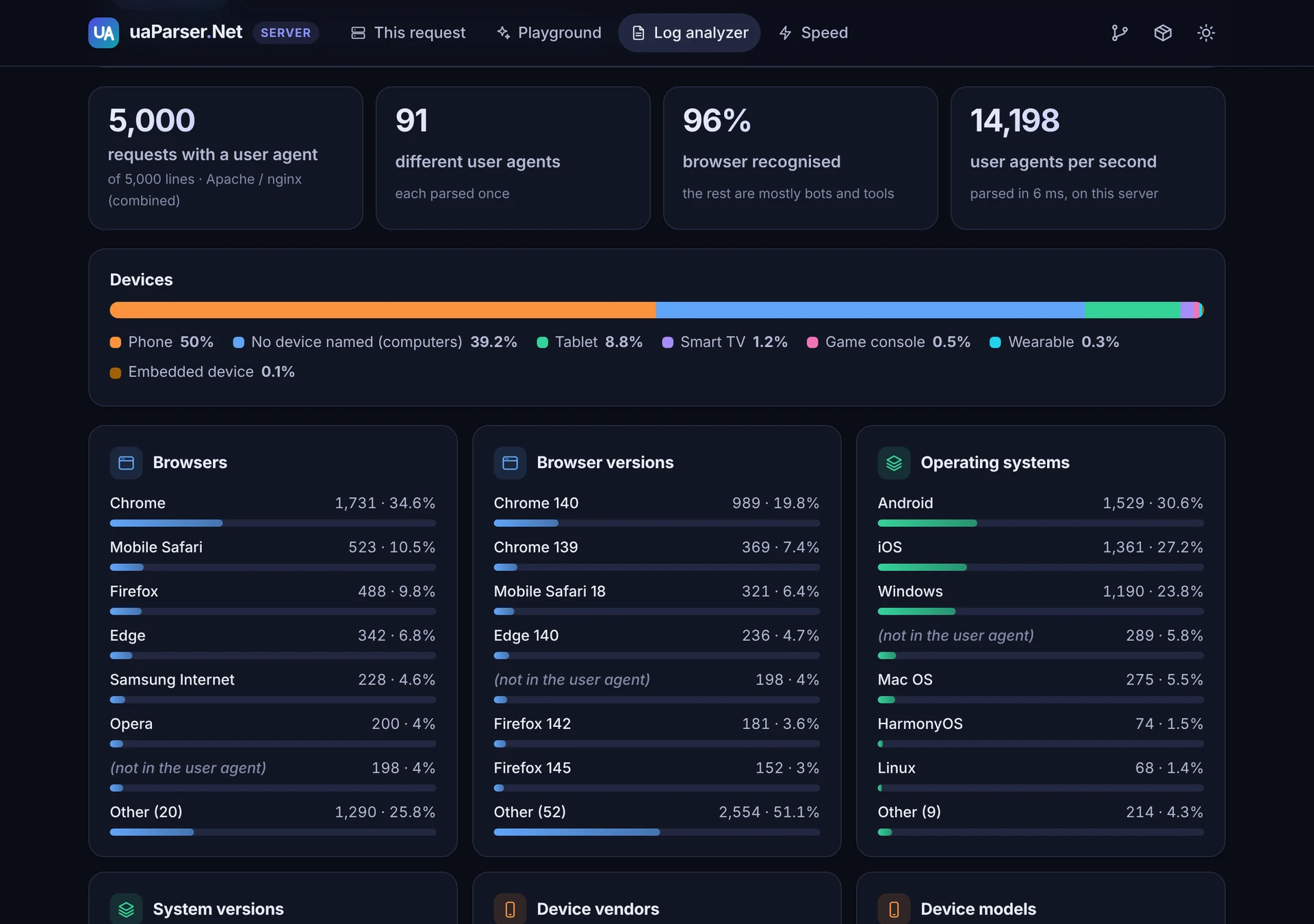
| Log analyzer | the browsers, systems and devices in an Apache, nginx, IIS or JSON access log, read in the browser | the same, on the server |
| Also | Client Hints next to the User-Agent, the GPU, the iPad check; a speed test in the browser | a JSON API (/api/client, /api/parse?ua=); a speed test on the server |
dotnet run -c Release --project uaParserBlazorWebAssemblyDemo   # http://localhost:5000
dotnet run -c Release --project uaParserBlazorServerDemo        # http://localhost:5002
Performance
Measured on a 4-CPU Linux container (Intel Xeon 2.8 GHz), .NET 10:
| uaParser.Net | ua-parser-js 1.0.41 on Node 22 | |
|---|---|---|
| Per user agent, after warm-up | 23-30 µs | 34-40 µs |
Repeated user agent, ClientInfoCache |
about 40 ns | |
| Memory per parse | about 2.6 KB | |
| First call in a new process | about 110 ms (45-60 ms with ReadyToRun) | about 8 ms |
| In the browser (Blazor WebAssembly, Chromium) | about 0.4 ms |
Most regexes are skipped by a cheap substring check before they run (about 96 % of them for a
typical user agent); the checks are derived from the regexes and verified never to skip a match.
Publish with -p:PublishReadyToRun=true if start-up time matters.
Measure it on your own machine with uaParserBenchmark:
dotnet run -c Release -- --quick in uaParserBenchmark, and npm run bench in
tools/RuleGenerator for ua-parser-js. Results are saved as Markdown and JSON in
benchmark-results/.
Known limitations
- Frozen user agents. Browsers now report fixed values in the User-Agent string: Windows 11
shows as
Windows NT 10.0(read as Windows 10), and Chrome on Android sendsAndroid 10; Kwithout the real version or model. Only User-Agent Client Hints carry the real values. - Rules of ua-parser-js 1.0.41 (August 2025). ua-parser-js 1.x is no longer updated; very new browsers or devices, and most bots, are not recognised yet.
- GPU rules from 2021. Modern WebGL strings such as
ANGLE (NVIDIA, NVIDIA GeForce RTX 3060 Direct3D11 ...)are not recognised.
How the rules are made
tools/RuleGenerator (Node.js) loads ua-parser-js 1.0.41 and reads its rule table at run time,
then writes uaParserLibrary/Rules/UserAgentRules.g.cs: every regex becomes a [GeneratedRegex]
with JavaScript semantics (RegexOptions.ECMAScript, invariant culture), and every value
assignment one of seven shapes that mirror ua-parser-js exactly. Anything it does not recognise
stops it. It also writes the answer key the tests compare against (what ua-parser-js returns for
every user agent in the corpus) and a report of which rules the corpus reaches (306 of 307; the
last one can never be reached). See tools/RuleGenerator/README.md.
cd tools/RuleGenerator
npm ci --ignore-scripts
npm run all
Upgrading from 1.x
See CHANGELOG.md for every change.
| 1.x | 2.0 |
|---|---|
Missing values were "Other", "UnKnown", "" or "undefined" |
null |
Mutable classes with an Empty property |
Immutable records |
| The same result object was reused between calls (wrong results under concurrency) | Every call returns new results; thread-safe |
| Hand-ported subset of the rules | All rules of ua-parser-js 1.0.41, generated |
Some names differed from ua-parser-js (for example Samsung Browser, Edge HTML) |
Names of ua-parser-js 1.0.41 (Samsung Internet, EdgeHTML) |
AddUAParser(options => ...) with per-part switches; a singleton ClientInfo filled after the request |
AddUAParser() or AddUAParser(o => o.CacheCapacity = n); a scoped ClientInfo per request |
Separate uaParserResource assembly |
Removed |
| .NET 5 | .NET 10 |
Repository
| Folder | |
|---|---|
uaParserLibrary |
The uaParser.Net package |
uaParserMiddleware |
The uaParser.Net.AspNetCore package |
uaParserTest |
Tests: the answer key, ua-parser-js's own tests, behaviour, cache, middleware |
uaParserBenchmark |
Speed measurements |
tools/RuleGenerator |
Generates the rules, the answer key and the example user agents |
uaParserConsole |
Console sample |
uaParserBlazorWebAssemblyDemo, uaParserBlazorServerDemo |
Demos (see above) |
uaParserDemoComponents |
The demos' pages, shared by both |
Shared |
Example user agents shared by the samples |
dotnet build uaParser.sln
dotnet test
License
MIT, see LICENSE. The rules are ported from ua-parser-js 1.0.41, MIT License, copyright (c) 2012-2025 Faisal Salman; see THIRD-PARTY-NOTICES.md.
| Product | Versions Compatible and additional computed target framework versions. |
|---|---|
| .NET | net10.0 is compatible. net10.0-android was computed. net10.0-browser was computed. net10.0-ios was computed. net10.0-maccatalyst was computed. net10.0-macos was computed. net10.0-tvos was computed. net10.0-windows was computed. |
-
net10.0
- No dependencies.
NuGet packages (1)
Showing the top 1 NuGet packages that depend on uaParser.Net:
| Package | Downloads |
|---|---|
|
uaParser.Net.AspNetCore
ASP.NET Core integration for uaParser.Net: an injectable, per-request ClientInfo (with the request's User-Agent Client Hints), HttpContext.GetClientInfo(), an optional middleware that can ask for all client hints, and a shared cache for repeated user agents. |
GitHub repositories
This package is not used by any popular GitHub repositories.