Glass.Message
1.0.6
dotnet add package Glass.Message --version 1.0.6
NuGet\Install-Package Glass.Message -Version 1.0.6
<PackageReference Include="Glass.Message" Version="1.0.6" />
<PackageVersion Include="Glass.Message" Version="1.0.6" />
<PackageReference Include="Glass.Message" />
paket add Glass.Message --version 1.0.6
#r "nuget: Glass.Message, 1.0.6"
#:package Glass.Message@1.0.6
#addin nuget:?package=Glass.Message&version=1.0.6
#tool nuget:?package=Glass.Message&version=1.0.6
🪟 Glass.Message
The modern MessageBox replacement for .NET WinForms — Windows 11 ready, zero migration cost.
Mica & Acrylic backdrops · automatic dark/light theming · fluent builder API · async/await dialogs · inline text & password inputs · activity-aware live progress bars · toast notifications · per-monitor DPI · full RTL support.




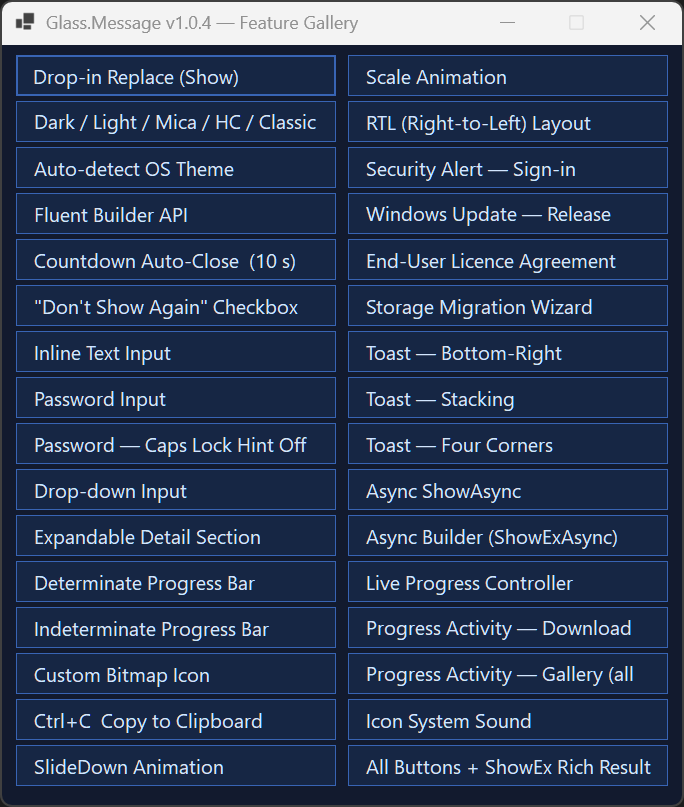
Why Glass.Message?
System.Windows.Forms.MessageBox hasn't changed since Windows XP. It ignores dark mode, ignores your monitor's DPI, can't be awaited, and looks out of place on Windows 10/11. Glass.Message replaces it with a single type-name change — the Show(...) overloads are 100% signature-compatible and still return DialogResult.
// Before — flat grey dialog, blocks the thread, ignores dark mode
MessageBox.Show("Save failed. The file is in use by another process.",
    "Save Error", MessageBoxButtons.RetryCancel, MessageBoxIcon.Error);

// After — same one-liner, now modern, themed, DPI-aware, animated
GlassMessage.Show("Save failed. The file is in use by another process.",
    "Save Error", MessageBoxIcon.Error);
No new dependencies. No additional configuration. Works on .NET Framework 4.8.1 and .NET 8 / 9 / 10.
🆕 What's new in v1.0.6
A quality, performance, and concurrency hardening maintenance release — no new features, no public API changes. Verified with real stress/concurrency tests and rendered DPI screenshots:
- Improved concurrency behavior —
GlassProgressControllerupdates from background threads now coalesce instead of flooding the UI thread, verified under sustained multi-threaded load with no deadlocks or hangs. - Reduced rendering allocation pressure — toast notifications and the dialog's close-button/countdown-ring no longer allocate new GDI+ objects on every repaint or animation frame; they're built once and reused.
- Improved resource management — GDI/USER handle counts verified stable across hundreds of dialog/toast create-and-dispose cycles.
- DPI / rendering polish — dialog rescaling verified clean at 100–200% DPI from actual rendered output, with no cropping or visual artifacts.
- Reliability — verified no stale toast state under rapid/simultaneous toast creation and dismissal, and no corruption when a DPI change occurs while progress updates and an open toast are concurrently active.
Full technical details: CHANGELOG.md.
Install
dotnet add package Glass.Message
Feature comparison
| Capability | MessageBox |
Glass.Message |
|---|---|---|
| Dark / light mode | ✗ | ✓ auto-detect |
| Windows 11 Mica backdrop | ✗ | ✓ |
| Windows 10 Acrylic blur | ✗ | ✓ |
| Rounded corners (DWM) | ✗ | ✓ |
| Per-monitor DPI scaling | ✗ | ✓ |
async / await support |
✗ | ✓ |
CancellationToken support |
✗ | ✓ |
| Open/close animations | ✗ | ✓ Fade, Slide, Scale |
| Inline text / password input | ✗ | ✓ |
| Inline drop-down input | ✗ | ✓ |
| Live progress bar | ✗ | ✓ determinate + marquee |
| Activity-aware progress animation | ✗ | ✓ upload / download / sync / compress / … |
| Checkbox ("don't show again") | ✗ | ✓ |
| Expandable detail panel | ✗ | ✓ |
| Toast notifications | ✗ | ✓ 6 positions, multi-monitor |
| Custom button labels | ✗ | ✓ |
| Custom themes | ✗ | ✓ |
| High contrast accessibility | system only | ✓ dedicated preset |
| Right-to-left layout | ✗ | ✓ |
| Countdown auto-close | ✗ | ✓ |
Ctrl+C copies content |
✗ | ✓ |
| .NET Framework 4.8.1 | ✓ | ✓ |
| .NET 8 / 9 / 10 | ✓ | ✓ |
Quick start
using Glass;
using System.Windows.Forms;

// Optional — set once at startup (e.g. in Program.cs or Form_Load)
GlassMessage.UseRoundedCorners = true;                    // Windows 11 rounded corners
GlassMessage.DefaultTheme      = GlassTheme.AutoDetect(); // follow the OS light / dark theme
GlassMessage.PlaySystemSounds  = true;                    // match classic MessageBox behaviour

// Drop-in replacement (same signature, same DialogResult)
DialogResult result = GlassMessage.Show(
    "Your changes have been saved.", "Success", MessageBoxIcon.Information);
Examples
Custom buttons + fluent builder
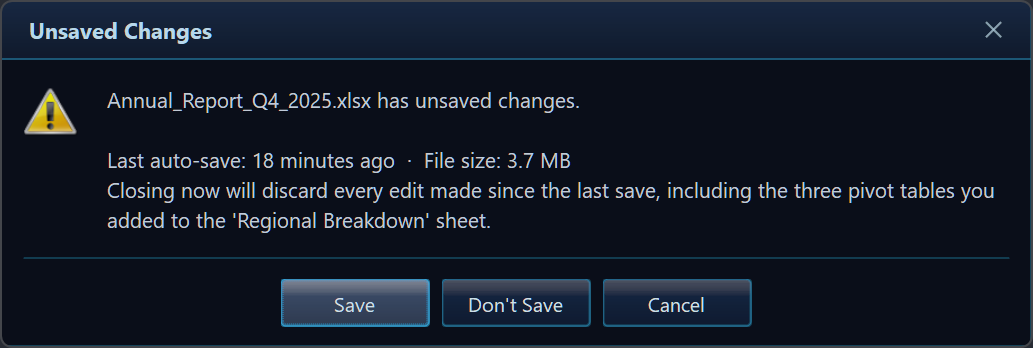
var r = GlassMessage.Create("Annual_Report_Q4.xlsx has unsaved changes.")
    .Title("Unsaved Changes")
    .Icon(MessageBoxIcon.Warning)
    .Buttons("Save", "Don't Save", "Cancel")
    .Show();
Text / password input
// Text input with a checkbox
var r = GlassMessage.Create("Enter a new name for this folder.")
    .Title("Rename")
    .InputText("Folder name", "Client Projects")
    .CheckBox("Apply to sub-folders")
    .Buttons("Rename", "Cancel")
    .ShowEx();

if (r.Button == DialogResult.OK)
    RenameFolder(r.InputText, applyRecursive: r.CheckBoxChecked);

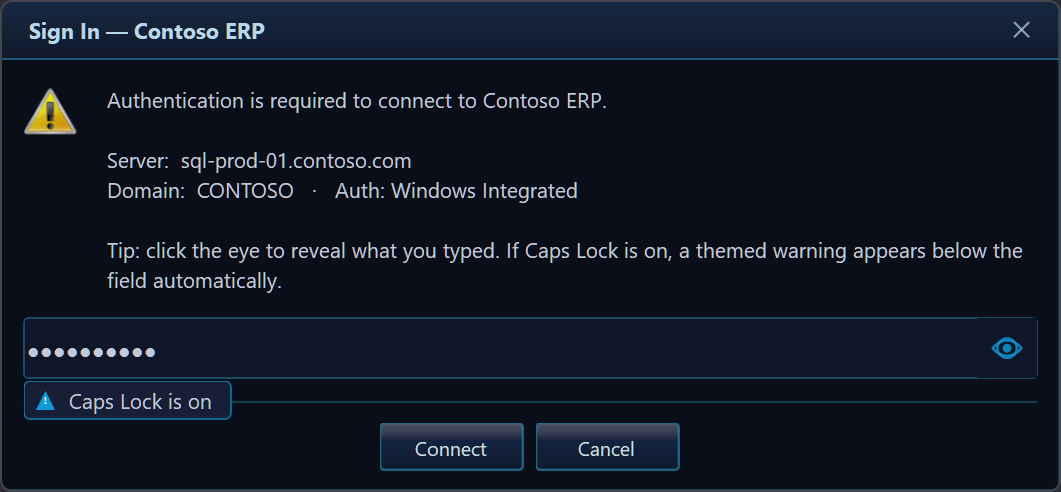
// Password input (masked, with reveal-eye toggle and Caps Lock hint)
var r = GlassMessage.Create("Enter your vault password to continue.")
    .Title("Authentication Required")
    .Icon(MessageBoxIcon.Shield)
    .InputPassword("Password")
    .Buttons("Unlock", "Cancel")
    .ShowEx();
Async dialogs with CancellationToken
// Non-blocking — the UI stays responsive while the dialog is open
var choice = await GlassMessage.ShowAsync(
    "Push local changes to origin/main?", "Sync",
    MessageBoxIcon.Question, MessageBoxButtons.OKCancel);

// Cancellable from code — e.g. session timeout after 30 s
using var cts = new CancellationTokenSource(TimeSpan.FromSeconds(30));
var result = await GlassMessage.Create("Confirm deployment to production?")
    .Title("Deploy")
    .Icon(MessageBoxIcon.Warning)
    .Buttons("Deploy Now", "Cancel")
    .ShowAsync(cts.Token);
Live progress dialog (activity-aware)
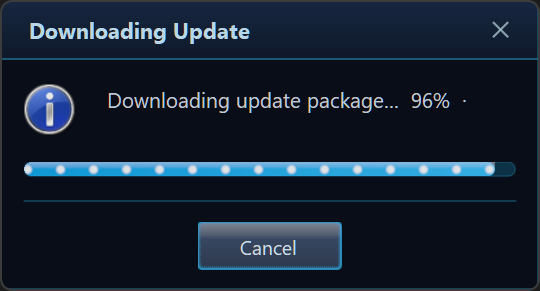
The bar can animate to match the operation — Upload, Download, Sync, Compress, and more — and you can switch the activity live as the work moves between phases:
var ctrl = GlassMessage.Create("Uploading files to cloud storage…")
    .Title("Upload")
    .Progress(0, 100)
    .ProgressActivity(GlassProgressActivity.Upload)   // glowing packets flow →
    .Buttons("Cancel")
    .ShowProgress();

for (int i = 0; i <= 100; i += 10)
{
    if (ctrl.WasCanceledByUser) break;
    ctrl.SetValue(i);
    ctrl.SetMessage($"Uploading file {i / 10 + 1} of 10…");
    await Task.Delay(500);
}
ctrl.Complete();
await ctrl.Completion;
Toast notifications
// Fire-and-forget, bottom-right corner, auto-dismiss after 4 s
GlassToast.Show("Invoice #1042 saved to SharePoint.", "Upload Complete",
    MessageBoxIcon.Information);

// Awaitable toast — continues after the notification disappears
await GlassToast.ShowAsync(new GlassToastOptions
{
    Title     = "Build finished",
    Message   = "Release x64 completed in 4.2 s.",
    Icon      = MessageBoxIcon.None,
    Position  = ToastPosition.TopRight,
    DurationMs = 6_000,
    OnClick   = () => OpenBuildLog(),
});
Theming
Five built-in presets — pick one or build your own:
| Preset | Description |
|---|---|
GlassTheme.Default |
Dark blue (ships as the default) |
GlassTheme.Light |
Bright palette for light-mode apps |
GlassTheme.Mica |
Neutral, tuned for Windows 11 Mica backdrop |
GlassTheme.HighContrast |
Full Windows system-colour accessibility preset |
GlassTheme.WindowsClassic |
Square, opaque — matches traditional Windows chrome |
GlassTheme.AutoDetect() |
Chooses Dark / Light / HighContrast at runtime |
Target frameworks & platforms
| Framework | Notes |
|---|---|
.NET Framework 4.8.1 |
Full support, ships explicit WinForms references |
.NET 8.0-windows |
LTS |
.NET 9.0-windows |
Current |
.NET 10.0-windows |
Preview |
AnyCPU — runs in both x86 and x64 processes.
Windows-only (WinForms). No third-party runtime dependencies.
Documentation & links
- 📖 Full docs, gallery & API reference: https://github.com/gcfernando/glass
- 📜 Changelog: https://github.com/gcfernando/glass/blob/main/CHANGELOG.md
- ⬇️ Releases & pre-built binaries: https://github.com/gcfernando/glass/releases
- 🐛 Issues & feature requests: https://github.com/gcfernando/glass/issues
MIT Licensed · © 2026 Gehan Fernando
Keywords: WinForms MessageBox replacement, Windows Forms modern dialog, dark mode dialog .NET, Windows 11 Mica dialog, Acrylic WinForms, async MessageBox C#, WinForms toast notification, DPI-aware dialog, WinForms progress dialog, WinForms input dialog, WinForms password dialog, themed dialog WinForms, GlassMessage, Glass.Message
| Product | Versions Compatible and additional computed target framework versions. |
|---|---|
| .NET | net8.0-windows7.0 is compatible. net9.0-windows was computed. net9.0-windows7.0 is compatible. net10.0-windows was computed. net10.0-windows7.0 is compatible. |
| .NET Framework | net481 is compatible. |
-
.NETFramework 4.8.1
- No dependencies.
-
net10.0-windows7.0
- No dependencies.
-
net8.0-windows7.0
- No dependencies.
-
net9.0-windows7.0
- No dependencies.
NuGet packages
This package is not used by any NuGet packages.
GitHub repositories
This package is not used by any popular GitHub repositories.
A quality, performance, and concurrency hardening release. No new features and
no public API changes — this release is exclusively internal correctness,
memory/resource, threading, and rendering-quality fixes found during a full
engineering audit of the codebase, verified with real stress, concurrency, and
DPI-rendering tests rather than code review alone.
### Thread Safety & Concurrency
- **Unbounded UI-thread backlog from rapid `GlassProgressController` updates** —
`SetValue`/`SetMessage`/`SetActivity` each previously queued a separate
`BeginInvoke` call per invocation. A worker thread calling these at high
frequency (or several worker threads calling them concurrently) could flood
the dialog's UI-thread message queue with thousands of queued delegates,
growing memory and leaving the dialog applying a long backlog of stale
values instead of the current one. Each update kind is now coalesced through
a lock-free drain loop so at most one marshaled call per kind is ever
outstanding, and only the latest value is ever applied — the worker thread
is never blocked and the UI never falls behind. This is purely an internal
dispatch change; the public `GlassProgressController` API and its threading
guarantees are unchanged.
- Verified, with a live message pump and six concurrent worker threads, that
there is no deadlock, no cross-thread exception, and no hang under sustained
concurrent controller updates, including a 15-trial concurrent
update/`Dispose()` race.
- Verified that `GlassMessage`'s async cancellation (`CancellationToken`)
reaches a terminal task state — never hangs — when cancellation arrives
before showing, immediately after showing, while visible/animating,
concurrently with a button click, or while the owner is being disposed.
- Verified that 25 simultaneously-stacked toasts and 50 rapid sequential
toast show/dismiss cycles leave no stale entries in the internal
active-toast list, and that firing DPI changes while a background thread
hammers a progress controller and a toast is simultaneously open does not
corrupt dialog/toast state or throw.
### Performance
- Progress-controller coalescing (above) removes the unbounded-backlog growth
path from high-frequency producers, keeping the UI thread's queue bounded
under load.
### Memory / Resource Management
- Verified, via `GetGuiResources` (the API backing Task Manager's GDI/USER
object columns), that GDI and USER handle counts remain bounded across 300
dialog and 200 toast create/show/paint/dispose cycles — no unbounded native
handle growth.
- `GlassDialog` and `GlassToast`'s `ToastForm` now tolerate double-`Dispose()`
safely with their additional cached GDI+ fields.
### GDI/GDI+ Allocation Reduction
- **Toast notifications allocated fresh GDI+ objects on every animation frame** —
`GlassToast`'s `ToastForm.OnPaint` built a new `GraphicsPath`, a new
`LinearGradientBrush`, a second new `GraphicsPath`, and two new `Pen`s on
*every* repaint, including every tick of the fade-in/fade-out animation.
These are now built once (lazily, since the final corner geometry is only
known after the handle is created) and reused for the toast's lifetime,
matching the caching pattern already used by `GlassDialog`/`GlassButton`,
and are disposed when the toast closes.
- **`GlassDialog` close-button and countdown-ring pens reallocated every paint** —
the close button's "×" pen (which changes only on hover) and the auto-close
countdown ring's track/fill pens were allocated fresh on every `OnPaint`,
including every mouse-move-driven repaint and every countdown tick. They are
now cached (keyed on hover state for the close button) and rebuilt only when
a DPI change triggers a dialog rebuild, instead of on every frame.
### Rendering / Visual Polish
- Verified, from actual rendered screenshots (not code review alone), that the
close button, countdown ring, progress-bar fill, checkbox, and button
borders render with sharp rounded corners, crisp single-pixel-consistent
strokes, and no visible seams or artifacts, across idle, hover, and focused
states.
### DPI / Animation
- Verified, by driving `GlassDialog`'s real `WM_DPICHANGED` handler and
capturing actual composited window output, that the dialog rescales cleanly
and proportionally at 100%, 125%, 150%, 175%, and 200% DPI, with no
cropping or layout corruption at any scale.
### Tests
- Added regression tests covering the three fixes above: concurrent/
high-frequency `GlassProgressController` updates from multiple threads
complete without exceptions; the controller tolerates calls that arrive
before the dialog's window handle exists; `GlassDialog` and
`GlassToast`'s `ToastForm` tolerate double-`Dispose()` safely now that
they own additional cached GDI+ resources; and a real handle-creation +
paint pass on a toast exercises the new cached-resource code path
end-to-end.
- Added runtime stress/concurrency harnesses that create, show, paint, and
dispose real `Form`-derived windows under an actual Win32 message pump
(rather than only reviewing code): 300-cycle dialog and 200-cycle toast
create/dispose loops asserting bounded GDI/USER handle growth; a 6-thread
`GlassProgressController` hammering test running concurrently with message
pumping; a dispose-race test; async-cancellation-lifecycle tests covering
cancellation before/immediately-after/during-visible/concurrent-with-click/
owner-disposed scenarios; and toast concurrency tests for 25 simultaneously
stacked toasts and 50 rapid sequential show/dismiss cycles, verified via the
internal active-toast list for stale entries.
- Added a DPI visual-capture harness that drives `GlassDialog`'s real
`WM_DPICHANGED` handler via `SendMessage` (not reflection) and saves actual
`PrintWindow`-composited screenshots at 100/125/150/175/200% for visual
inspection, plus a mixed-DPI test that fires simulated DPI changes while a
background thread hammers `GlassProgressController` and a toast is
simultaneously open, asserting no exception and no corrupted dialog/toast
state.
- The test project now multi-targets all four supported frameworks
(`net481`, `net8.0-windows`, `net9.0-windows`, `net10.0-windows`); the full
suite was executed — not just built — on every one of them.