Glass.Message
1.0.4
See the version list below for details.
dotnet add package Glass.Message --version 1.0.4
NuGet\Install-Package Glass.Message -Version 1.0.4
<PackageReference Include="Glass.Message" Version="1.0.4" />
<PackageVersion Include="Glass.Message" Version="1.0.4" />
<PackageReference Include="Glass.Message" />
paket add Glass.Message --version 1.0.4
#r "nuget: Glass.Message, 1.0.4"
#:package Glass.Message@1.0.4
#addin nuget:?package=Glass.Message&version=1.0.4
#tool nuget:?package=Glass.Message&version=1.0.4
🪟 Glass.Message
The modern MessageBox replacement for .NET WinForms — Windows 11 ready, zero migration cost.
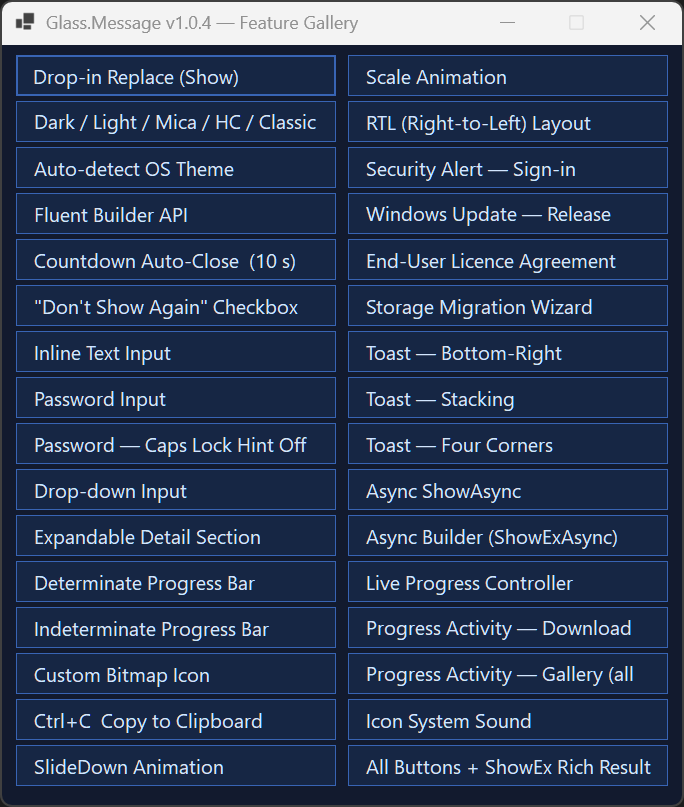
Mica & Acrylic backdrops · automatic dark/light theming · fluent builder API · async/await dialogs · inline text & password inputs · activity-aware live progress bars · toast notifications · per-monitor DPI · full RTL support.




Why Glass.Message?
System.Windows.Forms.MessageBox hasn't changed since Windows XP. It ignores dark mode, ignores your monitor's DPI, can't be awaited, and looks out of place on Windows 10/11. Glass.Message replaces it with a single type-name change — the Show(...) overloads are 100% signature-compatible and still return DialogResult.
// Before — flat grey dialog, blocks the thread, ignores dark mode
MessageBox.Show("Save failed. The file is in use by another process.",
    "Save Error", MessageBoxButtons.RetryCancel, MessageBoxIcon.Error);

// After — same one-liner, now modern, themed, DPI-aware, animated
GlassMessage.Show("Save failed. The file is in use by another process.",
    "Save Error", MessageBoxIcon.Error);
No new dependencies. No additional configuration. Works on .NET Framework 4.8.1 and .NET 8 / 9 / 10.
Install
dotnet add package Glass.Message
Feature comparison
| Capability | MessageBox |
Glass.Message |
|---|---|---|
| Dark / light mode | ✗ | ✓ auto-detect |
| Windows 11 Mica backdrop | ✗ | ✓ |
| Windows 10 Acrylic blur | ✗ | ✓ |
| Rounded corners (DWM) | ✗ | ✓ |
| Per-monitor DPI scaling | ✗ | ✓ |
async / await support |
✗ | ✓ |
CancellationToken support |
✗ | ✓ |
| Open/close animations | ✗ | ✓ Fade, Slide, Scale |
| Inline text / password input | ✗ | ✓ |
| Inline drop-down input | ✗ | ✓ |
| Live progress bar | ✗ | ✓ determinate + marquee |
| Activity-aware progress animation | ✗ | ✓ upload / download / sync / compress / … |
| Checkbox ("don't show again") | ✗ | ✓ |
| Expandable detail panel | ✗ | ✓ |
| Toast notifications | ✗ | ✓ 6 positions, multi-monitor |
| Custom button labels | ✗ | ✓ |
| Custom themes | ✗ | ✓ |
| High contrast accessibility | system only | ✓ dedicated preset |
| Right-to-left layout | ✗ | ✓ |
| Countdown auto-close | ✗ | ✓ |
Ctrl+C copies content |
✗ | ✓ |
| .NET Framework 4.8.1 | ✓ | ✓ |
| .NET 8 / 9 / 10 | ✓ | ✓ |
Quick start
using Glass;
using System.Windows.Forms;

// Optional — set once at startup (e.g. in Program.cs or Form_Load)
GlassMessage.UseRoundedCorners = true;                    // Windows 11 rounded corners
GlassMessage.DefaultTheme      = GlassTheme.AutoDetect(); // follow the OS light / dark theme
GlassMessage.PlaySystemSounds  = true;                    // match classic MessageBox behaviour

// Drop-in replacement (same signature, same DialogResult)
DialogResult result = GlassMessage.Show(
    "Your changes have been saved.", "Success", MessageBoxIcon.Information);
Examples
Custom buttons + fluent builder
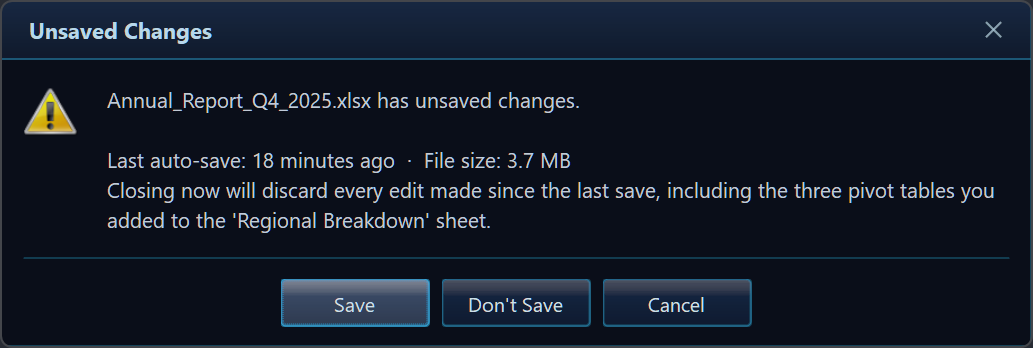
var r = GlassMessage.Create("Annual_Report_Q4.xlsx has unsaved changes.")
    .Title("Unsaved Changes")
    .Icon(MessageBoxIcon.Warning)
    .Buttons("Save", "Don't Save", "Cancel")
    .Show();
Text / password input
// Text input with a checkbox
var r = GlassMessage.Create("Enter a new name for this folder.")
    .Title("Rename")
    .InputText("Folder name", "Client Projects")
    .CheckBox("Apply to sub-folders")
    .Buttons("Rename", "Cancel")
    .ShowEx();

if (r.Button == DialogResult.OK)
    RenameFolder(r.InputText, applyRecursive: r.CheckBoxChecked);

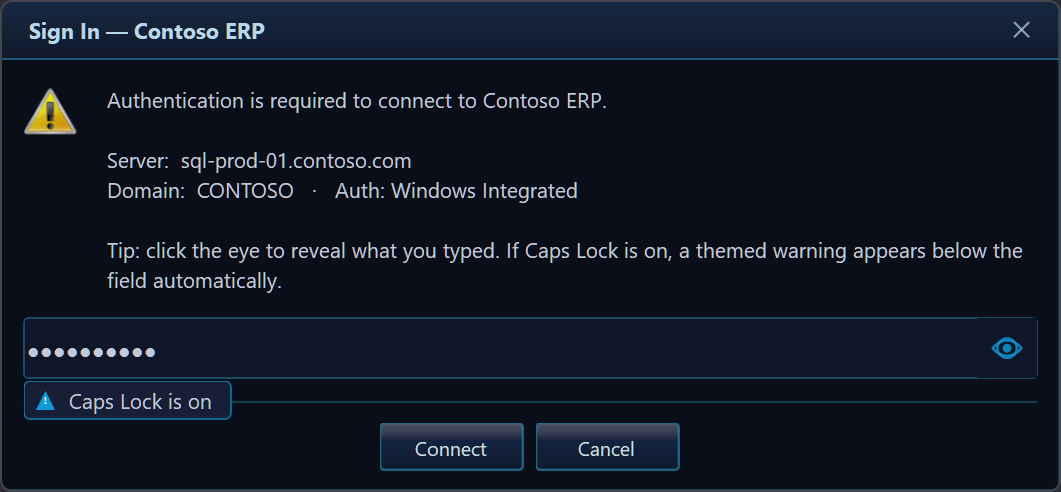
// Password input (masked, with reveal-eye toggle and Caps Lock hint)
var r = GlassMessage.Create("Enter your vault password to continue.")
    .Title("Authentication Required")
    .Icon(MessageBoxIcon.Shield)
    .InputPassword("Password")
    .Buttons("Unlock", "Cancel")
    .ShowEx();
Async dialogs with CancellationToken
// Non-blocking — the UI stays responsive while the dialog is open
var choice = await GlassMessage.ShowAsync(
    "Push local changes to origin/main?", "Sync",
    MessageBoxIcon.Question, MessageBoxButtons.OKCancel);

// Cancellable from code — e.g. session timeout after 30 s
using var cts = new CancellationTokenSource(TimeSpan.FromSeconds(30));
var result = await GlassMessage.Create("Confirm deployment to production?")
    .Title("Deploy")
    .Icon(MessageBoxIcon.Warning)
    .Buttons("Deploy Now", "Cancel")
    .ShowAsync(cts.Token);
Live progress dialog (activity-aware)
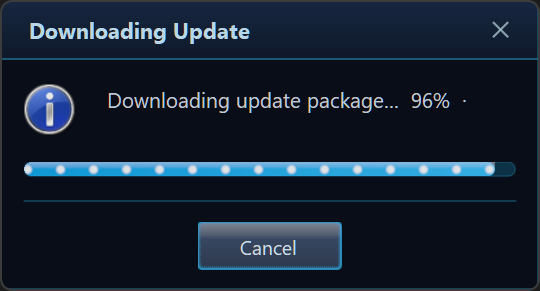
The bar can animate to match the operation — Upload, Download, Sync, Compress, and more — and you can switch the activity live as the work moves between phases:
var ctrl = GlassMessage.Create("Uploading files to cloud storage…")
    .Title("Upload")
    .Progress(0, 100)
    .ProgressActivity(GlassProgressActivity.Upload)   // glowing packets flow →
    .Buttons("Cancel")
    .ShowProgress();

for (int i = 0; i <= 100; i += 10)
{
    if (ctrl.WasCanceledByUser) break;
    ctrl.SetValue(i);
    ctrl.SetMessage($"Uploading file {i / 10 + 1} of 10…");
    await Task.Delay(500);
}
ctrl.Complete();
await ctrl.Completion;
Toast notifications
// Fire-and-forget, bottom-right corner, auto-dismiss after 4 s
GlassToast.Show("Invoice #1042 saved to SharePoint.", "Upload Complete",
    MessageBoxIcon.Information);

// Awaitable toast — continues after the notification disappears
await GlassToast.ShowAsync(new GlassToastOptions
{
    Title     = "Build finished",
    Message   = "Release x64 completed in 4.2 s.",
    Icon      = MessageBoxIcon.None,
    Position  = ToastPosition.TopRight,
    DurationMs = 6_000,
    OnClick   = () => OpenBuildLog(),
});
Theming
Five built-in presets — pick one or build your own:
| Preset | Description |
|---|---|
GlassTheme.Default |
Dark blue (ships as the default) |
GlassTheme.Light |
Bright palette for light-mode apps |
GlassTheme.Mica |
Neutral, tuned for Windows 11 Mica backdrop |
GlassTheme.HighContrast |
Full Windows system-colour accessibility preset |
GlassTheme.WindowsClassic |
Square, opaque — matches traditional Windows chrome |
GlassTheme.AutoDetect() |
Chooses Dark / Light / HighContrast at runtime |
Target frameworks & platforms
| Framework | Notes |
|---|---|
.NET Framework 4.8.1 |
Full support, ships explicit WinForms references |
.NET 8.0-windows |
LTS |
.NET 9.0-windows |
Current |
.NET 10.0-windows |
Preview |
AnyCPU — runs in both x86 and x64 processes.
Windows-only (WinForms). No third-party runtime dependencies.
Documentation & links
- 📖 Full docs, gallery & API reference: https://github.com/gcfernando/glass
- 📜 Changelog: https://github.com/gcfernando/glass/blob/main/CHANGELOG.md
- ⬇️ Releases & pre-built binaries: https://github.com/gcfernando/glass/releases
- 🐛 Issues & feature requests: https://github.com/gcfernando/glass/issues
MIT Licensed · © 2026 Gehan Fernando
Keywords: WinForms MessageBox replacement, Windows Forms modern dialog, dark mode dialog .NET, Windows 11 Mica dialog, Acrylic WinForms, async MessageBox C#, WinForms toast notification, DPI-aware dialog, WinForms progress dialog, WinForms input dialog, WinForms password dialog, themed dialog WinForms, GlassMessage, Glass.Message
| Product | Versions Compatible and additional computed target framework versions. |
|---|---|
| .NET | net8.0-windows7.0 is compatible. net9.0-windows was computed. net9.0-windows7.0 is compatible. net10.0-windows was computed. net10.0-windows7.0 is compatible. |
| .NET Framework | net481 is compatible. |
-
.NETFramework 4.8.1
- No dependencies.
-
net10.0-windows7.0
- No dependencies.
-
net8.0-windows7.0
- No dependencies.
-
net9.0-windows7.0
- No dependencies.
NuGet packages
This package is not used by any NuGet packages.
GitHub repositories
This package is not used by any popular GitHub repositories.
A feature release that makes the live progress dialog *activity-aware* — the
bar can now animate to match the operation it represents (upload, download,
sync, compress, …) — plus visual-polish and performance fixes for the progress
bar.
### Added
- **`ProgressActivity(GlassProgressActivity)` builder method** and the new
**`GlassProgressActivity`** enum (17 activities). The progress bar paints a
distinct, eye-catching animation grouped into six visual families:
| Family | Animation | Activities |
|---|---|---|
| **Packets** | glowing dots glide along | `Upload` · `Download` · `Stream` |
| **Chevrons** | diagonal bands march | `FileTransfer` · `Import` |
| **Segments** | rounded blocks march | `Compress` · `Extract` · `Export` |
| **Wave** | a sinusoidal ripple | `Backup` · `Restore` · `Sync` |
| **Pulse** | the fill breathes | `Encrypt` · `Decrypt` · `Connecting` |
| **Comet** | a soft shine sweeps | `Install` · `Search` · `Processing` |
Stripes flow forward for outgoing work, backward for incoming, and ease both
ways for a two-way sync. Works on both determinate and indeterminate bars; use
`GlassProgressActivity.None` for a plain bar.
- **`GlassProgressController.SetActivity(GlassProgressActivity)`** — change the
flow animation live as an operation moves between phases (e.g. `Compress` then
`Upload`).
### Fixed
- **Progress bar "box" artifact** — the progress panel now paints the dialog's
themed gradient behind itself (like every other custom control) instead of
clearing to a flat colour, so it blends into the window seamlessly rather than
showing a dark rectangle around the track.
- **Progress bar visibility** — boosted the contrast of every activity animation
so the styles read clearly at the standard bar height.
### Performance
- **No per-frame allocations in the animated progress panel** — the glow-dot
sprite, themed-background gradient, track border pen, flow brushes, and chevron
geometry are all cached/reused, so an animating progress dialog no longer
churns GDI+ objects at 30 fps.