Glass.Message
1.0.2
See the version list below for details.
dotnet add package Glass.Message --version 1.0.2
NuGet\Install-Package Glass.Message -Version 1.0.2
<PackageReference Include="Glass.Message" Version="1.0.2" />
<PackageVersion Include="Glass.Message" Version="1.0.2" />
<PackageReference Include="Glass.Message" />
paket add Glass.Message --version 1.0.2
#r "nuget: Glass.Message, 1.0.2"
#:package Glass.Message@1.0.2
#addin nuget:?package=Glass.Message&version=1.0.2
#tool nuget:?package=Glass.Message&version=1.0.2
🪟 Glass.Message
The modern MessageBox replacement for .NET WinForms — Windows 11 ready, zero migration cost.
Mica & Acrylic backdrops · automatic dark/light theming · fluent builder API · async/await dialogs · inline text & password inputs · live progress bars · toast notifications · per-monitor DPI · full RTL support.




Used by developers at companies including Microsoft, Google, and Oracle.
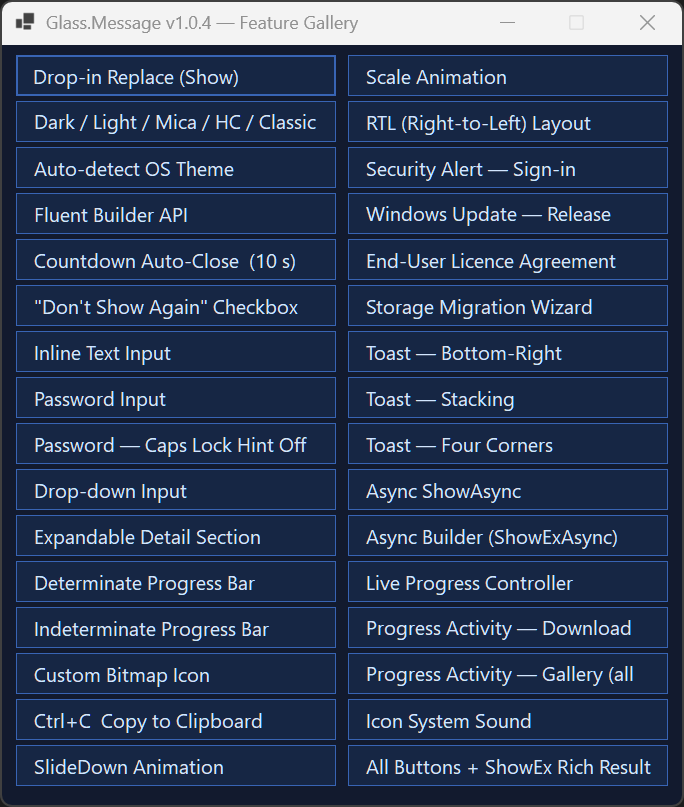
Why Glass.Message?
System.Windows.Forms.MessageBox hasn't changed since Windows XP. It ignores dark mode, ignores your monitor's DPI, can't be awaited, and looks out of place on Windows 10/11. Glass.Message replaces it with a single type-name change — the Show(...) overloads are 100% signature-compatible and still return DialogResult.
// Before — flat grey dialog, blocks the thread, ignores dark mode
MessageBox.Show("Save failed. The file is in use by another process.",
    "Save Error", MessageBoxButtons.RetryCancel, MessageBoxIcon.Error);

// After — same one-liner, now modern, themed, DPI-aware, animated
GlassMessage.Show("Save failed. The file is in use by another process.",
    "Save Error", MessageBoxIcon.Error);
No new dependencies. No additional configuration. Works on .NET Framework 4.8.1 and .NET 8 / 9 / 10.
Install
dotnet add package Glass.Message
Feature comparison
| Capability | MessageBox |
Glass.Message |
|---|---|---|
| Dark / light mode | ✗ | ✓ auto-detect |
| Windows 11 Mica backdrop | ✗ | ✓ |
| Windows 10 Acrylic blur | ✗ | ✓ |
| Rounded corners (DWM) | ✗ | ✓ |
| Per-monitor DPI scaling | ✗ | ✓ |
async / await support |
✗ | ✓ |
CancellationToken support |
✗ | ✓ |
| Open/close animations | ✗ | ✓ Fade, Slide, Scale |
| Inline text / password input | ✗ | ✓ |
| Inline drop-down input | ✗ | ✓ |
| Live progress bar | ✗ | ✓ determinate + marquee |
| Checkbox ("don't show again") | ✗ | ✓ |
| Expandable detail panel | ✗ | ✓ |
| Toast notifications | ✗ | ✓ 6 positions, multi-monitor |
| Custom button labels | ✗ | ✓ |
| Custom themes | ✗ | ✓ |
| High contrast accessibility | system only | ✓ dedicated preset |
| Right-to-left layout | ✗ | ✓ |
| Countdown auto-close | ✗ | ✓ |
Ctrl+C copies content |
✗ | ✓ |
| .NET Framework 4.8.1 | ✓ | ✓ |
| .NET 8 / 9 / 10 | ✓ | ✓ |
Quick start
using Glass;
using System.Windows.Forms;

// Optional — set once at startup (e.g. in Program.cs or Form_Load)
GlassMessage.UseRoundedCorners = true;                    // Windows 11 rounded corners
GlassMessage.DefaultTheme      = GlassTheme.AutoDetect(); // follow the OS light / dark theme
GlassMessage.PlaySystemSounds  = true;                    // match classic MessageBox behaviour

// Drop-in replacement (same signature, same DialogResult)
DialogResult result = GlassMessage.Show(
    "Your changes have been saved.", "Success", MessageBoxIcon.Information);
Examples
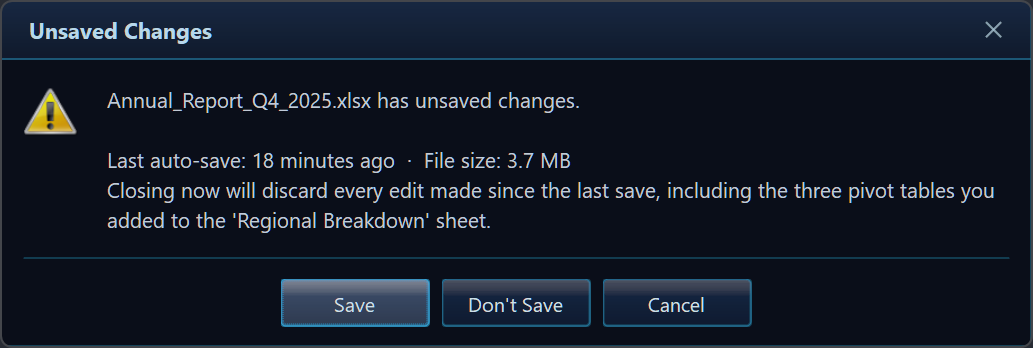
Custom buttons + fluent builder
var r = GlassMessage.Create("Annual_Report_Q4.xlsx has unsaved changes.")
    .Title("Unsaved Changes")
    .Icon(MessageBoxIcon.Warning)
    .Buttons("Save", "Don't Save", "Cancel")
    .Show();
Text / password input
// Text input with a checkbox
var r = GlassMessage.Create("Enter a new name for this folder.")
    .Title("Rename")
    .InputText("Folder name", "Client Projects")
    .CheckBox("Apply to sub-folders")
    .Buttons("Rename", "Cancel")
    .ShowEx();

if (r.Button == DialogResult.OK)
    RenameFolder(r.InputText, applyRecursive: r.CheckBoxChecked);

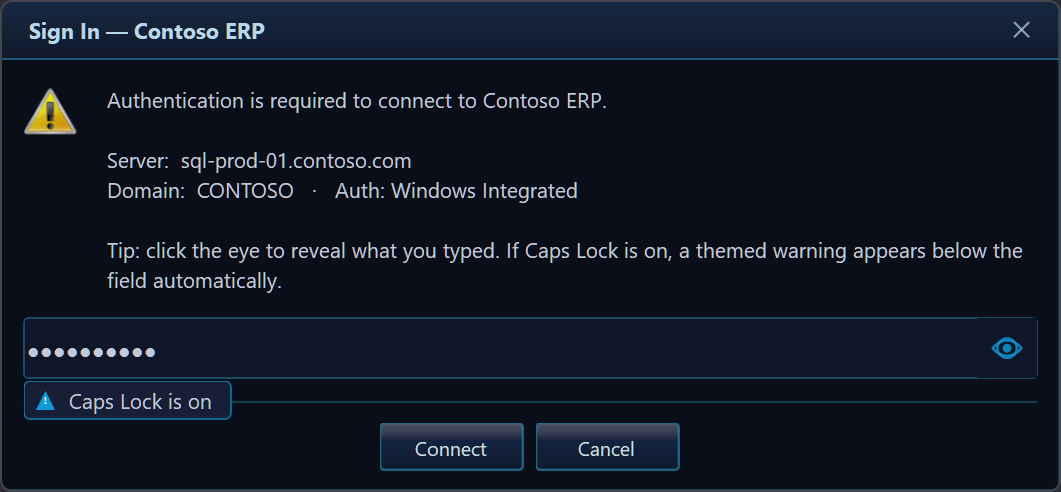
// Password input (masked, with reveal-eye toggle and Caps Lock hint)
var r = GlassMessage.Create("Enter your vault password to continue.")
    .Title("Authentication Required")
    .Icon(MessageBoxIcon.Shield)
    .InputPassword("Password")
    .Buttons("Unlock", "Cancel")
    .ShowEx();
Async dialogs with CancellationToken
// Non-blocking — the UI stays responsive while the dialog is open
var choice = await GlassMessage.ShowAsync(
    "Push local changes to origin/main?", "Sync",
    MessageBoxIcon.Question, MessageBoxButtons.OKCancel);

// Cancellable from code — e.g. session timeout after 30 s
using var cts = new CancellationTokenSource(TimeSpan.FromSeconds(30));
var result = await GlassMessage.Create("Confirm deployment to production?")
    .Title("Deploy")
    .Icon(MessageBoxIcon.Warning)
    .Buttons("Deploy Now", "Cancel")
    .ShowAsync(cts.Token);
Live progress dialog
var ctrl = GlassMessage.Create("Uploading files to cloud storage…")
    .Title("Upload")
    .Progress(0, 100)
    .Buttons("Cancel")
    .ShowProgress();

for (int i = 0; i <= 100; i += 10)
{
    if (ctrl.WasCanceledByUser) break;
    ctrl.SetValue(i);
    ctrl.SetMessage($"Uploading file {i / 10 + 1} of 10…");
    await Task.Delay(500);
}
ctrl.Complete();
await ctrl.Completion;
Toast notifications
// Fire-and-forget, bottom-right corner, auto-dismiss after 4 s
GlassToast.Show("Invoice #1042 saved to SharePoint.", "Upload Complete",
    MessageBoxIcon.Information);

// Awaitable toast — continues after the notification disappears
await GlassToast.ShowAsync(new GlassToastOptions
{
    Title     = "Build finished",
    Message   = "Release x64 completed in 4.2 s.",
    Icon      = MessageBoxIcon.None,
    Position  = ToastPosition.TopRight,
    DurationMs = 6_000,
    OnClick   = () => OpenBuildLog(),
});
Theming
Five built-in presets — pick one or build your own:
| Preset | Description |
|---|---|
GlassTheme.Default |
Dark blue (ships as the default) |
GlassTheme.Light |
Bright palette for light-mode apps |
GlassTheme.Mica |
Neutral, tuned for Windows 11 Mica backdrop |
GlassTheme.HighContrast |
Full Windows system-colour accessibility preset |
GlassTheme.WindowsClassic |
Square, opaque — matches traditional Windows chrome |
GlassTheme.AutoDetect() |
Chooses Dark / Light / HighContrast at runtime |
Target frameworks & platforms
| Framework | Notes |
|---|---|
.NET Framework 4.8.1 |
Full support, ships explicit WinForms references |
.NET 8.0-windows |
LTS |
.NET 9.0-windows |
Current |
.NET 10.0-windows |
Preview |
AnyCPU — runs in both x86 and x64 processes.
Windows-only (WinForms). No third-party runtime dependencies.
Documentation & links
- 📖 Full docs, gallery & API reference: https://github.com/gcfernando/glass
- 📜 Changelog: https://github.com/gcfernando/glass/blob/main/CHANGELOG.md
- ⬇️ Releases & pre-built binaries: https://github.com/gcfernando/glass/releases
- 🐛 Issues & feature requests: https://github.com/gcfernando/glass/issues
MIT Licensed · © 2026 Gehan Fernando
Keywords: WinForms MessageBox replacement, Windows Forms modern dialog, dark mode dialog .NET, Windows 11 Mica dialog, Acrylic WinForms, async MessageBox C#, WinForms toast notification, DPI-aware dialog, WinForms progress dialog, WinForms input dialog, WinForms password dialog, themed dialog WinForms, GlassMessage, Glass.Message
| Product | Versions Compatible and additional computed target framework versions. |
|---|---|
| .NET | net8.0-windows7.0 is compatible. net9.0-windows was computed. net9.0-windows7.0 is compatible. net10.0-windows was computed. net10.0-windows7.0 is compatible. |
| .NET Framework | net481 is compatible. |
-
.NETFramework 4.8.1
- No dependencies.
-
net10.0-windows7.0
- No dependencies.
-
net8.0-windows7.0
- No dependencies.
-
net9.0-windows7.0
- No dependencies.
NuGet packages
This package is not used by any NuGet packages.
GitHub repositories
This package is not used by any popular GitHub repositories.
### Added
- **`showCapsLockHint` parameter on `InputPassword()`** — opt out of the Caps Lock
badge per dialog with `.InputPassword("placeholder", showCapsLockHint: false)`.
The hint stays on by default; suppress it for PIN entry, kiosk flows, or anywhere
uppercase input is intentional. Showcased by the new **Password — Caps Lock Hint
Off** demo (`Demo_PasswordNoCapsLock`).
### Fixed
#### Thread safety & concurrency
- **Volatile static properties** — `DefaultTheme`, `UseRoundedCorners`, and
`PlaySystemSounds` in `GlassMessage` now use `volatile` backing fields, ensuring
writes from any thread are immediately visible on all architectures including ARM64.
- **CancellationToken callback crash** (C1) — the `ct.Register` callback in
`ShowModeless` now wraps `BeginInvoke` in a `try/catch` for
`InvalidOperationException` / `ObjectDisposedException`, preventing an unhandled
exception that could crash the process when the dialog's handle is destroyed
concurrently with cancellation.
- **Hanging async tasks on shutdown** (C2, C7) — `GlassMessage.ShowModeless` and
`GlassToast.ShowAsync` now subscribe to the form's `Disposed` event and call
`TrySetResult` as a safety net, guaranteeing that every awaited task completes even
when `Application.Exit` disposes forms without firing `FormClosed`.
- **Concurrent GDI+ bitmap access** (C5) — system icons loaded from
`SystemIcons`/`MessageBoxIcon` are now cloned per-dialog via a new `ResolveIcon`
helper. The `_ownsIconBitmap` flag ensures clones are disposed while shared bitmaps
are left alone.
- **Toast options mutation** — `GlassToast.Show/ShowAsync` resolved the theme into a
local variable instead of writing back into the caller's `GlassToastOptions`, so
the same options object can be reused safely.
- **Toast race: form added to active list before handlers registered** — `FormClosed`
and `Disposed` are now registered before `_active.Add`, eliminating the window
where a fast OS `WM_CLOSE` could leave a ghost entry in the stack.
- **Toast `OnClick` exception suppressing dismiss** — wrapped in `try/finally` so a
throwing callback never prevents the toast from closing.
#### Animation & DPI
- **Scale animation close-button hit-test** (#5) — `_closeBtnBounds` is now
recalculated after every scale frame in `ApplyAnimationFrame`, so the × button
remains clickable throughout the opening/closing animation.
- **DPI change corrupting animation state** (#7) — `Rebuild()` now resets all
animation flags (`_scaleActive`, `_slideActive`, `_fadingOut`) and disposes the
fade timer before rebuilding, preventing leftover state from corrupting the next
animation cycle.
- **Wrong initial DPI scale** — the dialog now reads the DPI of the monitor under
the cursor at construction time via `GetDpiForMonitor` + `MonitorFromPoint`
P/Invokes instead of using the primary monitor's device context.
- **Width cap using primary monitor** — `MeasureForm` now accepts a `targetScreen`
parameter and caps width against the target screen's working area, not the primary.
#### GDI+ resource management
- **Per-frame pen allocation** (#11) — the input border pen is now pre-allocated
once in the constructor as `_inputBorderPen` and disposed in `Dispose()`, avoiding
GDI+ handle churn on every `OnPaint` call.
- **Preset theme double-instantiation** (#18) — `GlassTheme.Dark` is now the same
object reference as `GlassTheme.Default`, halving font allocations for the default
case and making equality checks (`Dark == Default`) correct.
#### Drag behaviour
- **Dialog draggable off-screen** (#3) — `OnMouseMove` now calls `ClampToScreen`
after each drag update, keeping the title bar (and drag handle) always reachable.
#### API correctness
- **`GlassResult` null implicit conversion** (#19) — the `implicit operator
DialogResult` now uses `r?.Button ?? DialogResult.None` instead of `r.Button`,
preventing a `NullReferenceException` when the result is assigned from `null`.
- **`InputDropdown` null argument crash** (#1) — a `null` `items` enumerable no
longer throws; an empty dropdown is created instead.
- **`EM_SETCUEBANNER` wParam** — the `wParam` for the `EM_SETCUEBANNER` message in
`PlaceholderTextBox` is now `1u` (redraw even if focused), matching the MSDN spec
and ensuring placeholder text renders reliably.
- **`GlassDialogConfig` property access modifiers** (#17) — all properties on the
already-`internal` `GlassDialogConfig` class are now explicitly `internal`,
removing misleading `public` modifiers that had no external effect but implied
wider accessibility than intended.
#### Docs & XML
- **`Buttons(params string[])` XML doc** (#4) — updated to document the 3-label
maximum and explain that labels beyond the third are silently ignored.
#### Tests
- Added `[CollectionDefinition("GlassStaticState")]` and applied
`[Collection("GlassStaticState")]` to `GlassBuilderTests` and
`GlassMessageStaticTests`, serialising the classes that mutate global static state
so they cannot interfere with each other under xUnit parallel execution.
- Added `CalcToastLocationTests` — pure coordinate-math tests for all six
`ToastPosition` values plus stack-offset assertions.
- Added `V102RegressionTests` — targeted regression tests for the `GlassResult` null
conversion, `Dark == Default` identity, and `InputDropdown(null)` safety.
- Updated xUnit packages: `xunit` and `xunit.runner.visualstudio` → **2.9.3**,
`Microsoft.NET.Test.Sdk` → **17.12.0**.
#### Progress controller
- Documented the intentional fire-and-forget design of `BeginInvoke` in
`GlassProgressController.Marshal` — `SetValue`/`SetMessage` are best-effort UI
refreshes that must not block worker threads; `Completion` remains the correct
await point.
#### Marquee timer
- Halved marquee progress timer pressure: interval 16 ms → 33 ms (≈ 30 fps),
phase step scaled proportionally so visual speed is unchanged.
---