OpenccNetLib 1.3.0
See the version list below for details.
dotnet add package OpenccNetLib --version 1.3.0
NuGet\Install-Package OpenccNetLib -Version 1.3.0
<PackageReference Include="OpenccNetLib" Version="1.3.0" />
<PackageVersion Include="OpenccNetLib" Version="1.3.0" />
<PackageReference Include="OpenccNetLib" />
paket add OpenccNetLib --version 1.3.0
#r "nuget: OpenccNetLib, 1.3.0"
#:package OpenccNetLib@1.3.0
#addin nuget:?package=OpenccNetLib&version=1.3.0
#tool nuget:?package=OpenccNetLib&version=1.3.0
OpenccNet


OpenccNetLib is a fast and efficient .NET library for converting Chinese text, offering support for Simplified ↔ Traditional, Taiwan, Hong Kong, and Japanese Kanji variants. Built with inspiration from OpenCC, this library is designed to integrate seamlessly into modern .NET projects with a focus on performance and minimal memory usage.
Table of Contents
Features
- Fast, multi-stage conversion using static dictionary caching
- Supports:
- Simplified ↔ Traditional Chinese
- Traditional (Taiwan) ↔ Simplified/Traditional
- Traditional (Hong Kong) ↔ Simplified/Traditional
- Japanese Kanji Shinjitai ↔ Traditional Kyujitai
- Accurate handling of non-BMP (U+20000+) Chinese characters for better conversion fidelity
- Optional punctuation conversion
- Thread-safe and suitable for parallel processing
- .NET Standard 2.0 compatible
(cross-platform: Windows, Linux, macOS; supported on .NET Core 2.0+, .NET 5+, .NET 6/7/8/9/10 LTS)
Installation
- Add the library to your project via NuGet or reference the source code directly.
- Add required dependencies of dictionary files to library root.
dicts\dictionary_maxlength.zstdDefault dictionary file.dicts\*.*Others dictionary files for different configurations.
Install via NuGet:
dotnet add package OpenccNetLib
Or, clone and include the source files in your project.
Usage
Basic Example
using OpenccNetLib;
var opencc = new Opencc("s2t"); // Simplified to Traditional
string traditional = opencc.Convert("汉字转换测试");
Console.WriteLine(traditional);
// Output: 漢字轉換測試
Supported Configurations
| Config | Description |
|---|---|
| s2t | Simplified → Traditional |
| t2s | Traditional → Simplified |
| s2tw | Simplified → Traditional (Taiwan) |
| tw2s | Traditional (Taiwan) → Simplified |
| s2twp | Simplified → Traditional (Taiwan, idioms) |
| tw2sp | Traditional (Taiwan, idioms) → Simplified |
| s2hk | Simplified → Traditional (Hong Kong) |
| hk2s | Traditional (Hong Kong) → Simplified |
| t2tw | Traditional → Traditional (Taiwan) |
| tw2t | Traditional (Taiwan) → Traditional |
| t2twp | Traditional → Traditional (Taiwan, idioms) |
| tw2tp | Traditional (Taiwan, idioms) → Traditional |
| t2hk | Traditional → Traditional (Hong Kong) |
| hk2t | Traditional (Hong Kong) → Traditional |
| t2jp | Traditional Kyujitai → Japanese Kanji Shinjitai |
| jp2t | Japanese Kanji Shinjitai → Traditional Kyujitai |
Example: Convert with Punctuation
var opencc = new Opencc("s2t");
string result = opencc.Convert("“汉字”转换。", punctuation: true);
Console.WriteLine(result);
// Output: 「漢字」轉換。
Example: Switching Config Dynamically
using OpenccNetLib;

var opencc = new Opencc("s2t");

// Initial conversion
string result = opencc.Convert("动态切换转换方式");
Console.WriteLine(result);  // Output: 動態切換轉換方式

// Switch config using string
opencc.Config = "t2s";  // Also valid: opencc.SetConfig("t2s")
result = opencc.Convert("動態切換轉換方式");
Console.WriteLine(result);  // Output: 动态切换转换方式

// Switch config using enum (recommended for safety and autocomplete)
opencc.SetConfig(OpenccConfig.S2T);
result = opencc.Convert("动态切换转换方式");
Console.WriteLine(result);  // Output: 動態切換轉換方式

// Invalid config falls back to "s2t"
opencc.Config = "invalid_config";
Console.WriteLine(opencc.GetLastError());  // Output: Invalid config provided: invalid_config. Using default 's2t'.
💡 Tips
- Use
OpenccConfigenum for compile-time safety and IntelliSense support. - Use
GetLastError()to check if fallback occurred due to an invalid config. - You can also validate config strings with
Opencc.IsValidConfig("t2tw").
Direct API Methods
You can also use direct methods for specific conversions:
using OpenccNetLib;
var opencc = new Opencc();
opencc.S2T("汉字");
// Simplified to Traditional opencc.T2S("漢字");
// Traditional to Simplified opencc.S2Tw("汉字");
// Simplified to Taiwan Traditional opencc.T2Jp("漢字");
// Traditional to Japanese Kanji
// ...and more
Error Handling
If an error occurs (e.g., invalid config), use:
string error = opencc.GetLastError();
Console.WriteLine(error); // Output the last error message
Language Detection
Detect if a string is Simplified, Traditional, or neither:
using OpenccNetLib;
int result = Opencc.ZhoCheck("汉字"); // Returns 2 for Simplified, 1 for Traditional, 0 for neither
Console.WriteLine(result); // Output: 2 (for Simplified)
Using Custom Dictionary
Library default is zstd compressed dictionary Lexicon.
It can be changed to custom dictionary (JSON, CBOR or "baseDir/*.txt") prior to instantiate Opencc():
using OpenccNetLib;
Opencc.UseCustomDictionary(DictionaryLib.FromDicts()) // Init only onece, dicts from baseDir "./dicts/"
var opencc = new Opencc("s2t"); // Simplified to Traditional
string traditional = opencc.Convert("汉字转换测试");
Console.WriteLine(traditional); // Output: 漢字轉換測試
Performance
- Uses static dictionary caching and thread-local buffers for high throughput.
- Suitable for batch and parallel processing scenarios.
🚀 Performance Benchmark for OpenccNetLib 1.2.1
S2T Conversion (after Pre-Chunk Optimization)
Environment
| Item | Value |
|---|---|
| BenchmarkDotNet | v0.15.4 |
| OS | Windows 11 (24H2 / Build 26100.6899) |
| CPU | Intel Core i5-13400 (10C/16T @ 2.5 GHz) |
| .NET SDK | 9.0.306 |
| Runtime | .NET 9.0.10 (X64 RyuJIT x86-64-v3) |
| Iterations | 10 (+ 1 warm-up) |
| Method | Size | Mean | Error | StdDev | Min | Max | Rank | Gen0 | Gen1 | Gen2 | Allocated |
|---|---|---|---|---|---|---|---|---|---|---|---|
| BM_Convert_Sized | 100 | 2.73µs | 0.02µs | 0.01µs | 2.72µs | 2.75µs | 1 | 0.52 | – | – | 5.37KB |
| BM_Convert_Sized | 1,000 | 66.63µs | 0.47µs | 0.28µs | 66.09µs | 66.99µs | 2 | 8.79 | – | – | 90.38KB |
| BM_Convert_Sized | 10,000 | 264.71µs | 18.05µs | 11.94µs | 253.76µs | 282.28µs | 3 | 83.50 | 19.04 | – | 845.77KB |
| BM_Convert_Sized | 100,000 | 3.97ms | 94.88µs | 62.76µs | 3.90ms | 4.08ms | 4 | 890.63 | 367.19 | 117.19 | 8,427.81KB |
| BM_Convert_Sized | 1,000,000 | 21.0ms | 506.18µs | 334.81µs | 20.52ms | 21.49ms | 5 | 8,468.75 | 1,437.50 | 625.00 | 85,550.74KB |
⏱ Relative Performance Chart
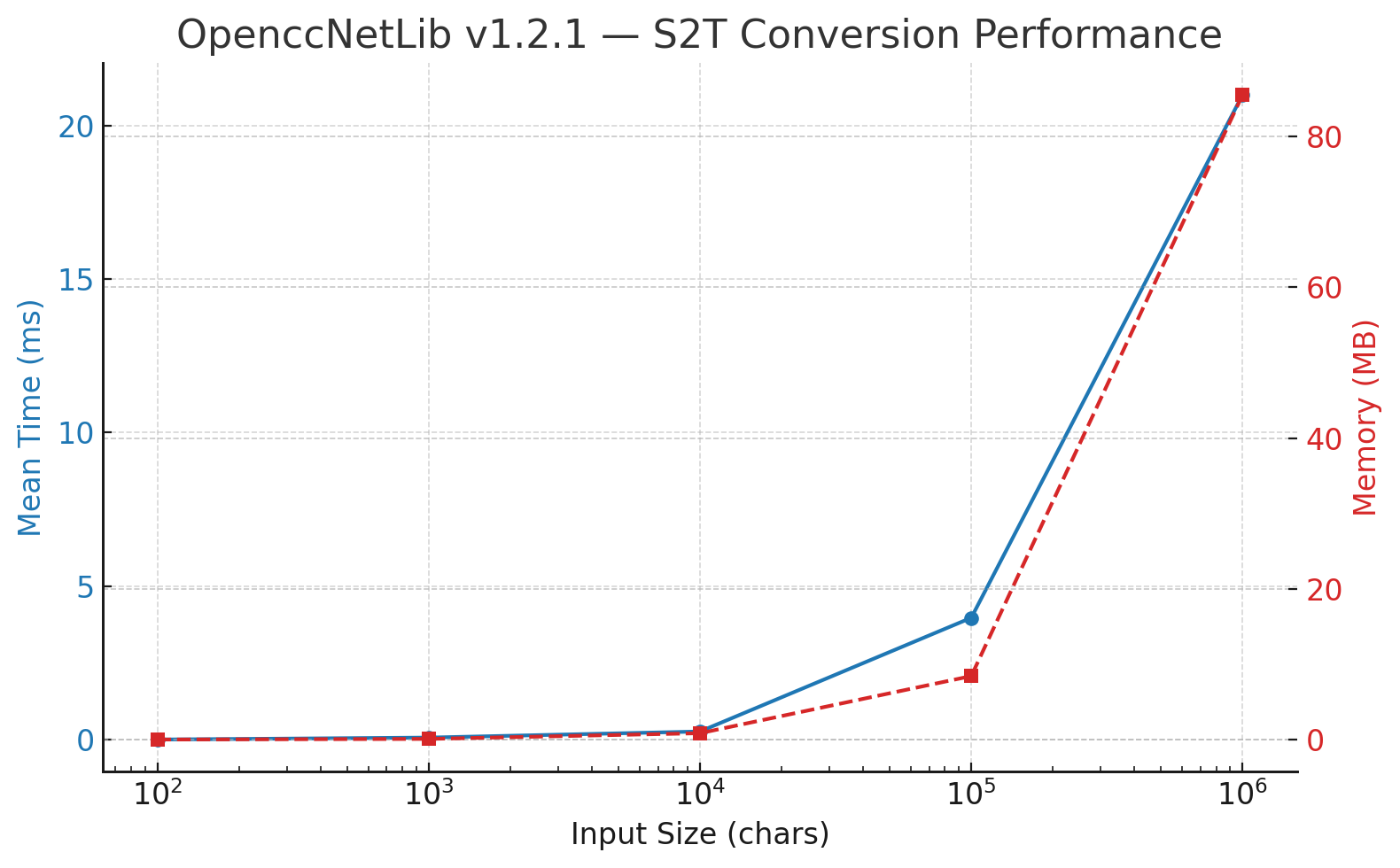
🟢 Highlights
🚀 Performance Gain:
More than 50 % faster than the previous implementation.
1 M characters now convert in ≈ 21 ms — about 47 million chars per second (≈ 95 MB/s)
on a mid-range Intel i5-13400 CPU.⚙️ Major Improvement Sources
- Pre-chunked
SplitRanges— balanced workloads forParallel.For, minimizing task-stealing overhead. - Mask-first gating + short-circuit paths — fewer candidate probes per segment.
- Global
StringBuilderreuse — avoids per-segment reallocation on .NET Standard 2.0.
- Pre-chunked
📈 GC Profile:
Stable; most allocations come from per-chunkStringBuilders and the final stitched string.
Threads reuse their buffers efficiently — no Gen 2 pressure spikes.🏁 Throughput:
Sustained ≈ 95 MB/s for Simplified → Traditional (S2T) conversions.
Consistent 40–50 ms conversion time for multi-million-character novels.💾 Memory Overhead:
Increased from ≈ 83 MB → 85 MB total — only +3 MB (≈ 3–4 %), an excellent trade-off for the speed gain.🧩 Future Optimization Ideas
- Tune
batchSize(128–512) for your typical corpus. - Add thread-local scratch arrays via
localInit/localFinallyto reduce Gen 0 churn. - Multi-target .NET 8+ to use
Dictionary.TryGetValue(ReadOnlySpan<char>). - Add short-key (len 1–2) lookup tables for ultra-common mappings.
- Tune
Notes: In
OpenccNetLib v1.3.0, performance further improved with the introduction of a global, lazily initialized staticPlanCache, eliminating redundant plan rebuilding, reducing GC pressure, and ensuring consistently faster conversions across all instances.
API Reference
Opencc Class
🔧 Constructor
Opencc(string config = null)
Create a new converter with the specified configuration.
🔁 Conversion Methods
string Convert(string inputText, bool punctuation = false)
Convert text according to the current config and punctuation mode.string S2T(string inputText, bool punctuation = false)string T2S(string inputText, bool punctuation = false)string S2Tw(string inputText, bool punctuation = false)string Tw2S(string inputText, bool punctuation = false)string S2Twp(string inputText, bool punctuation = false)string Tw2Sp(string inputText, bool punctuation = false)string S2Hk(string inputText, bool punctuation = false)string Hk2S(string inputText, bool punctuation = false)string T2Tw(string inputText)string T2Twp(string inputText)string Tw2T(string inputText)string Tw2Tp(string inputText)string T2Hk(string inputText)string Hk2T(string inputText)string T2Jp(string inputText)string Jp2T(string inputText)
⚙️ Configuration
string Config { get; set; }
Gets or sets the current config string. Invalid configs fallback to "s2t" and update error status.void SetConfig(string config)
Set the config using a string (e.g., "tw2sp"). Falls back to "s2t" if invalid.void SetConfig(OpenccConfig configEnum)
Set the config using a strongly typed OpenccConfig enum. Recommended for safety and IDE support.string GetConfig()
Returns the current config string (e.g., "s2tw").string GetLastError()
Returns the most recent error message, if any, from config setting.
📋 Validation and Helpers
static bool IsValidConfig(string config)
Checks whether the given string is a valid config name.static IReadOnlyCollection<string> GetSupportedConfigs()
Returns the list of all supported config names as strings.static bool TryParseConfig(string config, out OpenccConfig result)
Converts a valid config string to the correspondingOpenccConfigenum. Returnsfalseif invalid.static int ZhoCheck(string inputText)
Detects whether the input is likely Simplified Chinese (2), Traditional Chinese (1), or neither (0).
Dictionary Data
- Dictionaries are loaded and cached on first use.
- Data files are expected in the
dicts/directory (seeDictionaryLibfor details).
Add-On CLI Tools (Separated from OpenccNetLib)
OpenccNet dictgen
Description:
  Generate OpenccNetLib dictionary files.

Usage:
  OpenccNet dictgen [options]

Options:
  -f, --format <cbor|json|zstd>  Dictionary format: [zstd|cbor|json] [default: zstd]
  -o, --output <output>          Output filename. Default: dictionary_maxlength.<ext>
  -b, --base-dir <base-dir>      Base directory containing source dictionary files [default: dicts]
  -?, -h, --help                 Show help and usage information
OpenccNet convert
Description:
  Convert text using OpenccNetLib configurations.

Usage:
  OpenccNet convert [options]

Options:
  -i, --input              Read original text from file <input>
  -o, --output             Write original text to file <output>
  -c, --config (REQUIRED)  Conversion configuration: s2t|s2tw|s2twp|s2hk|t2s|tw2s|tw2sp|hk2s|jp2t|t2jp
  -p, --punct              Punctuation conversion. [default: False]
  --in-enc                 Encoding for input: UTF-8|UNICODE|GBK|GB2312|BIG5|Shift-JIS [default: UTF-8]
  --out-enc                Encoding for output: UTF-8|UNICODE|GBK|GB2312|BIG5|Shift-JIS [default: UTF-8]
  -?, -h, --help           Show help and usage information
OpenccNet office
Description:
  Convert Office documents or Epub using OpenccNetLib.

Usage:
  OpenccNet office [options]

Options:
  -i, --input              Input Office document <input>
  -o, --output             Output Office document <output>
  -c, --config (REQUIRED)  Conversion configuration: s2t|s2tw|s2twp|s2hk|t2s|tw2s|tw2sp|hk2s|jp2t|t2jp
  -p, --punct              Enable punctuation conversion. [default: False]
  -f, --format             Force Office document format: docx | xlsx | pptx | odt | ods | odp | epub
  --keep-font              Preserve font names in Office documents [default: true]. Use --keep-font:false to disable. [default: True]
  --auto-ext               Auto append correct extension to Office output files [default: true]. Use --auto-ext:false to disable. [default: True]
  -?, -h, --help           Show help and usage information
Project That Use OpenccNetLib
- OpenccNetLibGui : A GUI application for
OpenccNetLib, providing a user-friendly interface for Chinese text conversion.
License
- This project is licensed under the MIT License. See the LICENSE file for details.
See THIRD_PARTY_NOTICES.md for bundled OpenCC lexicons (Apache License 2.0).
OpenccNet is not affiliated with the original OpenCC project, but aims to provide a compatible and high-performance solution for .NET developers.
| Product | Versions Compatible and additional computed target framework versions. |
|---|---|
| .NET | net5.0 was computed. net5.0-windows was computed. net6.0 was computed. net6.0-android was computed. net6.0-ios was computed. net6.0-maccatalyst was computed. net6.0-macos was computed. net6.0-tvos was computed. net6.0-windows was computed. net7.0 was computed. net7.0-android was computed. net7.0-ios was computed. net7.0-maccatalyst was computed. net7.0-macos was computed. net7.0-tvos was computed. net7.0-windows was computed. net8.0 was computed. net8.0-android was computed. net8.0-browser was computed. net8.0-ios was computed. net8.0-maccatalyst was computed. net8.0-macos was computed. net8.0-tvos was computed. net8.0-windows was computed. net9.0 was computed. net9.0-android was computed. net9.0-browser was computed. net9.0-ios was computed. net9.0-maccatalyst was computed. net9.0-macos was computed. net9.0-tvos was computed. net9.0-windows was computed. net10.0 was computed. net10.0-android was computed. net10.0-browser was computed. net10.0-ios was computed. net10.0-maccatalyst was computed. net10.0-macos was computed. net10.0-tvos was computed. net10.0-windows was computed. |
| .NET Core | netcoreapp2.0 was computed. netcoreapp2.1 was computed. netcoreapp2.2 was computed. netcoreapp3.0 was computed. netcoreapp3.1 was computed. |
| .NET Standard | netstandard2.0 is compatible. netstandard2.1 was computed. |
| .NET Framework | net461 was computed. net462 was computed. net463 was computed. net47 was computed. net471 was computed. net472 was computed. net48 was computed. net481 was computed. |
| MonoAndroid | monoandroid was computed. |
| MonoMac | monomac was computed. |
| MonoTouch | monotouch was computed. |
| Tizen | tizen40 was computed. tizen60 was computed. |
| Xamarin.iOS | xamarinios was computed. |
| Xamarin.Mac | xamarinmac was computed. |
| Xamarin.TVOS | xamarintvos was computed. |
| Xamarin.WatchOS | xamarinwatchos was computed. |
-
.NETStandard 2.0
- PeterO.Cbor (>= 4.5.5)
- System.Memory (>= 4.6.3)
- System.Text.Json (>= 8.0.5)
- ZstdSharp.Port (>= 0.8.6)
NuGet packages
This package is not used by any NuGet packages.
GitHub repositories
This package is not used by any popular GitHub repositories.
OpenccNetLib v1.3.0
This release focuses on performance, code simplification, and astral-safe text handling.
Highlights
- 🚀 **Pre-chunked Parallel Conversion**: Balanced `SplitRanges` batching (128–512 ranges per chunk) now feeds `Parallel.For`
with evenly sized tasks — achieving >50% faster conversion on S2T workloads (1M chars → ~21 ms on i5-13400).
- 🧩 Added `Chunk` struct and `BuildChunks()` helper for predictable, cache-friendly load balancing with per-chunk
`StringBuilder` buffers (slightly higher memory usage +3 MB, well worth the speedup).
- 🧠 Introduced `StarterUnion` with `UnionKey`-based caching in `ConversionPlanCache` — fewer allocations and faster startup.
- ⚙️ Added `BuildFromStarterMasks()` to construct `StarterUnion` directly from precomputed per-starter length masks,
eliminating full key scans and saving ~10 ms on large dictionary builds.
- 🧮 O(1) per-starter metadata: 64-bit length mask + minLen + cap → skips impossible probe lengths instantly.
- 🈚 Astral-safe `GetAt(c0, c1, hasSecond, …)` detects surrogate pairs, clamps `len == 1`, and ensures full non-BMP safety.
- 🗜️ Shared high-surrogate (c0) indexing for astral characters (st/ts_characters) → dense, cache-friendly tables.
- 🔧 Simplified bit helpers (`LowestLen` / `HighestLen`) using compact inlined loops — faster than `BitOperations` for small masks.
- ✅ Corrected longest-match behavior; single-grapheme fast path now triggers only when no longer candidates exist.
- 💡 .NET Standard 2.0-compatible throughout — removed “??=”, static locals, and lambda captures for full runtime portability.
Project: https://github.com/laisuk/OpenccNet