OpenccNetLib 1.3.1
See the version list below for details.
dotnet add package OpenccNetLib --version 1.3.1
NuGet\Install-Package OpenccNetLib -Version 1.3.1
<PackageReference Include="OpenccNetLib" Version="1.3.1" />
<PackageVersion Include="OpenccNetLib" Version="1.3.1" />
<PackageReference Include="OpenccNetLib" />
paket add OpenccNetLib --version 1.3.1
#r "nuget: OpenccNetLib, 1.3.1"
#:package OpenccNetLib@1.3.1
#addin nuget:?package=OpenccNetLib&version=1.3.1
#tool nuget:?package=OpenccNetLib&version=1.3.1
OpenccNet


OpenccNetLib is a fast and efficient .NET library for converting Chinese text, offering support for Simplified ↔ Traditional, Taiwan, Hong Kong, and Japanese Kanji variants. Built with inspiration from OpenCC, this library is designed to integrate seamlessly into modern .NET projects with a focus on performance and minimal memory usage.
Table of Contents
Features
- Fast, multi-stage conversion using static dictionary caching
- Supports:
- Simplified ↔ Traditional Chinese
- Traditional (Taiwan) ↔ Simplified/Traditional
- Traditional (Hong Kong) ↔ Simplified/Traditional
- Japanese Kanji Shinjitai ↔ Traditional Kyujitai
- Accurate handling of non-BMP (U+20000+) Chinese characters for better conversion fidelity
- Optional punctuation conversion
- Thread-safe and suitable for parallel processing
- .NET Standard 2.0 compatible
(cross-platform: Windows, Linux, macOS; supported on .NET Core 2.0+, .NET 5+, .NET 6/7/8/9/10 LTS)
Installation
- Add the library to your project via NuGet or reference the source code directly.
- Add required dependencies of dictionary files to library root.
dicts\dictionary_maxlength.zstdDefault dictionary file.dicts\*.*Others dictionary files for different configurations.
Install via NuGet:
dotnet add package OpenccNetLib
Or, clone and include the source files in your project.
Usage
Basic Example
using OpenccNetLib;
var opencc = new Opencc("s2t"); // Simplified to Traditional
string traditional = opencc.Convert("汉字转换测试");
Console.WriteLine(traditional);
// Output: 漢字轉換測試
Supported Configurations
| Config | Description |
|---|---|
| s2t | Simplified → Traditional |
| t2s | Traditional → Simplified |
| s2tw | Simplified → Traditional (Taiwan) |
| tw2s | Traditional (Taiwan) → Simplified |
| s2twp | Simplified → Traditional (Taiwan, idioms) |
| tw2sp | Traditional (Taiwan, idioms) → Simplified |
| s2hk | Simplified → Traditional (Hong Kong) |
| hk2s | Traditional (Hong Kong) → Simplified |
| t2tw | Traditional → Traditional (Taiwan) |
| tw2t | Traditional (Taiwan) → Traditional |
| t2twp | Traditional → Traditional (Taiwan, idioms) |
| tw2tp | Traditional (Taiwan, idioms) → Traditional |
| t2hk | Traditional → Traditional (Hong Kong) |
| hk2t | Traditional (Hong Kong) → Traditional |
| t2jp | Traditional Kyujitai → Japanese Kanji Shinjitai |
| jp2t | Japanese Kanji Shinjitai → Traditional Kyujitai |
Example: Convert with Punctuation
var opencc = new Opencc("s2t");
string result = opencc.Convert("“汉字”转换。", punctuation: true);
Console.WriteLine(result);
// Output: 「漢字」轉換。
Example: Switching Config Dynamically
using OpenccNetLib;

var opencc = new Opencc("s2t");

// Initial conversion
string result = opencc.Convert("动态切换转换方式");
Console.WriteLine(result);  // Output: 動態切換轉換方式

// Switch config using string
opencc.Config = "t2s";  // Also valid: opencc.SetConfig("t2s")
result = opencc.Convert("動態切換轉換方式");
Console.WriteLine(result);  // Output: 动态切换转换方式

// Switch config using enum (recommended for safety and autocomplete)
opencc.SetConfig(OpenccConfig.S2T);
result = opencc.Convert("动态切换转换方式");
Console.WriteLine(result);  // Output: 動態切換轉換方式

// Invalid config falls back to "s2t"
opencc.Config = "invalid_config";
Console.WriteLine(opencc.GetLastError());  // Output: Invalid config provided: invalid_config. Using default 's2t'.
💡 Tips
- Use
OpenccConfigenum for compile-time safety and IntelliSense support. - Use
GetLastError()to check if fallback occurred due to an invalid config. - You can also validate config strings with
Opencc.IsValidConfig("t2tw").
Direct API Methods
You can also use direct methods for specific conversions:
using OpenccNetLib;
var opencc = new Opencc();
opencc.S2T("汉字");
// Simplified to Traditional opencc.T2S("漢字");
// Traditional to Simplified opencc.S2Tw("汉字");
// Simplified to Taiwan Traditional opencc.T2Jp("漢字");
// Traditional to Japanese Kanji
// ...and more
Error Handling
If an error occurs (e.g., invalid config), use:
string error = opencc.GetLastError();
Console.WriteLine(error); // Output the last error message
Language Detection
Detect if a string is Simplified, Traditional, or neither:
using OpenccNetLib;
int result = Opencc.ZhoCheck("汉字"); // Returns 2 for Simplified, 1 for Traditional, 0 for neither
Console.WriteLine(result); // Output: 2 (for Simplified)
Using Custom Dictionary
Library default is zstd compressed dictionary Lexicon.
It can be changed to custom dictionary (JSON, CBOR or "baseDir/*.txt") prior to instantiate Opencc():
using OpenccNetLib;
Opencc.UseCustomDictionary(DictionaryLib.FromDicts()) // Init only onece, dicts from baseDir "./dicts/"
var opencc = new Opencc("s2t"); // Simplified to Traditional
string traditional = opencc.Convert("汉字转换测试");
Console.WriteLine(traditional); // Output: 漢字轉換測試
Performance
- Uses static dictionary caching and thread-local buffers for high throughput.
- Suitable for batch and parallel processing scenarios.
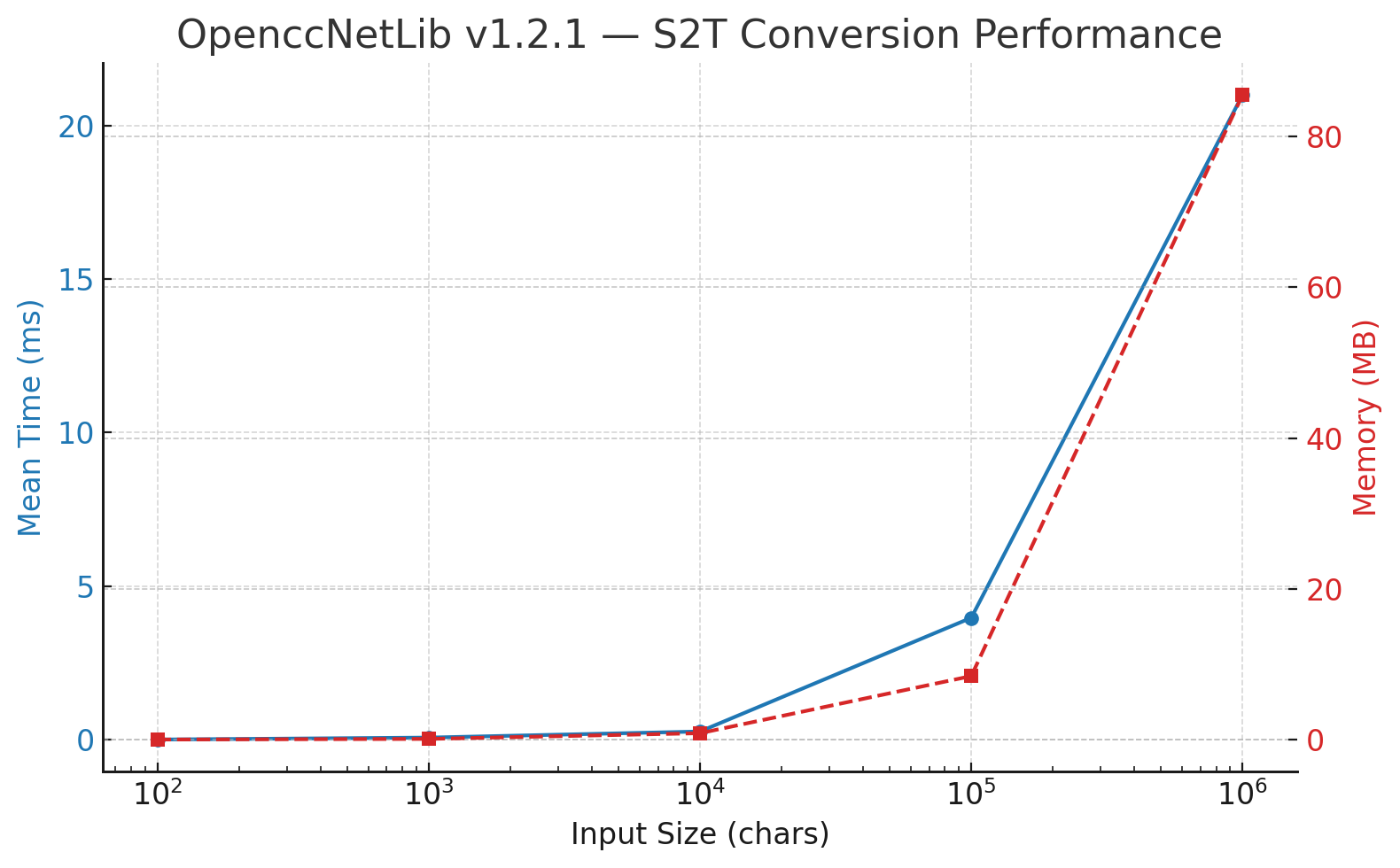
🚀 Performance Benchmark for OpenccNetLib 1.2.1
S2T Conversion (after Pre-Chunk Optimization)
Environment
| Item | Value |
|---|---|
| BenchmarkDotNet | v0.15.4 |
| OS | Windows 11 (24H2 / Build 26100.6899) |
| CPU | Intel Core i5-13400 (10C/16T @ 2.5 GHz) |
| .NET SDK | 9.0.306 |
| Runtime | .NET 9.0.10 (X64 RyuJIT x86-64-v3) |
| Iterations | 10 (+ 1 warm-up) |
| Method | Size | Mean | Error | StdDev | Min | Max | Rank | Gen0 | Gen1 | Gen2 | Allocated |
|---|---|---|---|---|---|---|---|---|---|---|---|
| BM_Convert_Sized | 100 | 2.73µs | 0.02µs | 0.01µs | 2.72µs | 2.75µs | 1 | 0.52 | – | – | 5.37KB |
| BM_Convert_Sized | 1,000 | 66.63µs | 0.47µs | 0.28µs | 66.09µs | 66.99µs | 2 | 8.79 | – | – | 90.38KB |
| BM_Convert_Sized | 10,000 | 264.71µs | 18.05µs | 11.94µs | 253.76µs | 282.28µs | 3 | 83.50 | 19.04 | – | 845.77KB |
| BM_Convert_Sized | 100,000 | 3.97ms | 94.88µs | 62.76µs | 3.90ms | 4.08ms | 4 | 890.63 | 367.19 | 117.19 | 8,427.81KB |
| BM_Convert_Sized | 1,000,000 | 21.0ms | 506.18µs | 334.81µs | 20.52ms | 21.49ms | 5 | 8,468.75 | 1,437.50 | 625.00 | 85,550.74KB |
⏱ Relative Performance Chart
🟢 Highlights
🚀 Performance Gain:
More than 50 % faster than the previous implementation.
1 M characters now convert in ≈ 21 ms — about 47 million chars per second (≈ 95 MB/s)
on a mid-range Intel i5-13400 CPU.⚙️ Major Improvement Sources
- Pre-chunked
SplitRanges— balanced workloads forParallel.For, minimizing task-stealing overhead. - Mask-first gating + short-circuit paths — fewer candidate probes per segment.
- Global
StringBuilderreuse — avoids per-segment reallocation on .NET Standard 2.0.
- Pre-chunked
📈 GC Profile:
Stable; most allocations come from per-chunkStringBuilders and the final stitched string.
Threads reuse their buffers efficiently — no Gen 2 pressure spikes.🏁 Throughput:
Sustained ≈ 95 MB/s for Simplified → Traditional (S2T) conversions.
Consistent 40–50 ms conversion time for multi-million-character novels.💾 Memory Overhead:
Increased from ≈ 83 MB → 85 MB total — only +3 MB (≈ 3–4 %), an excellent trade-off for the speed gain.🧩 Future Optimization Ideas
- Tune
batchSize(128–512) for your typical corpus. - Add thread-local scratch arrays via
localInit/localFinallyto reduce Gen 0 churn. - Multi-target .NET 8+ to use
Dictionary.TryGetValue(ReadOnlySpan<char>). - Add short-key (len 1–2) lookup tables for ultra-common mappings.
- Tune
Notes: In
OpenccNetLib v1.3.0, performance further improved with the introduction of a global, lazily initialized staticPlanCache, eliminating redundant plan rebuilding, reducing GC pressure, and ensuring consistently faster conversions across all instances.
API Reference
Opencc Class
🔧 Constructor
Opencc(string config = null)
Create a new converter with the specified configuration.
🔁 Conversion Methods
string Convert(string inputText, bool punctuation = false)
Convert text according to the current config and punctuation mode.string S2T(string inputText, bool punctuation = false)string T2S(string inputText, bool punctuation = false)string S2Tw(string inputText, bool punctuation = false)string Tw2S(string inputText, bool punctuation = false)string S2Twp(string inputText, bool punctuation = false)string Tw2Sp(string inputText, bool punctuation = false)string S2Hk(string inputText, bool punctuation = false)string Hk2S(string inputText, bool punctuation = false)string T2Tw(string inputText)string T2Twp(string inputText)string Tw2T(string inputText)string Tw2Tp(string inputText)string T2Hk(string inputText)string Hk2T(string inputText)string T2Jp(string inputText)string Jp2T(string inputText)
⚙️ Configuration
string Config { get; set; }
Gets or sets the current config string. Invalid configs fallback to "s2t" and update error status.void SetConfig(string config)
Set the config using a string (e.g., "tw2sp"). Falls back to "s2t" if invalid.void SetConfig(OpenccConfig configEnum)
Set the config using a strongly typed OpenccConfig enum. Recommended for safety and IDE support.string GetConfig()
Returns the current config string (e.g., "s2tw").string GetLastError()
Returns the most recent error message, if any, from config setting.
📋 Validation and Helpers
static bool IsValidConfig(string config)
Checks whether the given string is a valid config name.static IReadOnlyCollection<string> GetSupportedConfigs()
Returns the list of all supported config names as strings.static bool TryParseConfig(string config, out OpenccConfig result)
Converts a valid config string to the correspondingOpenccConfigenum. Returnsfalseif invalid.static int ZhoCheck(string inputText)
Detects whether the input is likely Simplified Chinese (2), Traditional Chinese (1), or neither (0).
Dictionary Data
- Dictionaries are loaded and cached on first use.
- Data files are expected in the
dicts/directory (seeDictionaryLibfor details).
Add-On CLI Tools (Separated from OpenccNetLib)
OpenccNet dictgen
Description:
  Generate OpenccNetLib dictionary files.

Usage:
  OpenccNet dictgen [options]

Options:
  -f, --format <cbor|json|zstd>  Dictionary format: [zstd|cbor|json] [default: zstd]
  -o, --output <output>          Output filename. Default: dictionary_maxlength.<ext>
  -b, --base-dir <base-dir>      Base directory containing source dictionary files [default: dicts]
  -?, -h, --help                 Show help and usage information
OpenccNet convert
Description:
  Convert text using OpenccNetLib configurations.

Usage:
  OpenccNet convert [options]

Options:
  -i, --input              Read original text from file <input>
  -o, --output             Write original text to file <output>
  -c, --config (REQUIRED)  Conversion configuration: s2t|s2tw|s2twp|s2hk|t2s|tw2s|tw2sp|hk2s|jp2t|t2jp
  -p, --punct              Punctuation conversion. [default: False]
  --in-enc                 Encoding for input: UTF-8|UNICODE|GBK|GB2312|BIG5|Shift-JIS [default: UTF-8]
  --out-enc                Encoding for output: UTF-8|UNICODE|GBK|GB2312|BIG5|Shift-JIS [default: UTF-8]
  -?, -h, --help           Show help and usage information
OpenccNet office
Description:
  Convert Office documents or Epub using OpenccNetLib.

Usage:
  OpenccNet office [options]

Options:
  -i, --input              Input Office document <input>
  -o, --output             Output Office document <output>
  -c, --config (REQUIRED)  Conversion configuration: s2t|s2tw|s2twp|s2hk|t2s|tw2s|tw2sp|hk2s|jp2t|t2jp
  -p, --punct              Enable punctuation conversion. [default: False]
  -f, --format             Force Office document format: docx | xlsx | pptx | odt | ods | odp | epub
  --keep-font              Preserve font names in Office documents [default: true]. Use --keep-font:false to disable. [default: True]
  --auto-ext               Auto append correct extension to Office output files [default: true]. Use --auto-ext:false to disable. [default: True]
  -?, -h, --help           Show help and usage information
Project That Use OpenccNetLib
- OpenccNetLibGui : A GUI application for
OpenccNetLib, providing a user-friendly interface for Chinese text conversion.
License
- This project is licensed under the MIT License. See the LICENSE file for details.
See THIRD_PARTY_NOTICES.md for bundled OpenCC lexicons (Apache License 2.0).
OpenccNet is not affiliated with the original OpenCC project, but aims to provide a compatible and high-performance solution for .NET developers.
| Product | Versions Compatible and additional computed target framework versions. |
|---|---|
| .NET | net5.0 was computed. net5.0-windows was computed. net6.0 was computed. net6.0-android was computed. net6.0-ios was computed. net6.0-maccatalyst was computed. net6.0-macos was computed. net6.0-tvos was computed. net6.0-windows was computed. net7.0 was computed. net7.0-android was computed. net7.0-ios was computed. net7.0-maccatalyst was computed. net7.0-macos was computed. net7.0-tvos was computed. net7.0-windows was computed. net8.0 was computed. net8.0-android was computed. net8.0-browser was computed. net8.0-ios was computed. net8.0-maccatalyst was computed. net8.0-macos was computed. net8.0-tvos was computed. net8.0-windows was computed. net9.0 was computed. net9.0-android was computed. net9.0-browser was computed. net9.0-ios was computed. net9.0-maccatalyst was computed. net9.0-macos was computed. net9.0-tvos was computed. net9.0-windows was computed. net10.0 was computed. net10.0-android was computed. net10.0-browser was computed. net10.0-ios was computed. net10.0-maccatalyst was computed. net10.0-macos was computed. net10.0-tvos was computed. net10.0-windows was computed. |
| .NET Core | netcoreapp2.0 was computed. netcoreapp2.1 was computed. netcoreapp2.2 was computed. netcoreapp3.0 was computed. netcoreapp3.1 was computed. |
| .NET Standard | netstandard2.0 is compatible. netstandard2.1 was computed. |
| .NET Framework | net461 was computed. net462 was computed. net463 was computed. net47 was computed. net471 was computed. net472 was computed. net48 was computed. net481 was computed. |
| MonoAndroid | monoandroid was computed. |
| MonoMac | monomac was computed. |
| MonoTouch | monotouch was computed. |
| Tizen | tizen40 was computed. tizen60 was computed. |
| Xamarin.iOS | xamarinios was computed. |
| Xamarin.Mac | xamarinmac was computed. |
| Xamarin.TVOS | xamarintvos was computed. |
| Xamarin.WatchOS | xamarinwatchos was computed. |
-
.NETStandard 2.0
- PeterO.Cbor (>= 4.5.5)
- System.Memory (>= 4.6.3)
- System.Text.Json (>= 8.0.5)
- ZstdSharp.Port (>= 0.8.6)
NuGet packages
This package is not used by any NuGet packages.
GitHub repositories
This package is not used by any popular GitHub repositories.
OpenccNetLib v1.3.1
This is a maintenance release identical to v1.3.0, focused on developer experience improvements.
Highlights
- 📝 Added XML documentation: the package now includes OpenccNetLib.xml for full IntelliSense support.
Hovering over methods like Opencc.Convert() now shows summary, parameter, and return descriptions.
- 🔧 Updated project configuration with GenerateDocumentationFile and removed redundant manual XML packing.
- 💠 Symbol package (.snupkg) remains available for debugging.
No functionality or performance changes from v1.3.0.