uTPro.Feature.FileManager
6.1.0
dotnet add package uTPro.Feature.FileManager --version 6.1.0
NuGet\Install-Package uTPro.Feature.FileManager -Version 6.1.0
<PackageReference Include="uTPro.Feature.FileManager" Version="6.1.0" />
<PackageVersion Include="uTPro.Feature.FileManager" Version="6.1.0" />
<PackageReference Include="uTPro.Feature.FileManager" />
paket add uTPro.Feature.FileManager --version 6.1.0
#r "nuget: uTPro.Feature.FileManager, 6.1.0"
#:package uTPro.Feature.FileManager@6.1.0
#addin nuget:?package=uTPro.Feature.FileManager&version=6.1.0
#tool nuget:?package=uTPro.Feature.FileManager&version=6.1.0
uTPro File Manager & Media Cleanup for Umbraco
Documentation: https://docs.utpro.dev/uTPro.Feature.FileManager/
A powerful File Manager and Media Cleanup toolkit for the Umbraco 16+ backoffice, on two workspace tabs. Browse, upload, download, edit, preview, rename and delete server files — and scan the media library to recycle, restore or delete unused, broken, duplicate, orphaned, large and disallowed media, all from within the backoffice.




-green.svg)
Installation
dotnet add package uTPro.Feature.FileManager
No configuration needed — auto-registers via Umbraco IComposer. After installation, navigate to Settings → File Manager in the backoffice.
Features
File Browsing
- Windows Explorer-style navigation with back, reload, and breadcrumb path bar
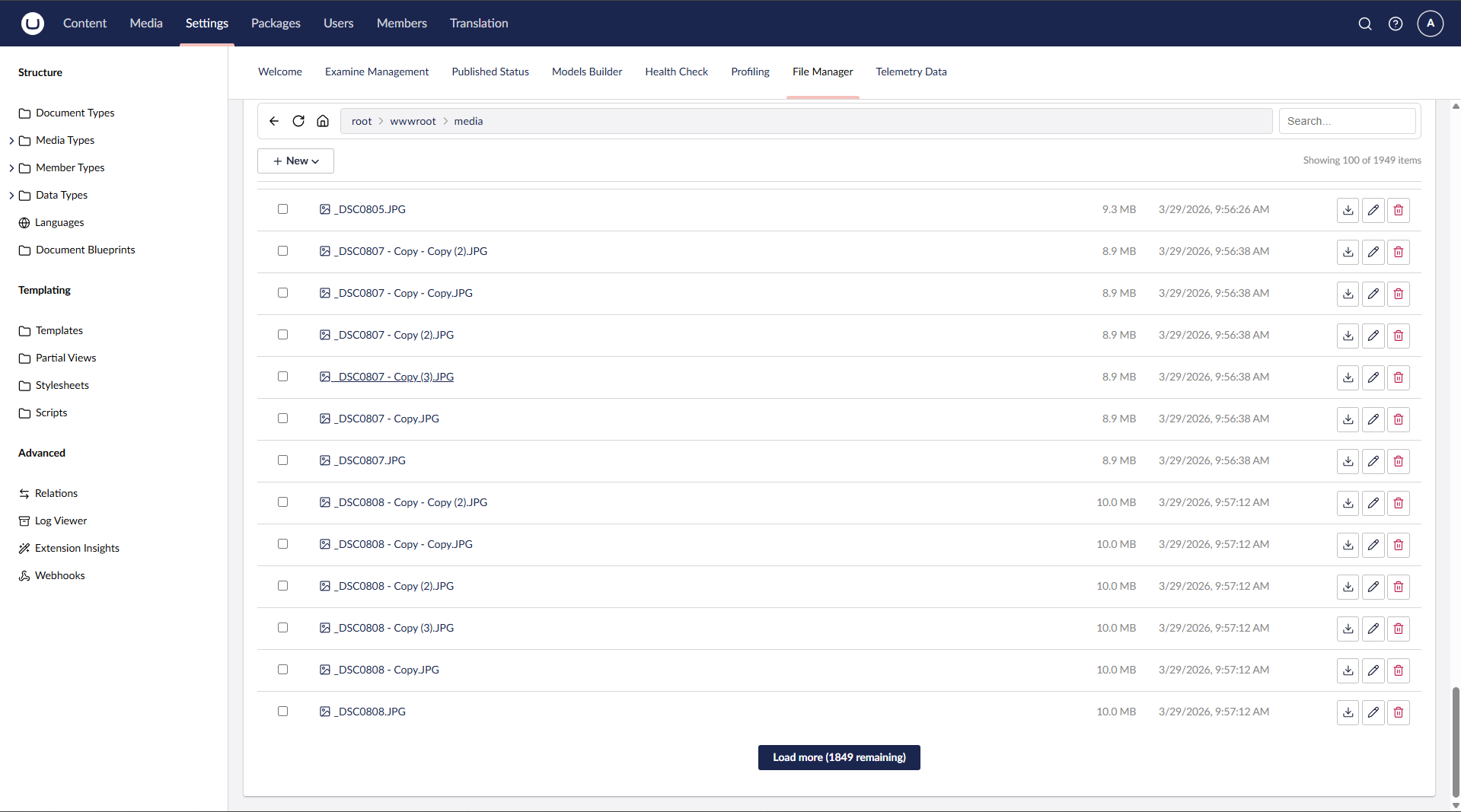
- Paginated file listing (100 items per page) with "Load more" for large directories
- Real-time search with debounce filtering
- URL state persistence — reload the page and return to the same folder/file
- Umbraco native icons for file types
File Operations
- Upload files via button or drag & drop
- Download files directly from the file list or file view
- Create new folders and empty files
- Rename files and folders (with live reload in file view)
- Delete files and folders (single or bulk selection)
- Import file via URL — fetch a remote file and save it to the current folder
- Extract ZIP — select
.zipfiles and extract them in place
Code Editor
- Built-in Monaco Editor (via Umbraco's
umb-code-editor) with syntax highlighting - Supports: JavaScript, TypeScript, JSON, HTML, CSS, SCSS, Razor, C#, XML, YAML, Markdown, SQL, and more
- Unsaved changes detection with browser close/navigate warning
- Ctrl+S keyboard shortcut to save
Media Preview
- Inline preview for images (JPG, PNG, GIF, SVG, WebP, BMP, ICO)
- Video player for MP4, WebM, OGG
- Audio player for MP3, WAV, OGG
- PDF viewer via embedded iframe
- Correct MIME types for inline rendering
Media Cleanup (v4.0.0)
- Lives on its own workspace tab next to File Manager (Settings → File Manager → Media Cleanup). Opening the tab scans automatically and shows an overview of cards — one per category with a live count; click a card to drill into that category. A breadcrumb (
All categories › <Category>) navigates back. - Reports media across seven categories, each with a live count:
- Unused media — media items that no content/entity references (best-effort via Umbraco tracked references)
- Broken media — media items whose backing file is missing on disk/storage
- Duplicates — media items whose files share the same SHA-256 content hash
- Orphaned files — files in the media file system not referenced by any media item
- Large files — files at or above a configurable size threshold (default 100 MB), sorted largest first
- Recycle Bin — media items currently in the Umbraco media recycle bin
- Actions per row (require Media section access; Admins always qualify):
- Media-backed rows (Unused/Broken/Duplicates/Large) → Move to recycle bin (safe, recoverable; Umbraco handles permanent deletion + file cleanup when the bin is emptied)
- Orphaned files → Delete file directly from the media file system (no media node to recycle)
- Recycle Bin rows → Restore (back to the media root) or Delete permanently; plus an Empty recycle bin action for the whole bin
- Bulk actions — tick rows to act on many at once (Recycle/Delete for the current category, or Restore/Delete for the Recycle Bin)
- Smart duplicates — in the Duplicates tab, Recycle dupes (keep 1) recycles every copy except the first in each hash group
- Preview — click an image/media row to preview it (streamed via the media file system) before deciding
- Cached scans — results are cached briefly (default 30s, configurable) so switching tabs is fast; a forced reload or any action re-scans
- Scan mode reuses the same paginated list ("Load more", 100 per page); the top bar Home button (or Exit in the footer) returns to normal File Manager
- Uses Umbraco's media file system abstraction, so it works with any storage provider (physical disk, Azure Blob, S3, …)
- Scanning (the report) is visible to any Settings user; actions are gated on the current user's Media permission. Treat "Unused" as a suggestion, since references made only in free-form markup (rich text, templates, CSS/JS) may not be tracked — recycling is preferred over permanent deletion so items stay recoverable
Security & Permissions
- Settings section access required to view the dashboard
- Admin — full access: browse entire server root (ContentRootPath), create, edit, rename, delete, upload, extract
- Settings (non-admin) — browse
wwwroot/tree only (view folder structure, check if files exist — no file actions) - Settings + Sensitive Data — browse
wwwroot/+ view/edit/download file content - Write operations (create, rename, delete, upload, extract ZIP, import URL) — Admin only
- Media Cleanup — the scan report is visible to any Settings user; its destructive actions (recycle/restore/delete/empty/delete-orphan) require Media section access (Admins always qualify)
- Non-admin users are jailed to
wwwroot/— cannot accessappsettings.json,web.config, or any files outsidewwwroot - Protected files:
web.config,appsettings.json,appsettings.development.json,appsettings.production.json,appsettings.staging.json, and.envcannot be viewed, downloaded, modified or deleted. The block list is now enforced on view and download too (previously only on modify/delete), and can be extended (never reduced) viaAdditionalBlockedNames. - RCE guard on write — creating, saving, or renaming a file to a server-executable extension (
.cshtml,.razor,.aspx,.ashx,.ascx,.asp,.php,.jsp,.exe,.dll,.bat,.cmd,.com,.msi,.vbs,.ps1,.sh, …) is blocked. Note: files like.cshtmlremain viewable/editable but cannot be created or written. Extend (never reduce) the list viaAdditionalDangerousWriteExtensions. - Path traversal protection on all endpoints
- Media endpoints require authorization — the media preview/stream (
media-file) endpoint requires Sensitive Data, and the media scan (scan-media) endpoint requires Media access (previously neither had a per-action check). - SVG served as attachment — SVG files are always served as an attachment (never inline) to prevent inline-script execution in the backoffice origin.
- Upload validation — configurable maximum size plus optional allow-list / block-list of extensions (see Configuration), enforced on both file upload and import-from-URL
- SSRF protection on Import via URL — the supplied URL must use
http/https, and any URL whose host resolves to a loopback, private, link-local, or reserved address (e.g. the cloud metadata endpoint169.254.169.254) is rejected. Auto-redirect is disabled so every redirect hop is re-validated — a redirect to an internal address can't bypass the guard. The DNS-based guard also covers IPv6 (mapped/loopback/ULA) and the full127.0.0.0/8range. Requests go throughIHttpClientFactoryto avoid socket exhaustion.
UI
- Windows Explorer-style navigation bar (back, reload, home, breadcrumb path bar, search)
- Sticky toolbar — the navigation bar stays pinned to the top while scrolling long file lists, flush with the section header on an opaque surface
- Workspace footer actions — primary actions live in the Umbraco workspace footer for a clean, uncluttered toolbar:
- Browsing:
New ▾menu (Upload, New Folder, New File, Import via URL), bulkDelete,Extract Zip, and a live item counter - File open:
Save,Actions ▾(Download, Rename, Delete), anUnsavedbadge, plus file size and type
- Browsing:
- Footer actions respect the current user's role — non-admin users never see write actions
- Multi-select with checkbox for bulk delete and zip extract
- Responsive layout with Umbraco UI Library (UUI) components
Configuration
No configuration is required — the package ships with safe defaults. To customize the upload limits, add an optional uTPro:Feature:FileManager section to appsettings.json:
{
  "uTPro": {
    "Feature": {
      "FileManager": {
        "MaxUploadSizeMB": 50,
        "AllowedUploadExtensions": [],
        "BlockedUploadExtensions": [ ".exe", ".dll", ".bat" ],
        "EditableExtensions": [],
        "AdditionalEditableExtensions": [ ".liquid" ],
        "AdditionalBlockedNames": [ "secrets.json" ],
        "AdditionalDangerousWriteExtensions": [ ".phtml" ],
        "MediaLargeFileThresholdMB": 100,
        "MediaScanCacheSeconds": 30,
        "IgnoredMediaIds": [],
        "MediaScanMaxFiles": 50000,
        "MediaScanTimeBudgetSeconds": 30,
        "Roots": [
          { "Key": "web", "Label": "Web root", "Path": "wwwroot", "Icon": "icon-globe", "AdminOnly": false }
        ]
      }
    }
  }
}
| Key | Default | Description |
|---|---|---|
MaxUploadSizeMB |
50 |
Maximum allowed upload size in megabytes. Enforced on both file upload and import-from-URL. |
AllowedUploadExtensions |
[] (allow all) |
Allow-list of file extensions. When non-empty, only these may be uploaded — unioned with Umbraco's Content:AllowedUploadedFileExtensions (both widen what's permitted). Leave empty to allow all (so File Manager can still upload site files like css/js/cshtml); an empty value does not inherit Umbraco's media whitelist. Case-insensitive, dot optional. |
BlockedUploadExtensions |
[] |
Additional block-list of file extensions, always rejected. Combined (union) with Umbraco's Content:DisallowedUploadedFileExtensions — keep the shared web-dangerous list in Umbraco and use this only for File-Manager-specific extras (e.g. binaries like .exe/.dll). |
EditableExtensions |
[] (use built-in list) |
Replaces the built-in list of viewable/editable text extensions when non-empty. Controls which files open in the code editor rather than downloading. Not security-sensitive — writing is still gated by the dangerous-extension guard (see below). Case-insensitive, dot optional. |
AdditionalEditableExtensions |
[] |
Extra editable text extensions added on top of the built-in defaults (does not replace them). Use this to make a custom text format viewable/editable without redefining the whole list. Case-insensitive, dot optional. |
AdditionalBlockedNames |
[] |
Security, additive-only. Extra protected file names that can never be viewed, edited, renamed or deleted. Built-in defaults (web.config, appsettings*.json, .env) can never be removed — config can only add protections, never take them away. |
AdditionalDangerousWriteExtensions |
[] |
Security, additive-only. Extra server-executable/dangerous extensions blocked from create/write/rename. Built-in RCE defaults (.cshtml, .razor, .aspx, .php, .exe, …) can never be removed — config can only add to the guard, never take away. |
MediaLargeFileThresholdMB |
100 |
Media Cleanup: files at or above this size (MB) are reported under the Large files category. |
MediaScanCacheSeconds |
30 |
Media Cleanup: how long a scan result is cached so repeated tab switches don't re-scan the whole library. A forced reload or any cleanup action clears the cache. Set to 0 to disable caching. |
IgnoredMediaIds |
[] |
Media Cleanup: media item IDs to ignore, silencing known false positives in the Unused and Large categories. |
Roots |
[] (single-root mode) |
Optional multi-root "Locations". When empty, the File Manager keeps its single-root behaviour (admins → content root, others → web root). When set, it shows a Locations overview with one card per configured root, each browsed as its own confined tree. Each entry has Key (stable id), Label (card title), Path (absolute or relative to the content root), optional Icon (Umbraco icon alias), and AdminOnly (default true — restricts the location to administrators). Path traversal outside each root is still blocked. |
MediaScanMaxFiles |
50000 |
Media Cleanup: scan guardrail — stops a very large scan early once this many files have been examined, with an on-screen notice. |
MediaScanTimeBudgetSeconds |
30 |
Media Cleanup: scan guardrail — stops a scan early once this time budget is exceeded, with an on-screen notice. |
The upload limits apply to write operations only and are enforced server-side, independent of any client-side checks.
The two security lists are additive.
AdditionalBlockedNamesandAdditionalDangerousWriteExtensionscan only add protections on top of the built-in defaults — config can never remove a built-in protection.
Compatibility
| Umbraco | .NET | Package |
|---|---|---|
| 16.x | 9.0 | 1.x – 4.x |
| 17.x | 10.0 | 2.x – 4.x |
| 18.x | 10.0 | 2.x – 4.x |
The package multi-targets net9.0 (Umbraco 16) and net10.0 (Umbraco 17 & 18); a single install picks the right build for your project automatically.
Screenshots
v5.0.0
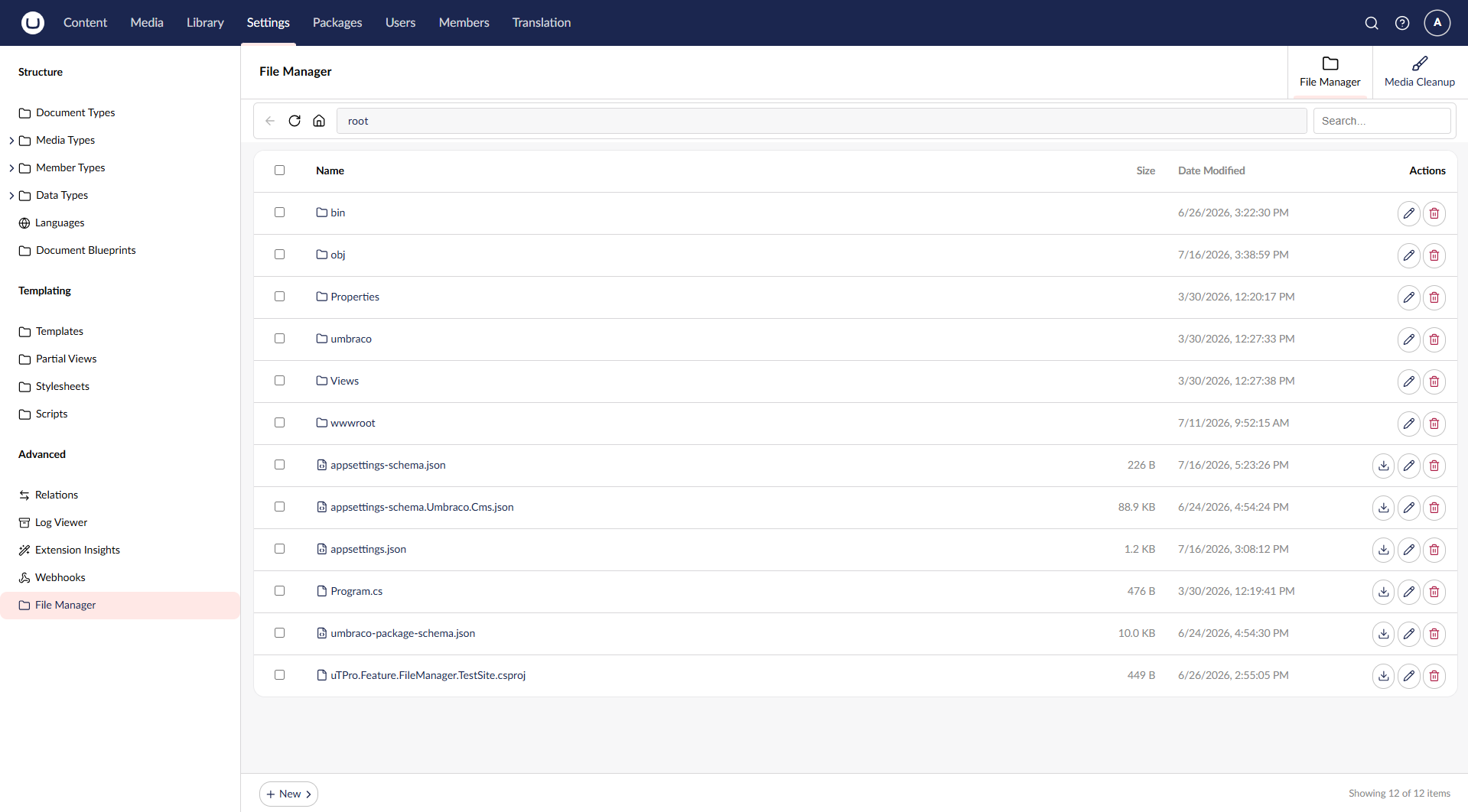
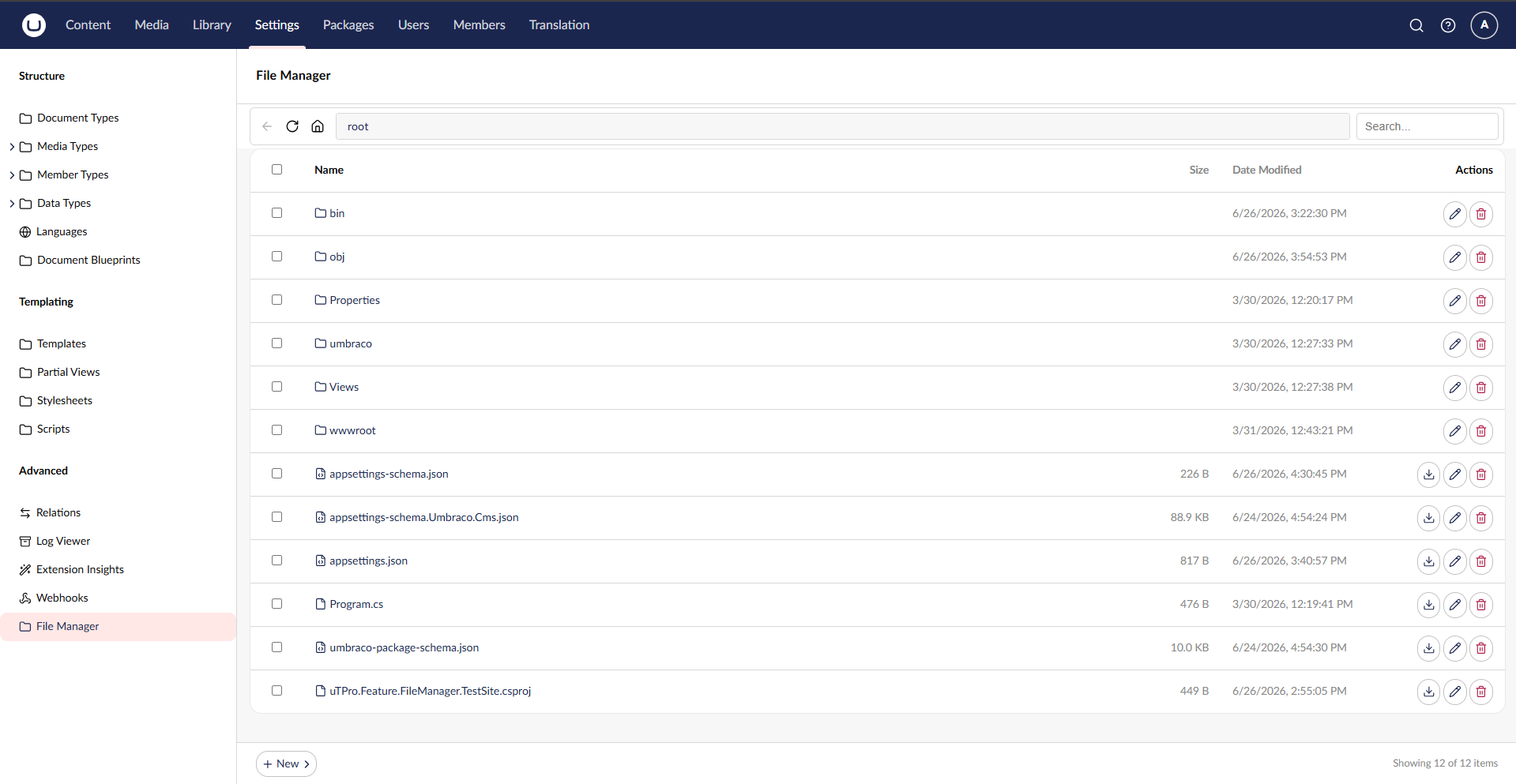
File Manager — browse, edit, upload, preview and manage server files
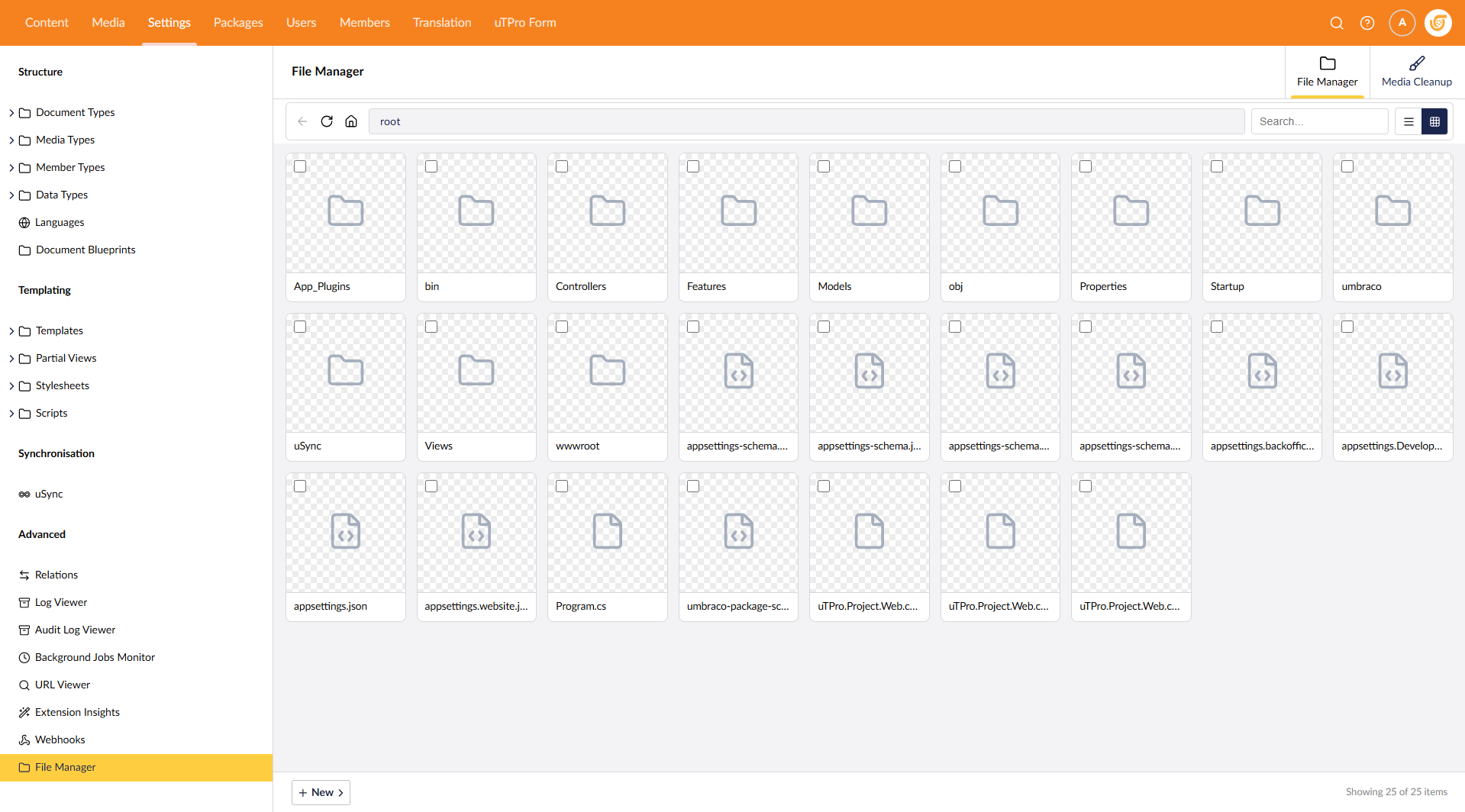
Grid view — square tiles with image thumbnails (toggle List / Grid)
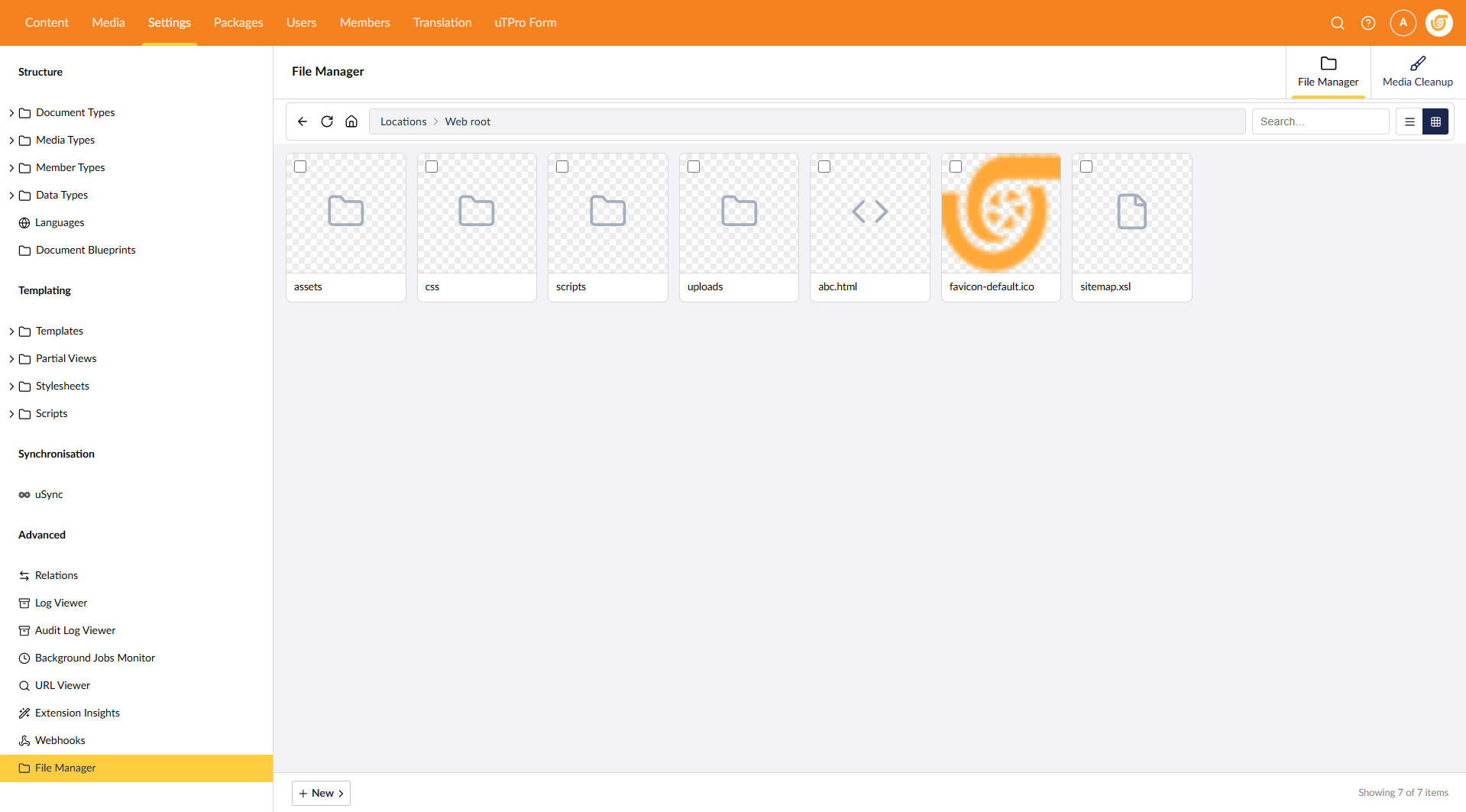
Multi-root "Locations" — a card per configured root (uTPro:Feature:FileManager:Roots)
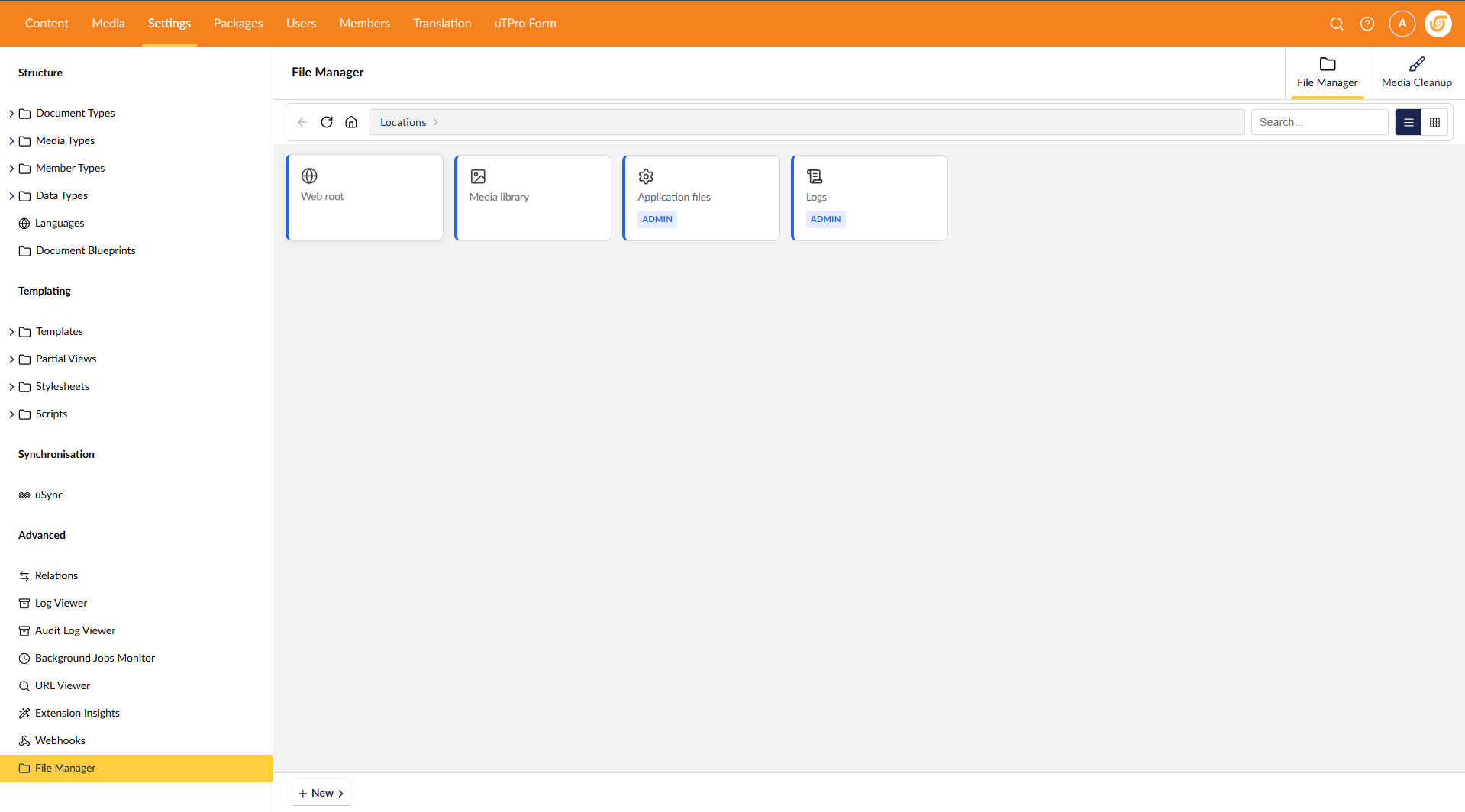
v4.0.0 — Two workspace tabs: File Manager & Media Cleanup
File Manager tab — browse, edit, upload, and manage server files
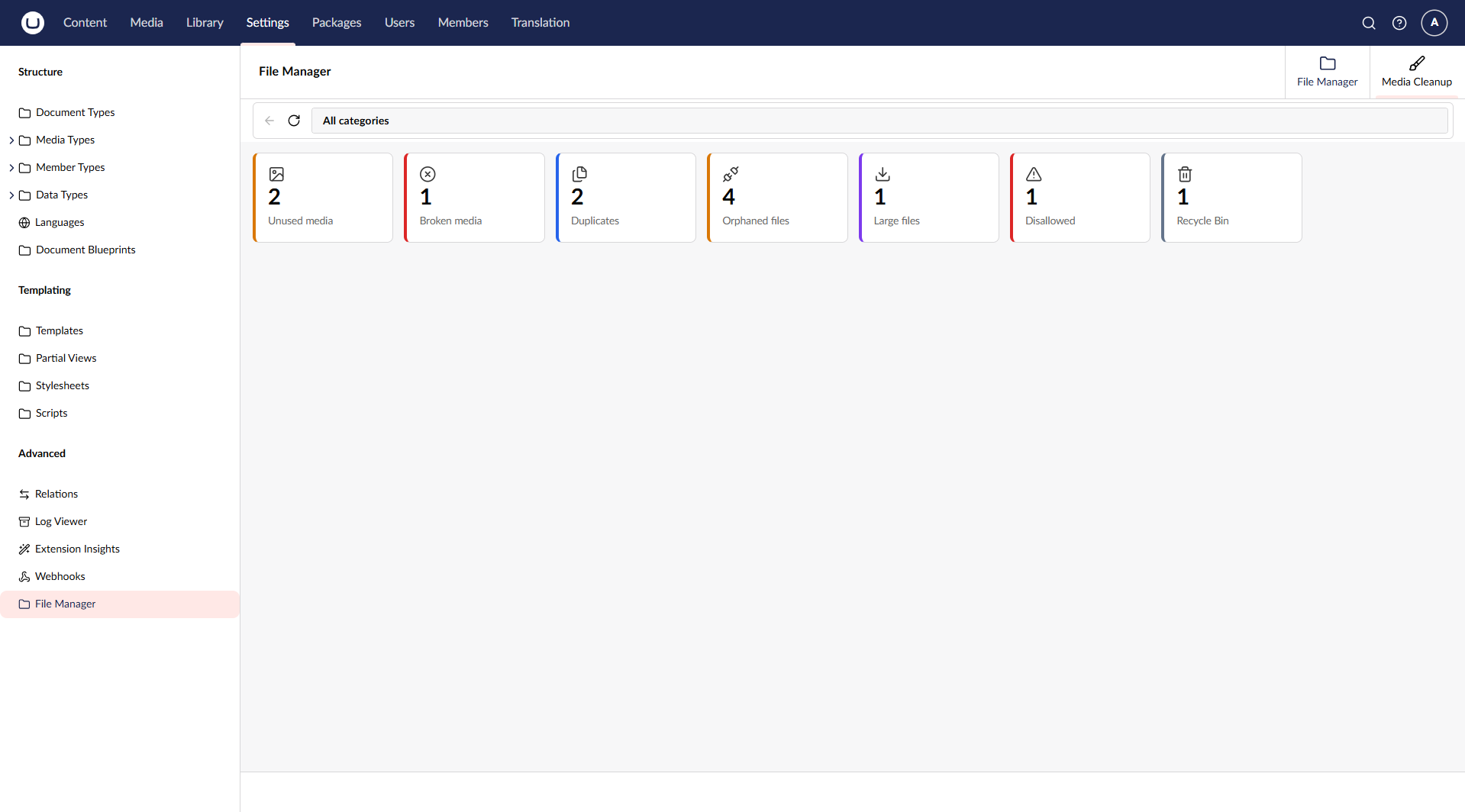
Media Cleanup tab — overview cards per category (Unused, Broken, Duplicates, Orphaned, Large, Disallowed, Recycle Bin); click a card to drill in and act
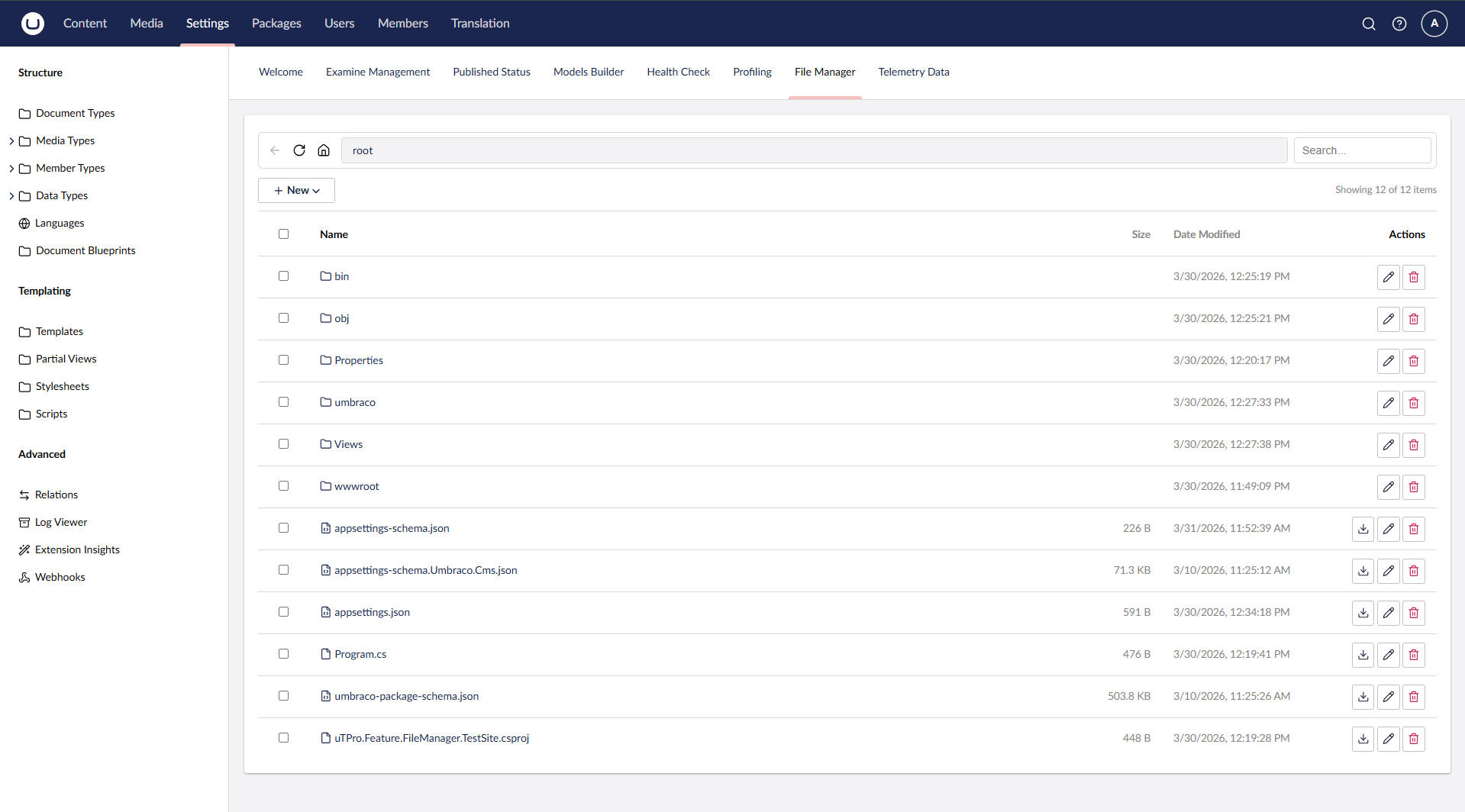
uTPro.Feature.FileManager - v2.0.0
Admin view — full access to browse, edit, upload, and manage all server files
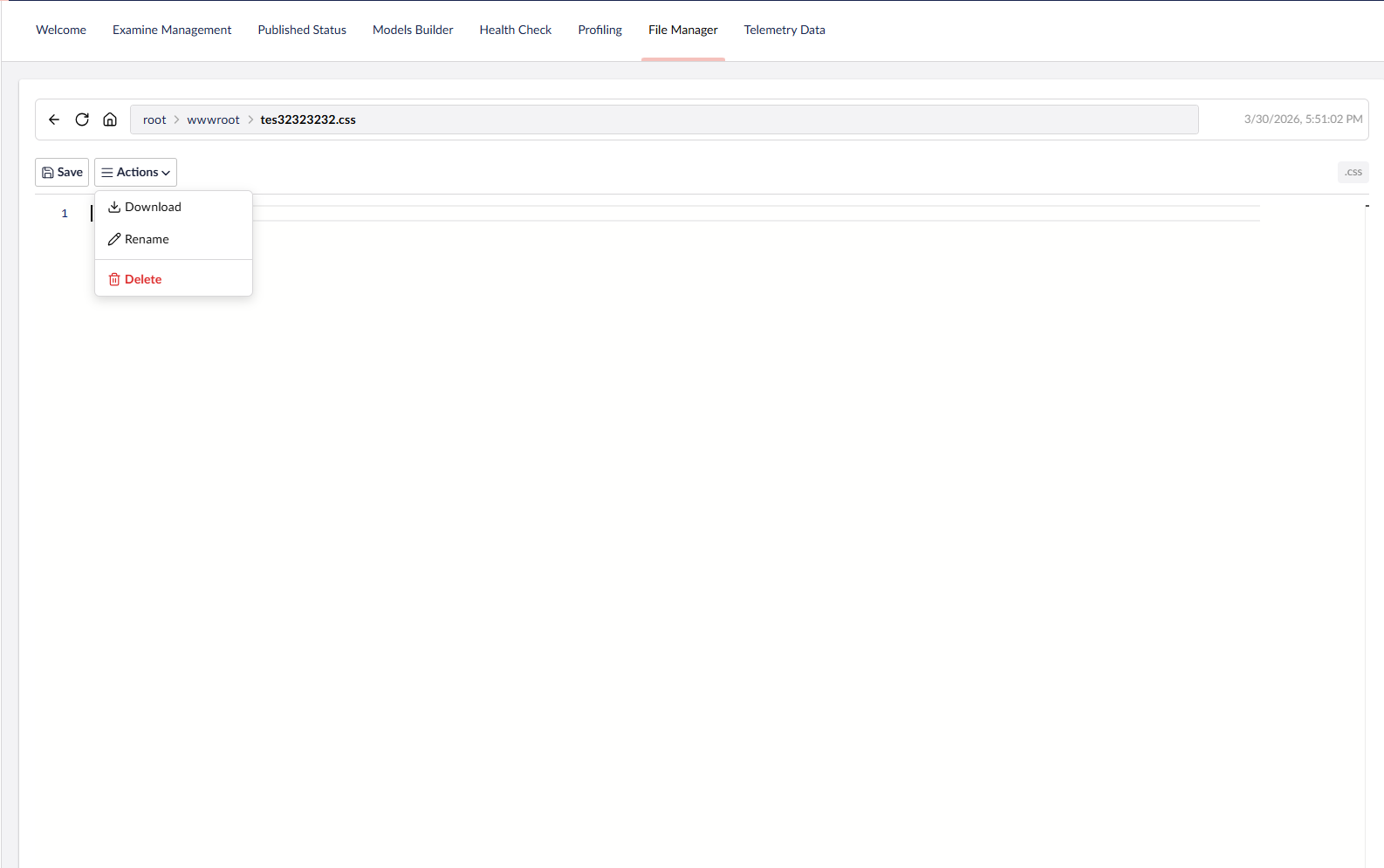
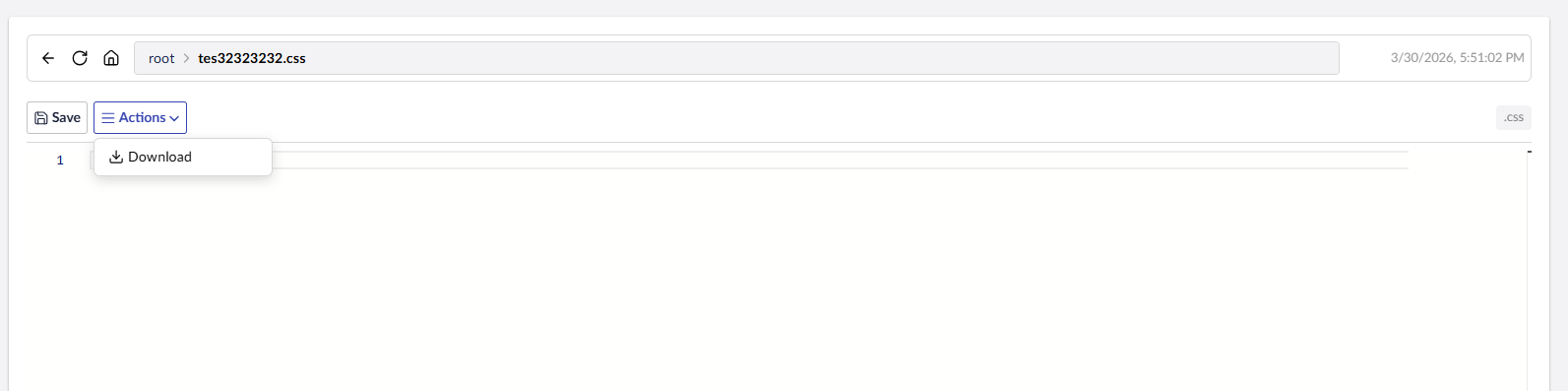
Code editor with syntax highlighting (Monaco) and file actions menu
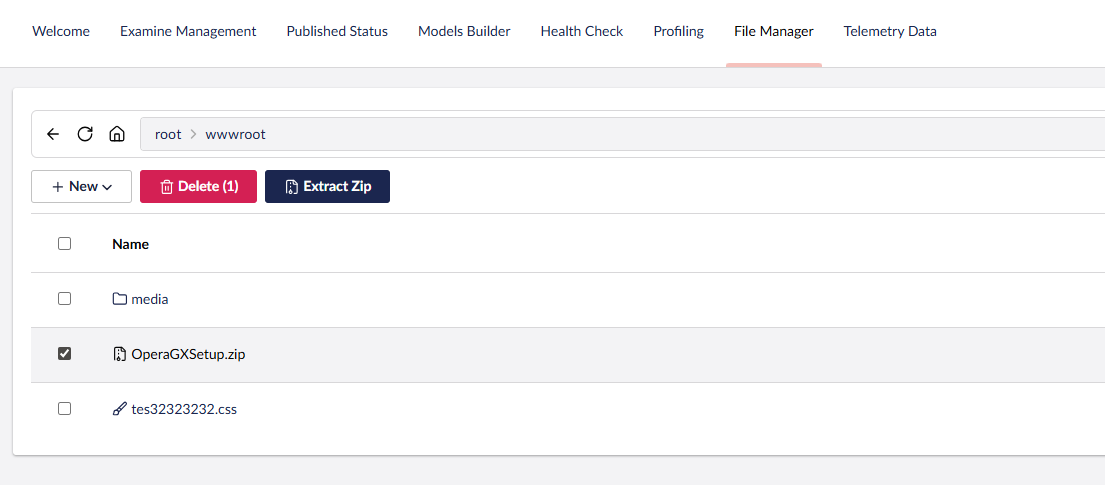
Select and extract ZIP files directly in the backoffice
Paginated loading — handles 2000+ files without UI lag
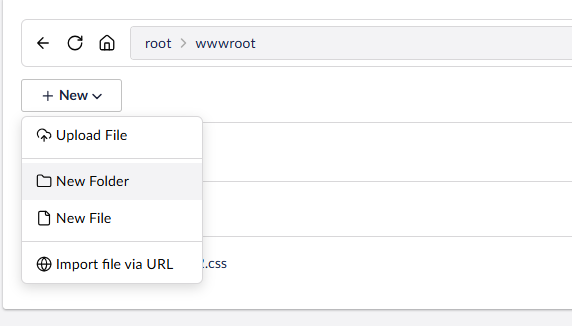
Create new files, folders, or import from URL
Non-admin users are restricted to wwwroot only
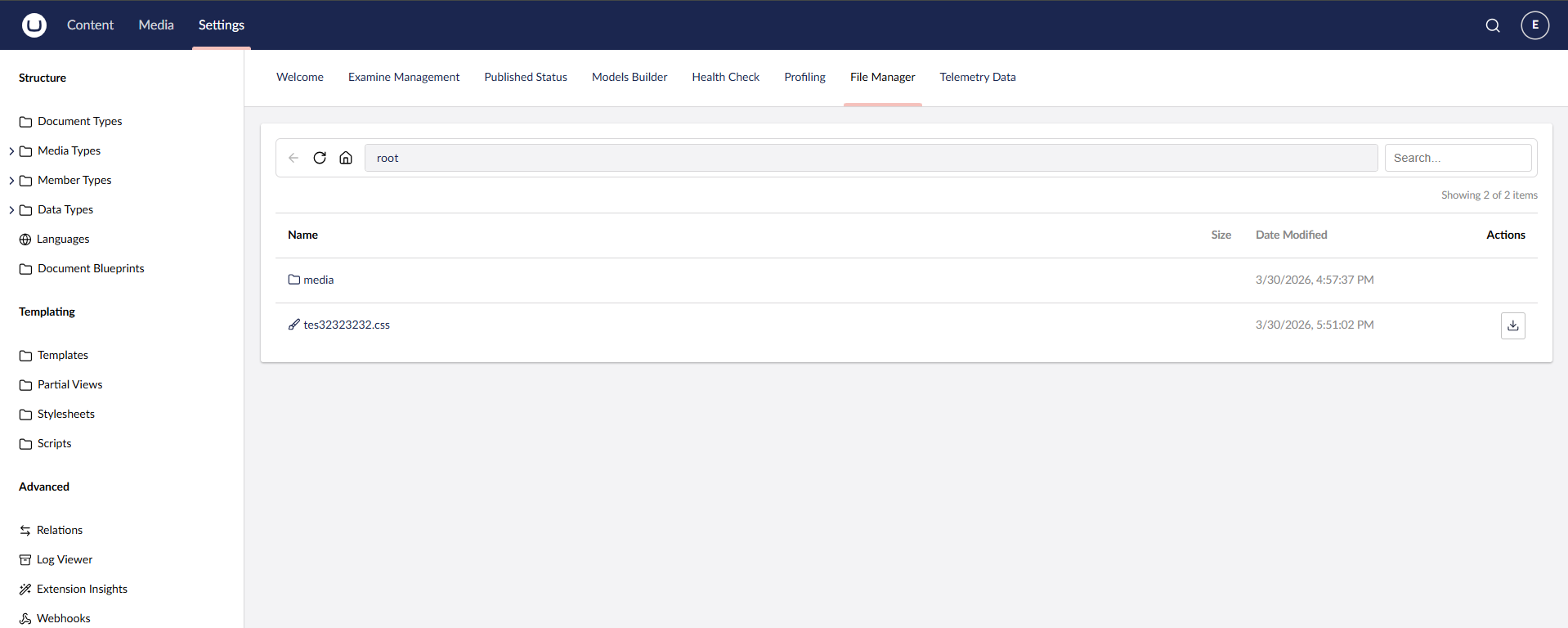
Sensitive Data role — read-only access to edit and view all files
Changelog
5.0.0
⚠ Breaking changes — access model tightened. This release hardens security in ways that change who can access what. Review before upgrading: media endpoints now require explicit permissions, the protected-file block list is enforced on view/download (not just modify/delete), server-executable files can no longer be created/written, and SVGs are always downloaded rather than opened inline. No HTTP endpoint contract was removed, but existing users who relied on the previous looser behaviour may see access change.
New features
- Multi-root "Locations" — a new optional
uTPro:Feature:FileManager:Rootsconfig. When empty, the File Manager keeps its single-root behaviour. When one or more roots are configured, it shows a Locations overview (one card per root, like Media Cleanup) and each root is browsed as its own confined tree, with aLocations › [root] › …breadcrumb. Each root has aKey,Label,Path(absolute or relative to the content root), optionalIcon, and anAdminOnlyflag (defaulttrue) that restricts a location to administrators. Path traversal outside each root is still blocked and all write operations remain admin-only. See Configuration. - List / Grid view modes in both the File Manager and Media Cleanup (drilled category) views. A toolbar toggle switches between the classic List view and a new Grid view of square tiles with image thumbnails (checkerboard background for transparency, like the Umbraco media grid). In Media Cleanup, grid tiles also show the status tag and per-item actions. The selected mode is remembered per browser (localStorage), and thumbnails are lazy-loaded only as tiles scroll into view, so large folders/scans stay responsive.
- Configurable editable/blocked/dangerous lists —
EditableExtensions(replaces the built-in editable set),AdditionalEditableExtensions(adds to it), plus two additive-only security lists:AdditionalBlockedNamesandAdditionalDangerousWriteExtensions(config can only add protections, never remove a built-in one). See Configuration.
Security (breaking behavioural changes)
- Authorization added to media endpoints —
media-file(preview/stream) now requires Sensitive Data andscan-mediarequires Media access; previously neither had a per-action check. - Block list enforced on read/download — protected file names are now blocked on view and download too (previously only modify/delete), and the built-in list was expanded to include
appsettings.production.json,appsettings.staging.json, and.env. - RCE guard on create/save/rename — writing to a server-executable extension (
.cshtml,.razor,.aspx,.php,.exe, …) is blocked; such files remain viewable/editable but cannot be created or written. - SVG served as attachment — SVG files are never served inline, preventing inline-script execution in the backoffice origin.
- Per-hop SSRF re-validation on Import via URL — auto-redirect is disabled and every redirect hop is re-validated so a redirect to an internal address can't bypass the guard; the DNS-based guard now also covers IPv6 (mapped/loopback/ULA) and the full
127.0.0.0/8range.
Fixes & performance
- The non-admin browse jail now follows the host's configured web root (
IWebHostEnvironment.WebRootPath, e.g.uTPro:Hosting:RootPath) instead of a hardcodedwwwroot, so a relocated/renamed web root is honoured. - Media Cleanup — fixed a "Broken media" false positive. Media served as static files from a custom URL path (for example
UmbracoMediaPath = ~/uploadsserved straight from the web root, or a customUmbracoMediaPhysicalRootPath) were incorrectly listed as broken because existence was only checked through the Umbraco media file system. The scan now falls back to checking the referenced file physically under the web/content root before flagging it as broken. - Media Cleanup preview/thumbnails now use the public media URL (like Umbraco's own media editor), so media served from a custom/static path renders correctly.
- MediaScanService performance — removed N+1 tracked-reference queries via batching, and unique-size files are no longer hashed (duplicate detection only hashes files that share a size).
4.0.0
- Media Cleanup is now its own workspace tab next to File Manager (no more "Scan Media" button / in-place mode toggle). Switch tabs to move between managing files and cleaning up media.
- Overview cards — opening the Media Cleanup tab auto-scans and shows a card per category (Unused, Broken, Duplicates, Orphaned, Large, Disallowed, Recycle Bin) with live counts and severity colors. Click a card to drill in; a breadcrumb navigates back. Row actions and bulk actions stay in the footer (consistent with the Files tab).
- Jump to Media — media-backed rows link to their node in the Media section (name link + action button), opening in a new tab. Especially handy for Broken media.
- No breaking server API changes. Requires a backoffice hard-refresh after upgrade (new workspace manifest).
3.1.1
- New "Disallowed" scan category — physical media files whose extension is in Umbraco's
Content:DisallowedUploadedFileExtensions(potential security risk), with recycle/delete actions. - Ignore list (
IgnoredMediaIds) to silence false positives in Unused/Large; scan guardrails (MediaScanMaxFiles,MediaScanTimeBudgetSeconds) stop very large scans early with an on-screen notice. - Upload validation unions with Umbraco —
BlockedUploadExtensions∪Content:DisallowedUploadedFileExtensionsalways reject; whenAllowedUploadExtensionsis set it unions withContent:AllowedUploadedFileExtensions. Empty allow-list = allow all (site files like css/js/cshtml still upload; Umbraco's media-only whitelist is not inherited when empty).
3.1.0
- Media Cleanup actions — the scan is no longer report-only. Each row now has actions: media-backed rows can be moved to the recycle bin, orphaned files can be deleted from the media file system, and a new Recycle Bin category lets you Restore, Delete permanently, or Empty recycle bin.
- Permissions — the scan report is visible to any Settings user, while the destructive actions (recycle/restore/delete/empty) require the current user to have Media section access (Admins always qualify).
- Bulk actions (row checkboxes), Smart duplicates ("keep 1 per group"), inline media preview, and cached scans (
MediaScanCacheSeconds, default 30s) for fast tab switching. - Recycle Bin added as a sixth scan category (after Large files).
- Auto-refresh on tab click — switching category tabs re-runs the scan so counts stay current.
- Media lookups now resolve by key via
IIdKeyMap+GetById(int)for compatibility across Umbraco 16/17/18 (Umbraco 18 removedIMediaService.GetById(Guid)from the interface). No breaking API changes to existing endpoints.
3.0.0
- Media Cleanup scan — a new Scan Media action in the File Manager footer reports media across five categories, each with a live count and filter tab: Unused media, Broken media, Duplicates, Orphaned files, and Large files. Results reuse the paginated list ("Load more"), and Home/Exit returns to the normal File Manager.
- Configurable large-file threshold via
uTPro:Feature:FileManager:MediaLargeFileThresholdMB(default 100 MB). See Configuration. - Scanning goes through Umbraco's media file system abstraction, so it works with any storage provider (disk, Azure Blob, S3, …).
- Admin only and report-only — no destructive actions. No breaking API changes to existing endpoints.
2.1.0
- Configurable upload limits via the
uTPro:Feature:FileManagersection —MaxUploadSizeMB, anAllowedUploadExtensionsallow-list, and aBlockedUploadExtensionsblock-list — enforced on both file upload and import-from-URL. See Configuration. - Import via URL hardening — now uses
IHttpClientFactoryand includes an SSRF guard that rejects URLs resolving to loopback/private/link-local/reserved addresses and any non-http(s)scheme. - No breaking API changes.
2.0.1
- Maintenance release — clean rebuild from a wiped output to guarantee the shipped assembly is current (packaging now goes through a deterministic clean-pack step). No source or API changes versus 2.0.0.
2.0.0
- Support for Umbraco 16, 17 and 18 (multi-target
net9.0/net10.0). - Hardened path-traversal root check and upload filename sanitization.
- No breaking API changes.
1.x
- Initial releases — file browsing, upload/download, code editor, media preview, and role-based access for Umbraco 16.
License
Free to use — including in commercial projects — under a proprietary End User License Agreement. The package is distributed as a compiled NuGet package; the source is not published, and modifying, reverse engineering, or redistributing the package is not permitted. See LICENSE.txt for full terms.
Author
T4VN — GitHub
| Product | Versions Compatible and additional computed target framework versions. |
|---|---|
| .NET | net9.0 is compatible. net9.0-android was computed. net9.0-browser was computed. net9.0-ios was computed. net9.0-maccatalyst was computed. net9.0-macos was computed. net9.0-tvos was computed. net9.0-windows was computed. net10.0 is compatible. net10.0-android was computed. net10.0-browser was computed. net10.0-ios was computed. net10.0-maccatalyst was computed. net10.0-macos was computed. net10.0-tvos was computed. net10.0-windows was computed. |
-
net10.0
- Umbraco.Cms.Api.Management (>= 17.0.0 && < 19.0.0)
-
net9.0
- Umbraco.Cms.Api.Management (>= 16.0.0 && < 17.0.0)
NuGet packages
This package is not used by any NuGet packages.
GitHub repositories
This package is not used by any popular GitHub repositories.
| Version | Downloads | Last Updated | |
|---|---|---|---|
| 6.1.0 | 87 | 10/15/2026 | |
| 6.0.2 | 205 | 9/3/2026 | |
| 6.0.1 | 200 | 8/19/2026 | |
| 6.0.0 | 706 | 7/29/2026 | |
| 5.0.1 | 217 | 7/21/2026 | |
| 5.0.0 | 176 | 7/18/2026 | |
| 4.1.0 | 156 | 7/17/2026 | |
| 4.0.0 | 171 | 7/17/2026 | |
| 4.0.0-rc.1 | 107 | 7/16/2026 | |
| 3.1.0 | 139 | 7/16/2026 | |
| 3.0.0 | 228 | 7/11/2026 | |
| 2.1.0 | 277 | 7/9/2026 | |
| 2.0.1 | 215 | 7/8/2026 | |
| 2.0.0 | 219 | 6/26/2026 | |
| 1.0.1 | 170 | 3/31/2026 | |
| 1.0.0 | 152 | 3/31/2026 |
v4.2.0: New List / Grid view mode in both the File Manager and Media Cleanup (drilled category) views — a toolbar toggle switches between the List view (default) and a Grid view of square tiles with image thumbnails (checkerboard background for transparency, like the Umbraco media grid); Media Cleanup grid tiles also show the status tag and row actions. The chosen mode is remembered per browser and thumbnails are lazy-loaded only as tiles scroll into view. The non-admin browse jail now follows the host's configured web root (IWebHostEnvironment.WebRootPath — e.g. uTPro:Hosting:RootPath) instead of a hardcoded "wwwroot", so a relocated web root is honoured. Also includes the v4.1.1 fix. v4.1.1: Fixed a Media Cleanup false positive where media served as static files from a custom URL path (e.g. UmbracoMediaPath=~/uploads served from the web root, or a custom UmbracoMediaPhysicalRootPath) were incorrectly reported under "Broken media". The scan now falls back to checking the file physically under the web/content root before flagging it as broken. No breaking API changes. v4.1.0: Security & configurability. The editable-file, protected-name and dangerous-write (RCE) extension lists are now configurable via uTPro:Feature:FileManager — EditableExtensions/AdditionalEditableExtensions replace/extend the editable list, while AdditionalBlockedNames and AdditionalDangerousWriteExtensions are additive (built-in protections can never be removed). The protected-name block list is now enforced on view/download too and was expanded (appsettings.production.json, appsettings.staging.json, .env). A new RCE guard blocks creating/saving/renaming server-executable files (.cshtml/.razor/.aspx/.php/.exe...). The media-file and scan-media endpoints now require authorization; SVG files are served as attachments (never inline); import-from-URL re-validates every redirect hop against the DNS-based (IPv6-aware) SSRF guard. Performance: Media Cleanup removes the N+1 tracked-reference queries (batched) and skips hashing files with a unique size. No breaking API changes. v4.0.0: Media Cleanup is now its own workspace tab next to File Manager (no more "Scan Media" toggle). Opening the tab auto-scans and shows overview cards per category (Unused, Broken, Duplicates, Orphaned, Large, Disallowed, Recycle Bin) — click a card to drill in; a breadcrumb navigates back; row/bulk actions stay in the footer. Media-backed rows link straight to their node in the Media section (opens in a new tab). No breaking server API changes; hard-refresh the backoffice after upgrading (new workspace manifest). v3.1.1: New "Disallowed" Media Cleanup category — physical media files whose extension is in Umbraco's Content:DisallowedUploadedFileExtensions (potential security risk), with recycle/delete actions. Added an ignore list (uTPro:Feature:FileManager:IgnoredMediaIds) to silence false positives in Unused/Large, and scan guardrails (MediaScanMaxFiles, MediaScanTimeBudgetSeconds) that stop very large scans early with an on-screen notice. Upload validation now unions with Umbraco: BlockedUploadExtensions ∪ Content:DisallowedUploadedFileExtensions always reject, and when AllowedUploadExtensions is set it unions with Content:AllowedUploadedFileExtensions (empty = allow all, so site files still upload). No breaking API changes. v3.1.0: Media Cleanup is now actionable. Media-backed rows (Unused/Broken/Duplicates/Large) can be moved to the recycle bin; Orphaned files can be deleted from the media file system; a new Recycle Bin category lets you Restore, Delete permanently, or Empty recycle bin. The scan report is visible to any Settings user, while destructive actions require the current user to have Media section access (Admins always qualify). Also adds bulk actions (row selection), smart duplicate cleanup (keep 1 per hash group), inline media preview, and cached scans (MediaScanCacheSeconds, default 30s) so switching category tabs is fast; a forced reload or any action re-scans. Media lookups resolve by key via IIdKeyMap + GetById(int) for compatibility across Umbraco 16/17/18 (Umbraco 18 removed IMediaService.GetById(Guid)). No breaking API changes. v3.0.0: New Media Cleanup scan — from the File Manager footer, "Scan Media" reports Unused media, Broken media, Duplicates, Orphaned files and Large files (client-side paged, filter by category). The large-file threshold is configurable via uTPro:Feature:FileManager:MediaLargeFileThresholdMB (default 100 MB). Scanning uses Umbraco's media file system abstraction so it works with any storage provider. Report-only (no destructive actions). v2.1.0: Configurable upload limits via the uTPro:Feature:FileManager section (MaxUploadSizeMB, AllowedUploadExtensions allow-list, BlockedUploadExtensions block-list) enforced on both file upload and import-from-URL. Import-from-URL now uses IHttpClientFactory and includes an SSRF guard that rejects URLs resolving to loopback/private/link-local/reserved addresses and non-http(s) schemes. No breaking API changes. v2.0.1: Maintenance release — clean rebuild from a wiped output to guarantee the shipped assembly is current (packaging now goes through a deterministic clean-pack step). No source or API changes versus 2.0.0. v2.0.0: Support for Umbraco 16, 17 and 18 (multi-target net9.0/net10.0). Hardened path-traversal root check and upload filename sanitization. No breaking API changes.