uTPro.Feature.FileManager
3.0.0
See the version list below for details.
dotnet add package uTPro.Feature.FileManager --version 3.0.0
NuGet\Install-Package uTPro.Feature.FileManager -Version 3.0.0
<PackageReference Include="uTPro.Feature.FileManager" Version="3.0.0" />
<PackageVersion Include="uTPro.Feature.FileManager" Version="3.0.0" />
<PackageReference Include="uTPro.Feature.FileManager" />
paket add uTPro.Feature.FileManager --version 3.0.0
#r "nuget: uTPro.Feature.FileManager, 3.0.0"
#:package uTPro.Feature.FileManager@3.0.0
#addin nuget:?package=uTPro.Feature.FileManager&version=3.0.0
#tool nuget:?package=uTPro.Feature.FileManager&version=3.0.0
uTPro.Feature.FileManager
A powerful file management dashboard for Umbraco 16+ backoffice. Browse, upload, download, edit, preview, rename, and delete server files — all from within the Umbraco backoffice.





Installation
dotnet add package uTPro.Feature.FileManager
No configuration needed — auto-registers via Umbraco IComposer. After installation, navigate to Settings → File Manager in the backoffice.
Features
File Browsing
- Windows Explorer-style navigation with back, reload, and breadcrumb path bar
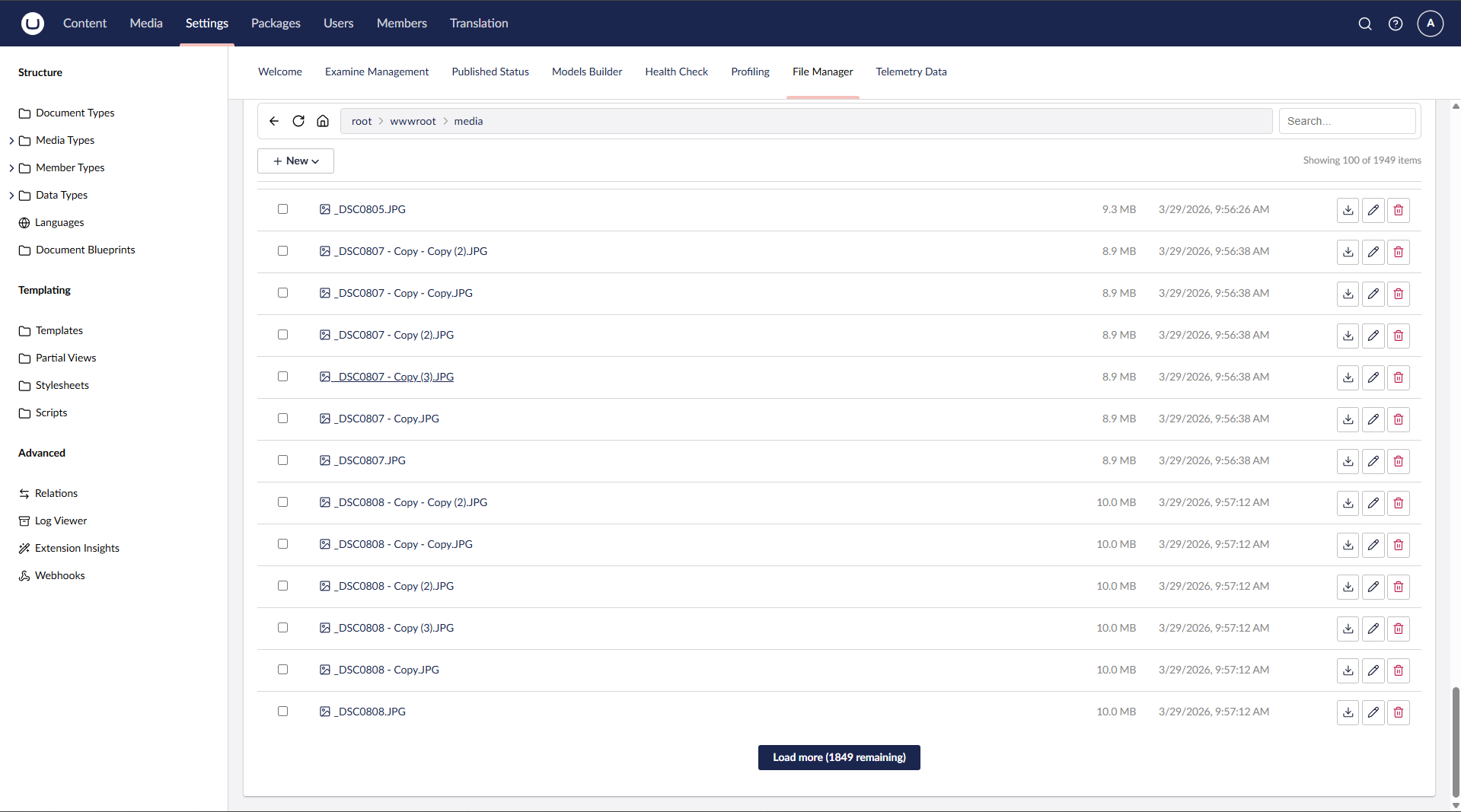
- Paginated file listing (100 items per page) with "Load more" for large directories
- Real-time search with debounce filtering
- URL state persistence — reload the page and return to the same folder/file
- Umbraco native icons for file types
File Operations
- Upload files via button or drag & drop
- Download files directly from the file list or file view
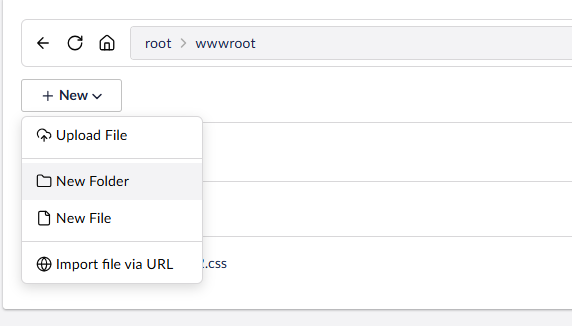
- Create new folders and empty files
- Rename files and folders (with live reload in file view)
- Delete files and folders (single or bulk selection)
- Import file via URL — fetch a remote file and save it to the current folder
- Extract ZIP — select
.zipfiles and extract them in place
Code Editor
- Built-in Monaco Editor (via Umbraco's
umb-code-editor) with syntax highlighting - Supports: JavaScript, TypeScript, JSON, HTML, CSS, SCSS, Razor, C#, XML, YAML, Markdown, SQL, and more
- Unsaved changes detection with browser close/navigate warning
- Ctrl+S keyboard shortcut to save
Media Preview
- Inline preview for images (JPG, PNG, GIF, SVG, WebP, BMP, ICO)
- Video player for MP4, WebM, OGG
- Audio player for MP3, WAV, OGG
- PDF viewer via embedded iframe
- Correct MIME types for inline rendering
Media Cleanup (v3.0.0)
- Scan Media button in the File Manager footer runs a full media-library scan and switches the list into a report-only "scan mode"
- Reports media across five categories, each with a live count and its own filter tab:
- Unused media — media items that no content/entity references (best-effort via Umbraco tracked references)
- Broken media — media items whose backing file is missing on disk/storage
- Duplicates — media items whose files share the same SHA-256 content hash
- Orphaned files — files in the media file system not referenced by any media item
- Large files — files at or above a configurable size threshold (default 100 MB), sorted largest first
- Scan mode reuses the same paginated list ("Load more", 100 per page); the top bar Home button (or Exit in the footer) returns to normal File Manager
- Uses Umbraco's media file system abstraction, so it works with any storage provider (physical disk, Azure Blob, S3, …)
- Admin only, and report-only — no destructive actions are performed. Treat "Unused" as a suggestion, since references made only in free-form markup (rich text, templates, CSS/JS) may not be tracked
Security & Permissions
- Settings section access required to view the dashboard
- Admin — full access: browse entire server root (ContentRootPath), create, edit, rename, delete, upload, extract
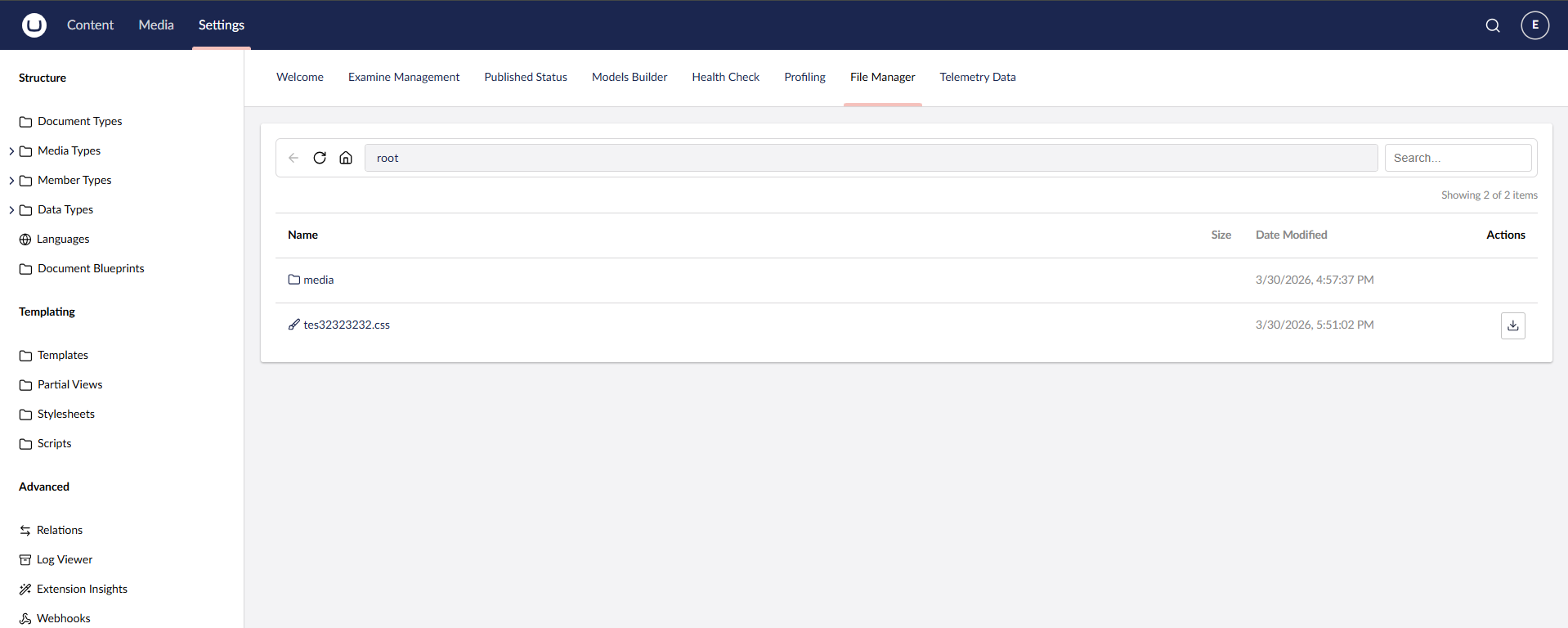
- Settings (non-admin) — browse
wwwroot/tree only (view folder structure, check if files exist — no file actions) - Settings + Sensitive Data — browse
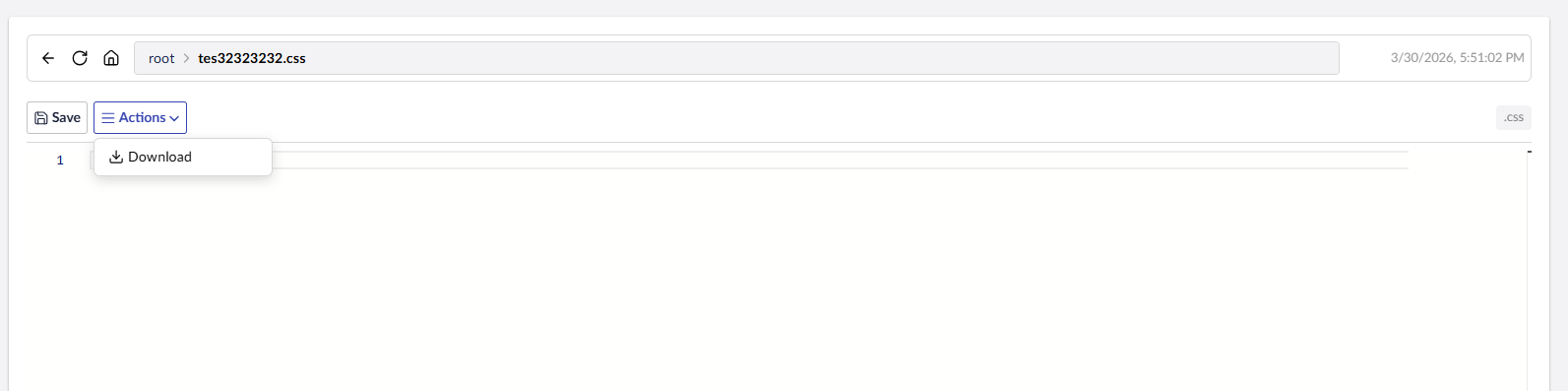
wwwroot/+ view/edit/download file content - Write operations (create, rename, delete, upload, extract ZIP, import URL) — Admin only
- Non-admin users are jailed to
wwwroot/— cannot accessappsettings.json,web.config, or any files outsidewwwroot - Protected files:
web.config,appsettings.json,appsettings.development.jsoncannot be modified or deleted - Path traversal protection on all endpoints
- Upload validation — configurable maximum size plus optional allow-list / block-list of extensions (see Configuration), enforced on both file upload and import-from-URL
- SSRF protection on Import via URL — the supplied URL must use
http/https, and any URL whose host resolves to a loopback, private, link-local, or reserved address (e.g. the cloud metadata endpoint169.254.169.254) is rejected. Requests go throughIHttpClientFactoryto avoid socket exhaustion.
UI
- Windows Explorer-style navigation bar (back, reload, home, breadcrumb path bar, search)
- Sticky toolbar — the navigation bar stays pinned to the top while scrolling long file lists, flush with the section header on an opaque surface
- Workspace footer actions — primary actions live in the Umbraco workspace footer for a clean, uncluttered toolbar:
- Browsing:
New ▾menu (Upload, New Folder, New File, Import via URL), bulkDelete,Extract Zip, and a live item counter - File open:
Save,Actions ▾(Download, Rename, Delete), anUnsavedbadge, plus file size and type
- Browsing:
- Footer actions respect the current user's role — non-admin users never see write actions
- Multi-select with checkbox for bulk delete and zip extract
- Responsive layout with Umbraco UI Library (UUI) components
Configuration
No configuration is required — the package ships with safe defaults. To customize the upload limits, add an optional uTPro:Feature:FileManager section to appsettings.json:
{
  "uTPro": {
    "Feature": {
      "FileManager": {
        "MaxUploadSizeMB": 50,
        "AllowedUploadExtensions": [],
        "BlockedUploadExtensions": [ ".exe", ".dll", ".bat" ],
        "MediaLargeFileThresholdMB": 100
      }
    }
  }
}
| Key | Default | Description |
|---|---|---|
MaxUploadSizeMB |
50 |
Maximum allowed upload size in megabytes. Enforced on both file upload and import-from-URL. |
AllowedUploadExtensions |
[] (allow all) |
Allow-list of file extensions. When non-empty, only these extensions may be uploaded. Entries are case-insensitive and may be written with or without a leading dot (".zip" or "zip"). |
BlockedUploadExtensions |
[] |
Block-list of file extensions. These are always rejected, even if present in the allow-list. |
MediaLargeFileThresholdMB |
100 |
Media Cleanup: files at or above this size (MB) are reported under the Large files category. |
The upload limits apply to write operations only and are enforced server-side, independent of any client-side checks.
Compatibility
| Umbraco | .NET | Package |
|---|---|---|
| 16.x | 9.0 | 1.x – 3.x |
| 17.x | 10.0 | 2.x – 3.x |
| 18.x | 10.0 | 2.x – 3.x |
The package multi-targets net9.0 (Umbraco 16) and net10.0 (Umbraco 17 & 18); a single install picks the right build for your project automatically.
Screenshots
uTPro.Feature.FileManager - v2.0.0
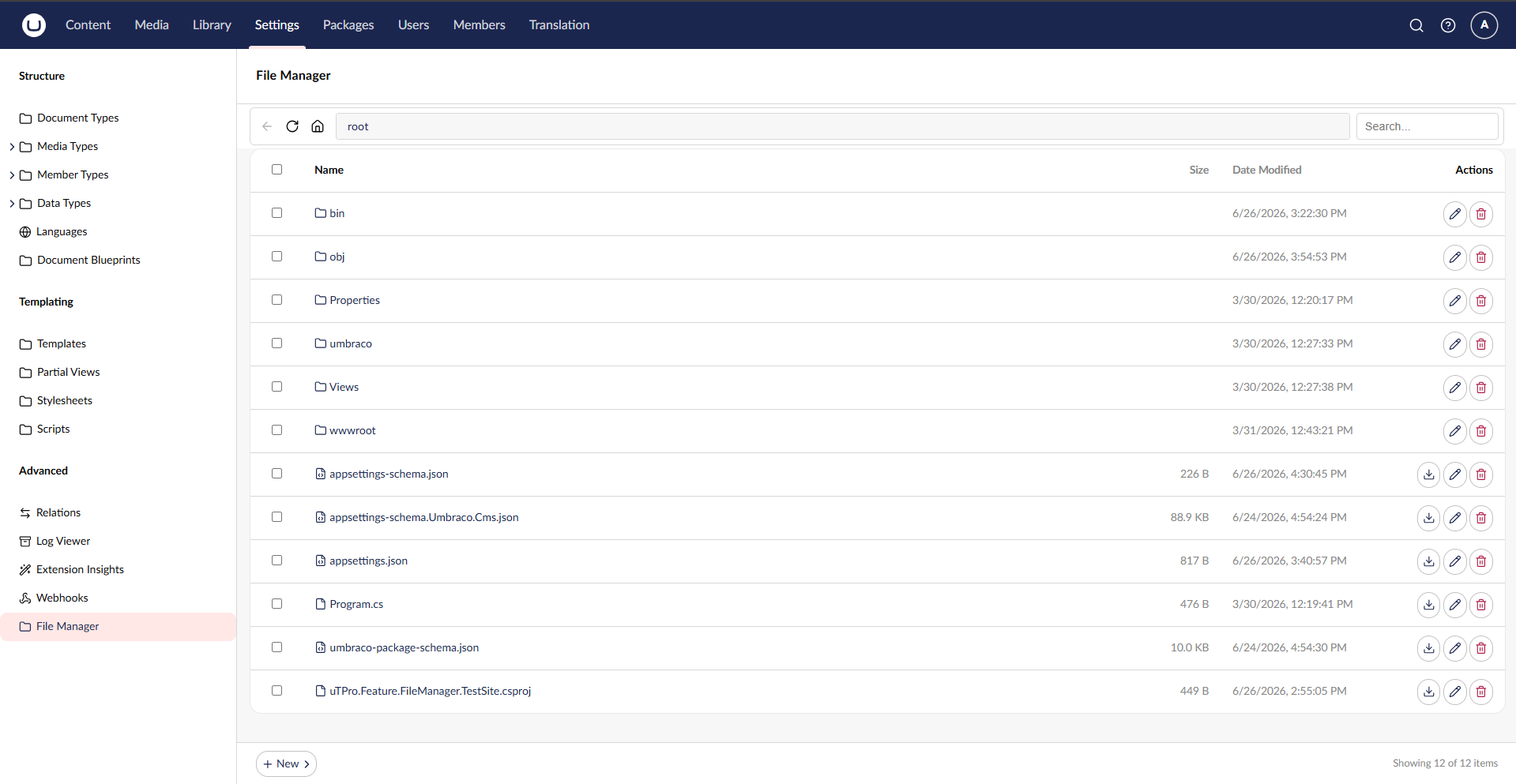
Admin view — full access to browse, edit, upload, and manage all server files
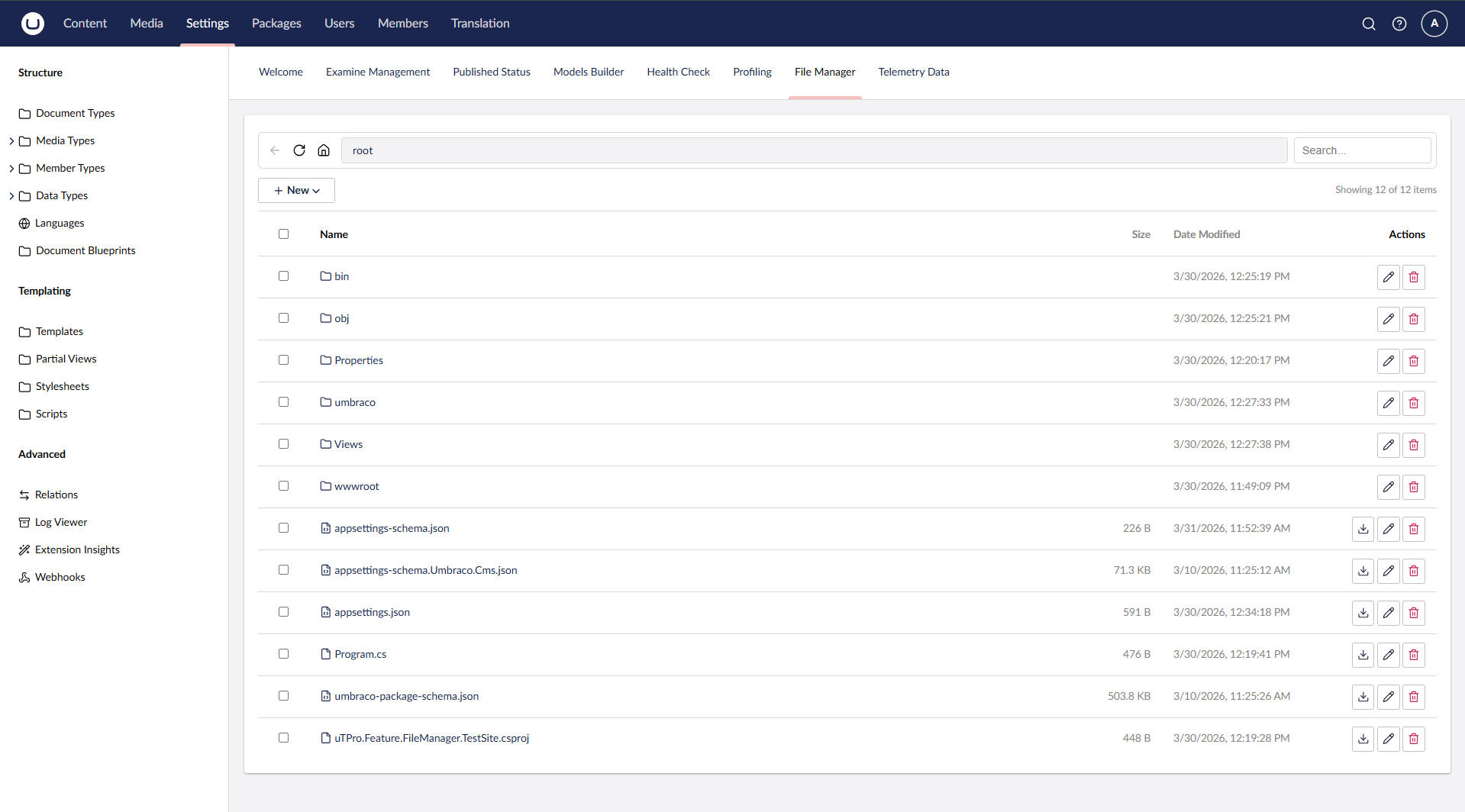
Code editor with syntax highlighting (Monaco) and file actions menu
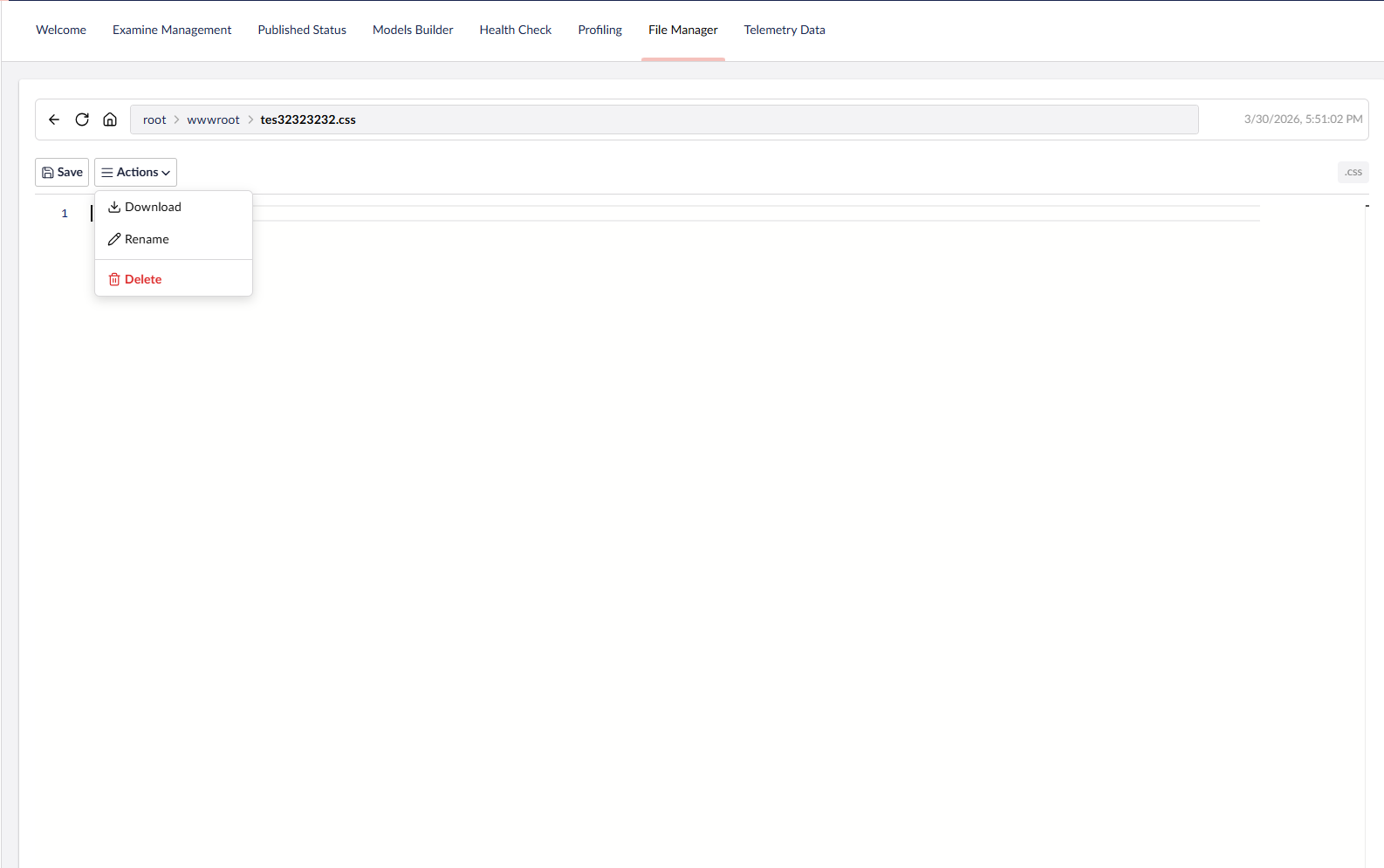
Select and extract ZIP files directly in the backoffice
Paginated loading — handles 2000+ files without UI lag
Create new files, folders, or import from URL
Non-admin users are restricted to wwwroot only
Sensitive Data role — read-only access to edit and view all files
Development
git clone https://github.com/T4VN/uTPro.Feature.FileManager.git
cd uTPro.Feature.FileManager
dotnet run --project src/uTPro.Feature.FileManager.TestSite
Navigate to https://localhost:54740/umbraco, log in, go to Settings → File Manager.
Project Structure
src/uTPro.Feature.FileManager/
├── Controllers/
│   └── FileManagerApiController.cs    # API endpoints with role-based access
├── Services/
│   ├── IFileManagerService.cs         # Service interface
│   ├── FileManagerService.cs          # File operations implementation
│   ├── IMediaScanService.cs           # Media Cleanup scan interface
│   ├── MediaScanService.cs            # Media Cleanup scan implementation
│   └── FileManagerComposer.cs         # DI registration
├── Models/
│   ├── FileItemViewModel.cs           # File/folder view model
│   ├── FileManagerOptions.cs          # Configurable options (upload limits, large-file threshold)
│   ├── MediaScanItem.cs               # Media Cleanup row view model
│   ├── MediaScanResult.cs             # Media Cleanup scan result + counts
│   ├── Requests.cs                    # API request DTOs
│   └── Results.cs                     # API response DTOs
└── wwwroot/
    ├── index.js                       # Main Lit Element dashboard view
    ├── footer.js                      # Workspace footer app (New/Save/Actions/bulk + item count)
    ├── context.js                     # Shared workspace context bridging view ↔ footer
    ├── helpers.js                     # Constants, utilities, icon mapping
    ├── styles.js                      # CSS styles
    └── umbraco-package.json           # Umbraco package manifest
Changelog
3.0.0
- Media Cleanup scan — a new Scan Media action in the File Manager footer reports media across five categories, each with a live count and filter tab: Unused media, Broken media, Duplicates, Orphaned files, and Large files. Results reuse the paginated list ("Load more"), and Home/Exit returns to the normal File Manager.
- Configurable large-file threshold via
uTPro:Feature:FileManager:MediaLargeFileThresholdMB(default 100 MB). See Configuration. - Scanning goes through Umbraco's media file system abstraction, so it works with any storage provider (disk, Azure Blob, S3, …).
- Admin only and report-only — no destructive actions. No breaking API changes to existing endpoints.
2.1.0
- Configurable upload limits via the
uTPro:Feature:FileManagersection —MaxUploadSizeMB, anAllowedUploadExtensionsallow-list, and aBlockedUploadExtensionsblock-list — enforced on both file upload and import-from-URL. See Configuration. - Import via URL hardening — now uses
IHttpClientFactoryand includes an SSRF guard that rejects URLs resolving to loopback/private/link-local/reserved addresses and any non-http(s)scheme. - No breaking API changes.
2.0.1
- Maintenance release — clean rebuild from a wiped output to guarantee the shipped assembly is current (packaging now goes through a deterministic clean-pack step). No source or API changes versus 2.0.0.
2.0.0
- Support for Umbraco 16, 17 and 18 (multi-target
net9.0/net10.0). - Hardened path-traversal root check and upload filename sanitization.
- No breaking API changes.
1.x
- Initial releases — file browsing, upload/download, code editor, media preview, and role-based access for Umbraco 16.
License
MIT
Author
T4VN — GitHub
| Product | Versions Compatible and additional computed target framework versions. |
|---|---|
| .NET | net9.0 is compatible. net9.0-android was computed. net9.0-browser was computed. net9.0-ios was computed. net9.0-maccatalyst was computed. net9.0-macos was computed. net9.0-tvos was computed. net9.0-windows was computed. net10.0 is compatible. net10.0-android was computed. net10.0-browser was computed. net10.0-ios was computed. net10.0-maccatalyst was computed. net10.0-macos was computed. net10.0-tvos was computed. net10.0-windows was computed. |
-
net10.0
- Umbraco.Cms.Api.Management (>= 17.0.0 && < 19.0.0)
-
net9.0
- Umbraco.Cms.Api.Management (>= 16.0.0 && < 17.0.0)
NuGet packages
This package is not used by any NuGet packages.
GitHub repositories
This package is not used by any popular GitHub repositories.
v3.0.0: New Media Cleanup scan — from the File Manager footer, "Scan Media" reports Unused media, Broken media, Duplicates, Orphaned files and Large files (client-side paged, filter by category). The large-file threshold is configurable via uTPro:Feature:FileManager:MediaLargeFileThresholdMB (default 100 MB). Scanning uses Umbraco's media file system abstraction so it works with any storage provider. Report-only (no destructive actions). v2.1.0: Configurable upload limits via the uTPro:Feature:FileManager section (MaxUploadSizeMB, AllowedUploadExtensions allow-list, BlockedUploadExtensions block-list) enforced on both file upload and import-from-URL. Import-from-URL now uses IHttpClientFactory and includes an SSRF guard that rejects URLs resolving to loopback/private/link-local/reserved addresses and non-http(s) schemes. No breaking API changes. v2.0.1: Maintenance release — clean rebuild from a wiped output to guarantee the shipped assembly is current (packaging now goes through a deterministic clean-pack step). No source or API changes versus 2.0.0. v2.0.0: Support for Umbraco 16, 17 and 18 (multi-target net9.0/net10.0). Hardened path-traversal root check and upload filename sanitization. No breaking API changes.